
Payhip
View pricing Visit Payhip →Free plan: 5% platform fee
Plus $29/mo; Pro $99/mo
Payment processing extra
- All features on every plan
- Unlimited products
- Direct Stripe or PayPal payouts

Polar
View pricing Visit Polar →$0/mo + 5% + $0.50 per sale
Lower rates from $20/mo
International and payout fees apply
- Merchant of Record service
- Files and license-key delivery
- Lower rates on paid plans

Podia
View pricing Visit Podia →From $42/mo, billed annually
Mover: 5% platform fee
Payment processing extra
- Courses and community
- Website and email tools
- Migration help available
Based on our testing of 12 platforms, Payhip leads our best Gumroad alternatives for 2026 because its free plan charges 5% instead of 10%, every plan includes the same features, and payments go straight to your own Stripe or PayPal account.
On a $20 direct sale, Gumroad’s platform fee and card processing total $3.38. That’s 16.9% before payout.
I’ll walk you through what each digital product platform costs, which Gumroad frustration it fixes, and what you give up by switching.
Why You Can Trust This Roundup
We tested every platform with the same $20 digital product, walking through setup, checkout, plan limits, and payout rules. Our ranking weights total cost at 30%, tax handling and payouts at 20%, product types and selling tools at 20%, setup and migration at 10%, storefront and marketing at 10%, and stability and support at 10%.
Our methodology below explains how those criteria affect the ranking.
Key Takeaways
- Payhip is our top pick: Free charges 5%, Plus charges 2%, and Pro charges 0%, with the same features throughout
- Payhip, Polar, Lemon Squeezy, and Ko-fi have no monthly starting fee; Ko-fi Gold costs $12 per month, while Podia starts at $42 per month, billed annually
- Gumroad became a Merchant of Record on January 1, 2025; Polar and Lemon Squeezy retain that tax handling from 5% + $0.50, while Payhip handles EU and UK VAT only
- Gumroad subscriptions have no direct transfer route: members need to re-subscribe on your new platform
- Choose Podia for courses and memberships, since every plan includes courses, community, email, and a website
See Our Best Gumroad Alternatives
Match your biggest Gumroad frustration to the platform that addresses it:
- Payhip: Best Overall Gumroad Alternative
- Polar: Best Low-Fee Merchant of Record
- Podia: Best for Courses and Memberships
- Sellfy: Best Flat-Fee Storefront
- Stan Store: Best for Link-in-Bio Selling
- Lemon Squeezy: Best for Software License Keys
- Ko-fi: Best for Tips and Fan Support
- Shopify: Best for Scaling Into a Full Store
Gumroad Alternatives Comparison Table
A 0% platform fee does not mean free selling. Compare subscriptions, tax responsibilities, and payout routes before choosing.
| Platform | Best for | Starting price | Platform fee | Merchant of Record | Free plan or trial | How you get paid |
|---|---|---|---|---|---|---|
| Gumroad | Baseline | $0 | Standard direct rate: 10% + $0.50, plus processing; 30% Discover | Yes, since January 1, 2025 | Free | Usually $100 minimum; at least 7-day hold on weekly, monthly, or quarterly payouts |
| Payhip | Best overall | $0 | 5% Free; 2% Plus; 0% Pro | EU and UK VAT only, not full MoR | Free plan | Immediately to your Stripe or PayPal |
| Polar | Low-fee MoR | $0 | 5% + $0.50 Starter; 3.8% + $0.40 Pro | Yes | Free plan | Manual withdrawals; Stripe payout fees |
| Podia | Courses and memberships | $42/month, billed annually | 5% Mover; 0% Shaker and above | No; sales tax settings | 14-day trial, no card | Stripe; PayPal from Shaker |
| Sellfy | Flat-fee storefront | $22/month, billed annually | 0%; annual sales caps from $10,000 | No | 14-day trial | Your Stripe or PayPal |
| Stan Store | Link-in-bio selling | $25/month, billed annually | 0% | No | 14-day trial | Your Stripe or PayPal |
| Lemon Squeezy | Software license keys | $0 | Base rate of 5% + $0.50 | Yes | Free to start | Paid out by Lemon Squeezy |
| Ko-fi | Tips and fans | $0 | 5% on free shop sales; 0% Gold | No | Free plan | Your Stripe or PayPal |
| Shopify | Scaling store | $29/month Basic, billed annually | 0% with Shopify Payments; 2% outside-gateway fee on Basic | No, in its standard setup | Free trial | Shopify Payments or your gateway |
Immediate payment into Stripe or PayPal is not immediate bank access. Processor settlement rules still apply. Gumroad also sends PayPal Connect sales straight to eligible creators’ PayPal accounts.
What Does a $20 Sale Really Cost?
Gumroad’s 10% + $0.50 direct-sale fee excludes card processing of 2.9% + $0.30. A $20 sale therefore costs $3.38; Discover’s 30% includes processing.
| Platform and plan | Fees on one $20 sale, excluding subscriptions | Monthly plan and sale fees at $2,000 in sales (100 orders) |
|---|---|---|
| Gumroad direct | $3.38 | $338 |
| Gumroad Discover, 30% all-in | $6.00 | $600 |
| Gumroad discounted direct tier, after $20,000 monthly | $1.50 platform fee, before any processing | Not applicable at $2,000/month |
| Payhip Free, 5% | $1.88 | $188 |
| Payhip Plus, $29/month and 2% | $1.28 | $157 |
| Polar Starter, 5% + $0.50, US card | $1.50 | $150 |
| Polar Pro, $20/month and 3.8% + $0.40 | $1.16 | $136 |
| Podia Shaker, $84/month and 0% | $0.88 | $172 |
| Sellfy Business, $59/month and 0% | $0.88 | $147 |
| Stan Store Creator, $25/month | $0.88 | $113 |
| Lemon Squeezy, base 5% + $0.50 | $1.50 | $150 |
| Ko-fi Gold, $12/month | $0.88 | $100 |
| Shopify Basic, $29/month with Shopify Payments | $0 platform fee + applicable card fees | $29 + applicable card fees |
Estimates assume US cards and 2.9% + $0.30 processing where charged separately, except Shopify. Monthly figures include subscriptions at annual-billing equivalents where available. Taxes, optional apps, disputes, currency conversion, and payout charges are excluded.
Shopify’s card rate depends on your plan and country, so add it on top of the $29. Gumroad’s discounted tier is shown as the platform fee only.
Payhip Plus saves $181 monthly against Gumroad direct at this volume. Polar adds 1.5% for international cards and charges for payouts; Sellfy needs Business because $24,000 annually exceeds Starter’s $10,000 cap.
Gumroad’s lower rate applies only to new direct sales after paid sales reach $20,000 that calendar month. It resets on the 1st.
1. Payhip: Best Overall Gumroad Alternative
- Payhip pricing: $0 to $99 per month, billed monthly
- Standout capability: Every feature on every plan
- Gumroad pain it fixes: High fees and platform-held payouts
Payhip is the best overall Gumroad alternative because it combines lower fees, unlimited products, and payments into your own account. However, its tax coverage is narrower than Polar’s Merchant of Record service, which starts at 5% + $0.50.
What I Like
- ✔️ Free plan with a 5% platform fee
- ✔️ No feature restrictions between pricing tiers
- ✔️ EU and UK VAT collected and remitted automatically
What I Dislike
- ❌ Other sales taxes remain your responsibility
- ❌ Processor fees apply on every plan
- ❌ Migration workload means you should budget for manual product uploads
What’s new with Payhip?
Payhip’s current lineup keeps the same tools across Free, Plus, and Pro. Upgrading reduces your transaction fee rather than unlocking essential selling features. You can launch on Free without postponing part of your product setup until a later upgrade.
Why use Payhip in 2026?
Payhip fits creators bringing their own buyers rather than relying on Gumroad Discover. You retain a pay-as-you-sell option without Gumroad’s fixed $0.50 platform charge. For a broader storefront comparison, our Shopify vs Payhip guide explains when a full ecommerce platform becomes worthwhile.
My Payhip testing notes
The first thing I set up on Payhip was the payment connection, before any store design. Payhip routes sales through your connected Stripe or PayPal account, not a Payhip balance. On my $20 product, fees come to $1.88 on Free versus $3.38 on Gumroad. Plus overtakes Free above $966.67 in monthly sales. My reservation is tax: US sales tax setup remains your job.
How Much Does Payhip Cost?
Payhip bills monthly, with payment processing charged separately on every tier.
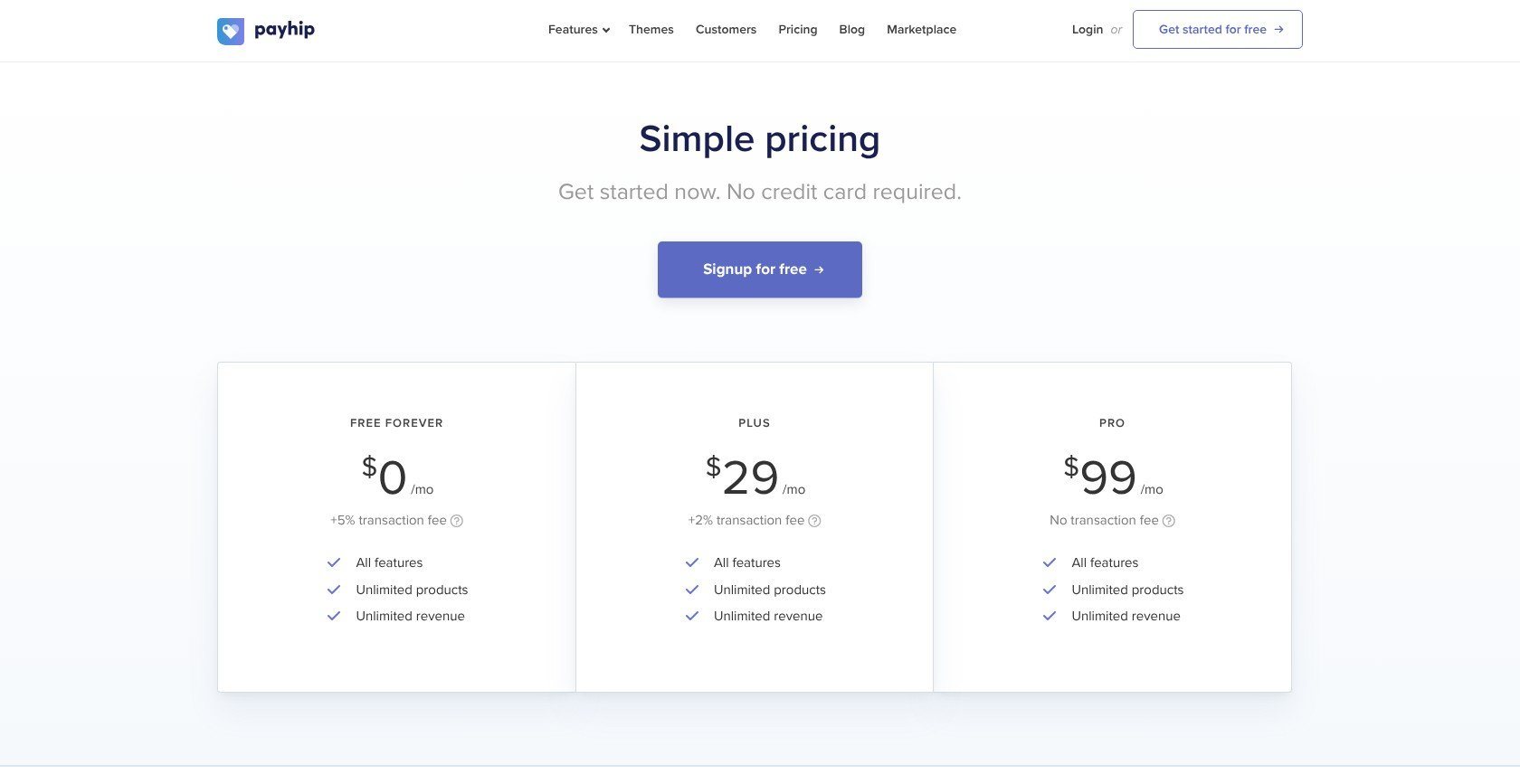
| Plan | Monthly price, billed monthly | Transaction fee | Who it’s for |
|---|---|---|---|
| Free Forever | $0 | 5% | Starting without fixed costs |
| Plus | $29 | 2% | Sales above $966.67/month |
| Pro | $99 | 0% | Sales above $3,500/month |
At $2,000 in monthly sales, Payhip Free costs $188 against Gumroad’s $338. Plus lowers that to $157 without changing your features. Pro overtakes Plus above $3,500 monthly, so do not upgrade simply because its platform fee is 0%.
2. Polar: Best Low-Fee Merchant of Record
- Polar pricing: $0 to $400 per month, billed monthly
- Standout capability: Merchant of Record with lower-rate paid tiers
- Gumroad pain it fixes: Paying 10% while retaining global tax handling
Polar is the best low-fee Merchant of Record because it handles transaction taxes and offers progressively lower selling rates. However, Payhip provides a more creator-oriented storefront, while Polar adds international-card and payout charges beyond its headline fee.
What I Like
- ✔️ Merchant of Record from 5% + $0.50
- ✔️ Delivery benefits for files, licenses, and gated access
- ✔️ Open-source codebase and transparent pricing tiers
What I Dislike
- ❌ International cards add 1.5%
- ❌ Disputes cost $15, with payout charges also applicable
- ❌ Developer-first storefront is plainer than Payhip or Sellfy
What’s new with Polar?
Polar’s current tiered pricing preserves an Early Member rate of 4% + $0.40 for organizations created before May 27, 2026. Upgrading forfeits that rate. Existing sellers should compare their protected pricing with the paid plans before switching.
Why use Polar in 2026?
Choose Polar when keeping sales tax collection and remittance off your workload matters more than storefront design. Its product benefits deliver downloads or license keys, while GitHub access and Discord roles suit technical communities. A course-first business fits Podia better.
My Polar testing notes
On Polar, I built my $20 product around its benefits, which is where file delivery and license access sit. A $20 US-card sale costs $1.50 on Starter, versus Gumroad’s $3.38. At that order value, Pro beats Starter at 59 monthly sales, excluding payout charges. My practical drawbacks are the plain storefront and manual withdrawals.
How Much Does Polar Cost?
Polar bills monthly; add international-card, payout, conversion, and dispute charges where applicable.
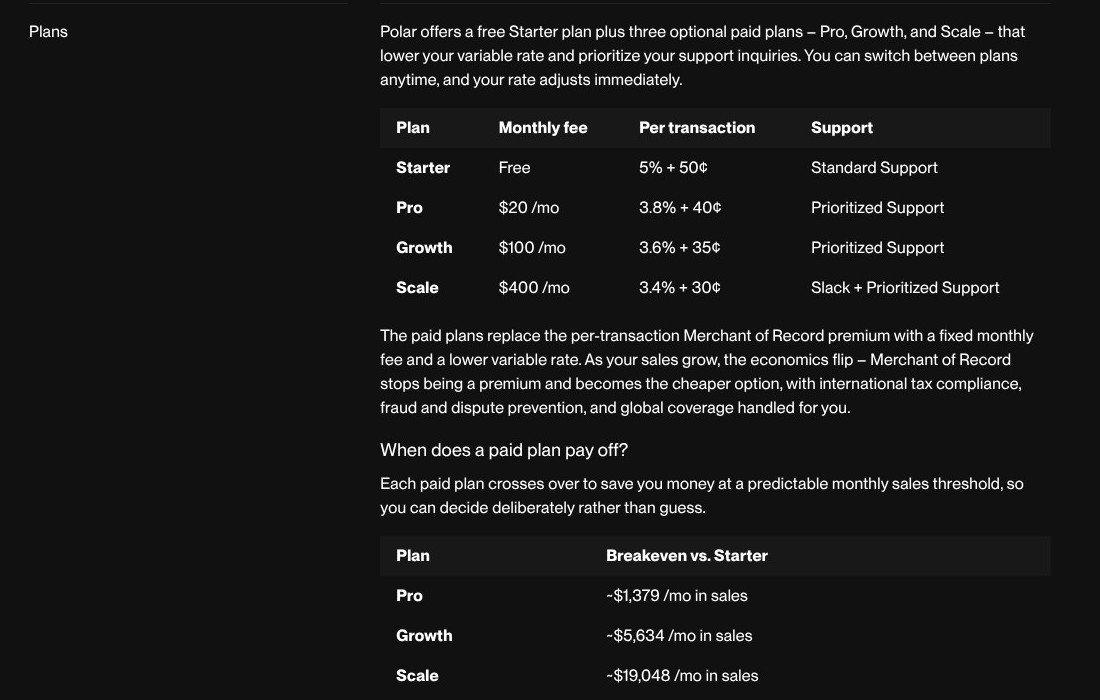
| Plan | Monthly price, billed monthly | Transaction fee | Who it’s for |
|---|---|---|---|
| Starter | $0 | 5% + $0.50 | Testing demand |
| Pro | $20 | 3.8% + $0.40 | Growing sales |
| Growth | $100 | 3.6% + $0.35 | Established volume |
| Scale | $400 | 3.4% + $0.30 | High-volume businesses |
Payout charges include $2 per active payout month and 0.25% + $0.25 per payout. Start with Starter if you want international transaction taxes handled without a monthly commitment, but include withdrawal costs in your budget.
3. Podia: Best for Courses and Memberships
- Podia pricing: $42 to $150 per month, billed annually
- Standout capability: Courses, community, email, and website together
- Gumroad pain it fixes: Outgrowing file-focused product pages
Podia is the best choice for courses and memberships because teaching and community tools sit alongside your downloads. However, its $42 entry price is the highest among these picks, and Mover still takes 5%; Payhip starts free.

What I Like
- ✔️ All-in-one setup for teaching and selling
- ✔️ Zero platform fees from Shaker
- ✔️ Migration assistance for up to 150 products
What I Dislike
- ❌ Mover commission adds 5% to the subscription
- ❌ PayPal and affiliates require Shaker
- ❌ Included email allowances range from 100 to 1,000 subscribers
What’s new with Podia?
Podia’s current lineup is Mover, Shaker, and Earthquaker. Migration assistance covers up to 50 products on Mover and 150 on either higher tier. Earthquaker allows unlimited products in your store, but its migration allowance still stops at 150.
Why use Podia in 2026?
Podia makes sense when the product is an ongoing learning experience rather than a ZIP file. Every plan includes a website and community alongside courses. You can replace separate teaching and website tools, but check your email list size against the included subscriber allowance before committing.
My Podia testing notes
I set up a course and a download side by side, because that combination is Podia’s strongest reason to switch. The checkout catch is PayPal: it starts on Shaker, not Mover. Shaker costs an extra $42 monthly under annual billing. Above $840 in monthly sales, that upgrade pays for itself through platform-fee savings alone.
How Much Does Podia Cost?
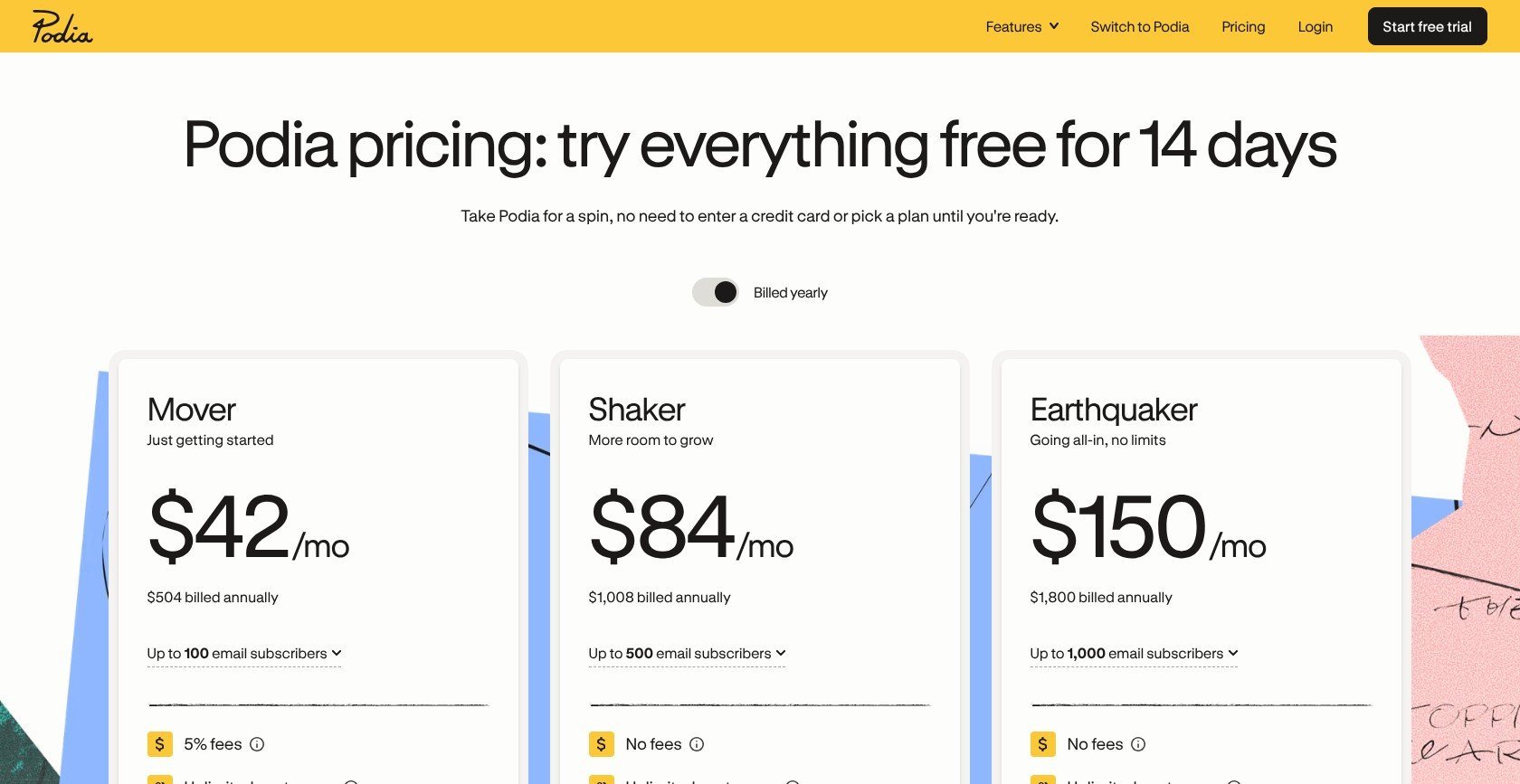
These prices require yearly billing; processing is extra, and the 14-day trial needs no card.
| Plan | Monthly price, billed annually | Transaction fee | Who it’s for |
|---|---|---|---|
| Mover | $42 | 5% | Up to 50 products; 100 email subscribers |
| Shaker | $84 | 0% | Up to 150 products; 500 subscribers; PayPal |
| Earthquaker | $150 | 0% | Unlimited products; 1,000 subscribers |
Choose Podia for courses with community access. Skip it if you only sell PDFs and would leave the teaching tools unused. Before moving, separate your product migration from paid-member re-subscription: moving content does not move payment authorization.
4. Sellfy: Best Flat-Fee Storefront
- Sellfy pricing: $22 to $119 per month, billed annually
- Standout capability: No platform transaction fee on any plan
- Gumroad pain it fixes: Percentage fees and limited storefront control
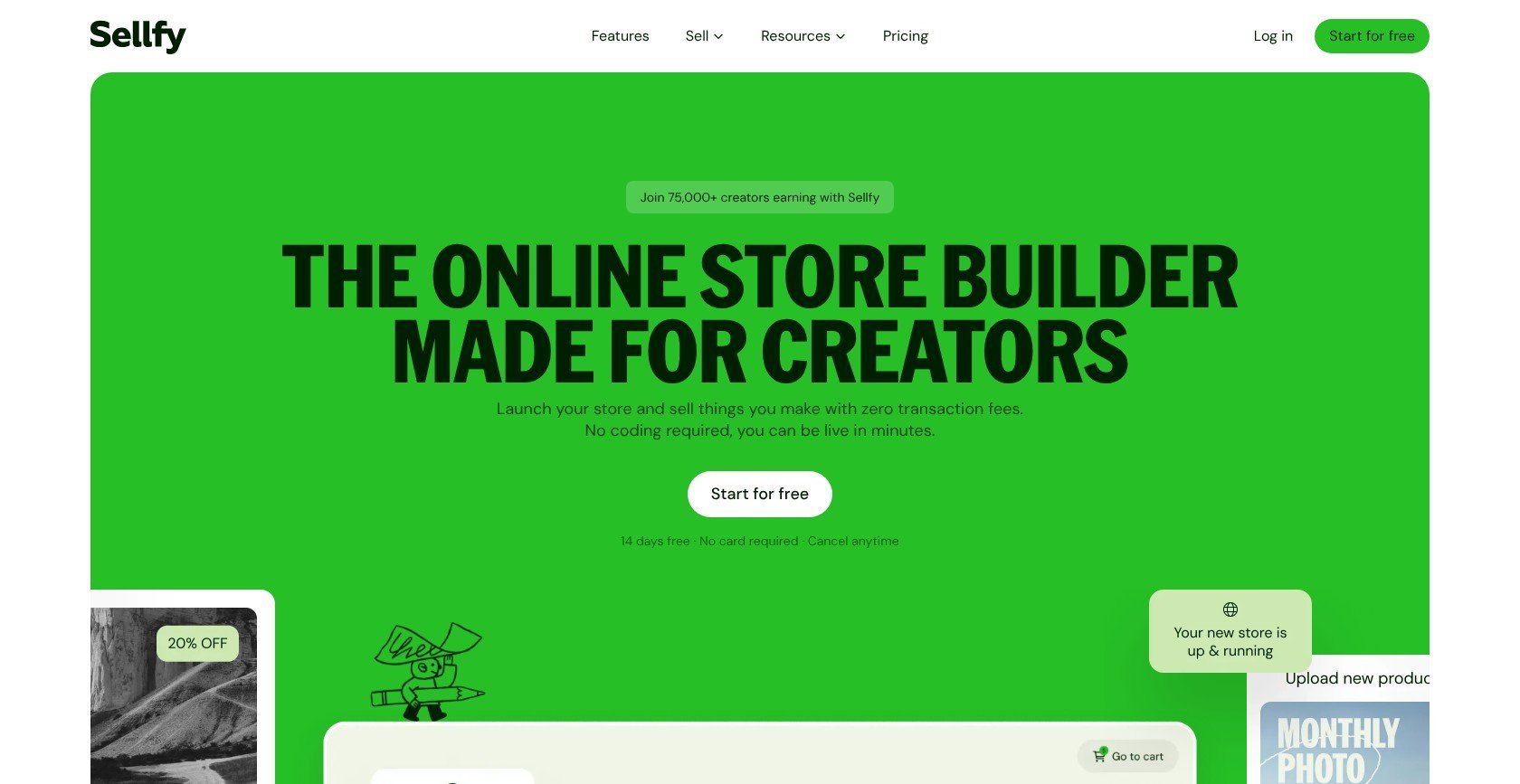
Sellfy is the best flat-fee storefront because it combines a branded store with digital and physical selling. But Starter caps sales at $10,000 annually. At a steady $2,000 monthly, budget for Business at $59, not the advertised $22 entry plan.
What I Like
- ✔️ Zero platform commission across all plans
- ✔️ Mixed product support including print-on-demand
- ✔️ Built-in email credits starting at 2,000 on Starter
What I Dislike
- ❌ Starter sales cap of $10,000 annually
- ❌ Upsells and abandoned-cart tools require Business
- ❌ Tax responsibilities stay with you, unlike Polar
What’s new with Sellfy?
Sellfy’s current plans tie your subscription to annual sales volume: $10,000 on Starter, $50,000 on Business, and $200,000 on Premium. Exceeding your allowance means upgrading or potentially paying a 2% overage fee. A flat subscription does not mean unlimited selling.
Why use Sellfy in 2026?
Sellfy suits a creator expanding from downloads into merchandise without adopting Shopify’s app-based setup. It supports subscriptions and print-on-demand alongside other products. Choose your plan using expected annual revenue, not just this month’s sales, so the sales cap does not undermine your fee comparison.
My Sellfy testing notes
I tested Sellfy’s store and checkout against its main promise: no platform commission. On my $20 product, only $0.88 in card processing comes off, before the subscription. I would not budget a $2,000-per-month business on Starter: $24,000 annually exceeds its allowance. Business is the appropriate comparison at that sustained volume.
How Much Does Sellfy Cost?
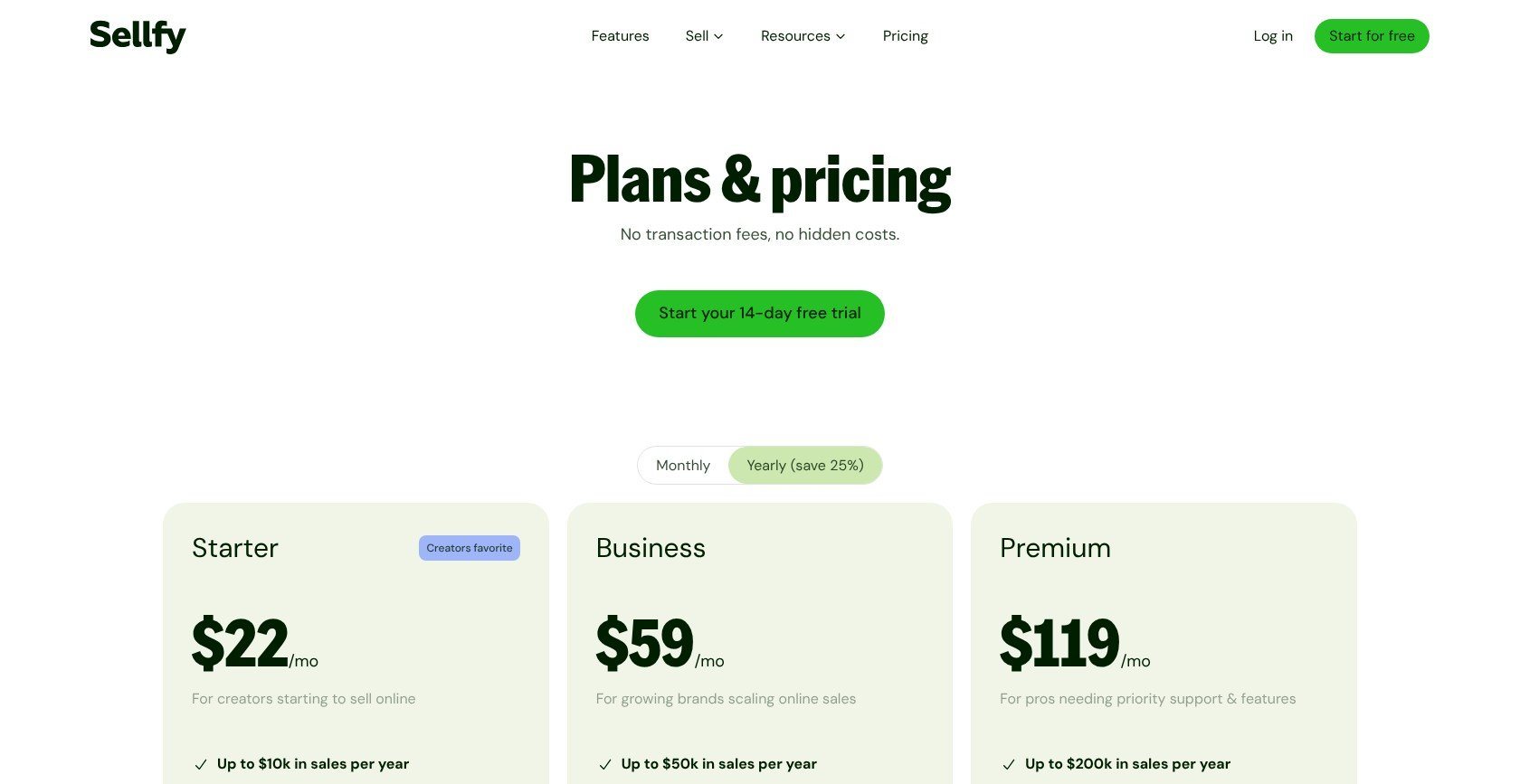
All plans charge 0% platform commission; Stripe or PayPal processing remains payable.
| Plan | Monthly price, billed annually | Monthly price, billed monthly | Transaction fee | Who it’s for |
|---|---|---|---|---|
| Starter | $22 | $29 | 0% within cap | Up to $10,000 annual sales |
| Business | $59 | $79 | 0% within cap | Up to $50,000; growth tools |
| Premium | $119 | $159 | 0% within cap | Up to $200,000; product/design migration |
Business includes store-design migration; Premium adds product migration. Confirm the scope before committing your catalog.
I recommend Sellfy for a mixed-product store with predictable revenue. Use the 14-day trial to check the storefront, but price the plan around your annual sales forecast.
5. Stan Store: Best for Link-in-Bio Selling
- Stan Store pricing: $25 to $79 per month, billed annually
- Standout capability: Mobile-first selling from your bio link
- Further comparison: Stan Store vs Linktree
Stan Store is the best link-in-bio option because it puts a compact storefront in the path of your social followers. However, Creator Pro costs $79 per month, billed annually, and even discount codes require that upgrade. Payhip does not gate features by plan.

What I Like
- ✔️ Zero platform fees on both plans
- ✔️ Social-first storefront for mobile buyers
- ✔️ Courses and bookings alongside digital products
What I Dislike
- ❌ No free plan after the 14-day trial
- ❌ Discounts and upsells require Creator Pro
- ❌ No Merchant of Record tax coverage
What’s new with Stan Store?
Stan’s current lineup separates Creator from Creator Pro. Pro includes Stan Payments with Afterpay and Klarna, alongside email flows and affiliate management. Do not budget around the entry plan if your selling strategy depends on those tools: they require the higher subscription.
Why use Stan Store in 2026?
Stan fits creators whose buyers arrive from Instagram or TikTok and need a short route from profile to purchase. It is less suited to a larger catalog-driven business. Our Stan Store vs Shopify comparison explains that storefront tradeoff in more detail.
My Stan Store testing notes
I tested Stan mostly from a phone, because the bio-link storefront is its main selling point. A $20 sale loses only $0.88 to card processing, with no Stan commission added. My concern is launch promotions: Creator does not include discount codes. I would budget Pro from the start if coupons or order bumps are essential.
How Much Does Stan Store Cost?
Stan charges a subscription plus payment processing, with annual billing reducing the monthly equivalent.
| Plan | Monthly price, billed annually | Monthly price, billed monthly | Transaction fee | Who it’s for |
|---|---|---|---|---|
| Creator | $25 | $29 | 0% | Basic social selling |
| Creator Pro | $79 | $99 | 0% | Discounts, upsells, affiliates, email flows |
Choose Stan when the bio-link purchase experience is central to your business. If you mainly want a cheaper checkout, Payhip Free or Ko-fi may solve that problem without a $300 annual commitment.
6. Lemon Squeezy: Best for Software License Keys
- Lemon Squeezy pricing: $0 monthly; base fee of 5% + $0.50
- Standout capability: License keys with Merchant of Record coverage
- Gumroad pain it fixes: Moving software customers and existing licenses
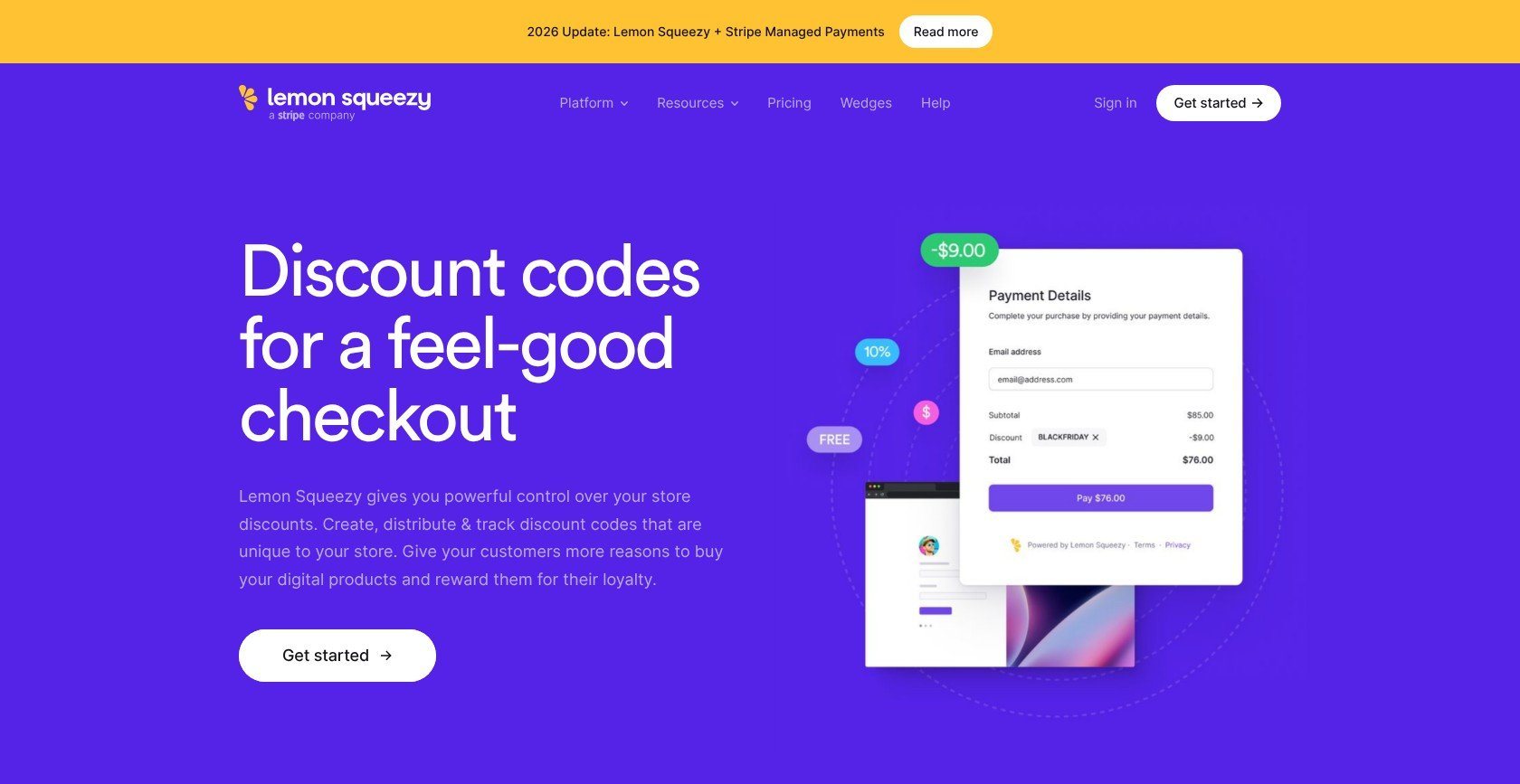
Lemon Squeezy is the best software-license pick because it combines licensing, subscriptions, and a Gumroad import route. But Stripe owns it, and its CEO said in January 2026 that the plan is migration to Stripe Managed Payments, acknowledging slower support and fewer updates.
What I Like
- ✔️ Merchant of Record without a monthly subscription
- ✔️ Software tools including licenses and subscriptions
- ✔️ Gumroad import for customers and license keys
What I Dislike
- ❌ Another platform move may follow your Gumroad migration
- ❌ Slower support and updates acknowledged by the company
- ❌ Subscriptions cannot be imported directly from Gumroad
What’s new with Lemon Squeezy?
The January 28, 2026 company update makes the direction explicit: Lemon Squeezy’s goal is an easy route to Stripe Managed Payments. Its current toolkit remains available, but I would treat the planned transition as a purchase consideration rather than background company news.
Why use Lemon Squeezy in 2026?
Lemon Squeezy fits sellers who need software licensing more than a course builder or fan page. Its Gumroad import can preserve customer and license records. That import route gives it a practical advantage when moving an existing software business, while the planned transition weighs against it.
My Lemon Squeezy testing notes
With Lemon Squeezy, I focused on license-key delivery and the CSV import rather than treating it as a simple file store. Lemon Squeezy quotes about 3 business days for its support-run Gumroad import. The limitation is substantial: product descriptions and media need rebuilding, as do files and variants. Subscriptions do not transfer.
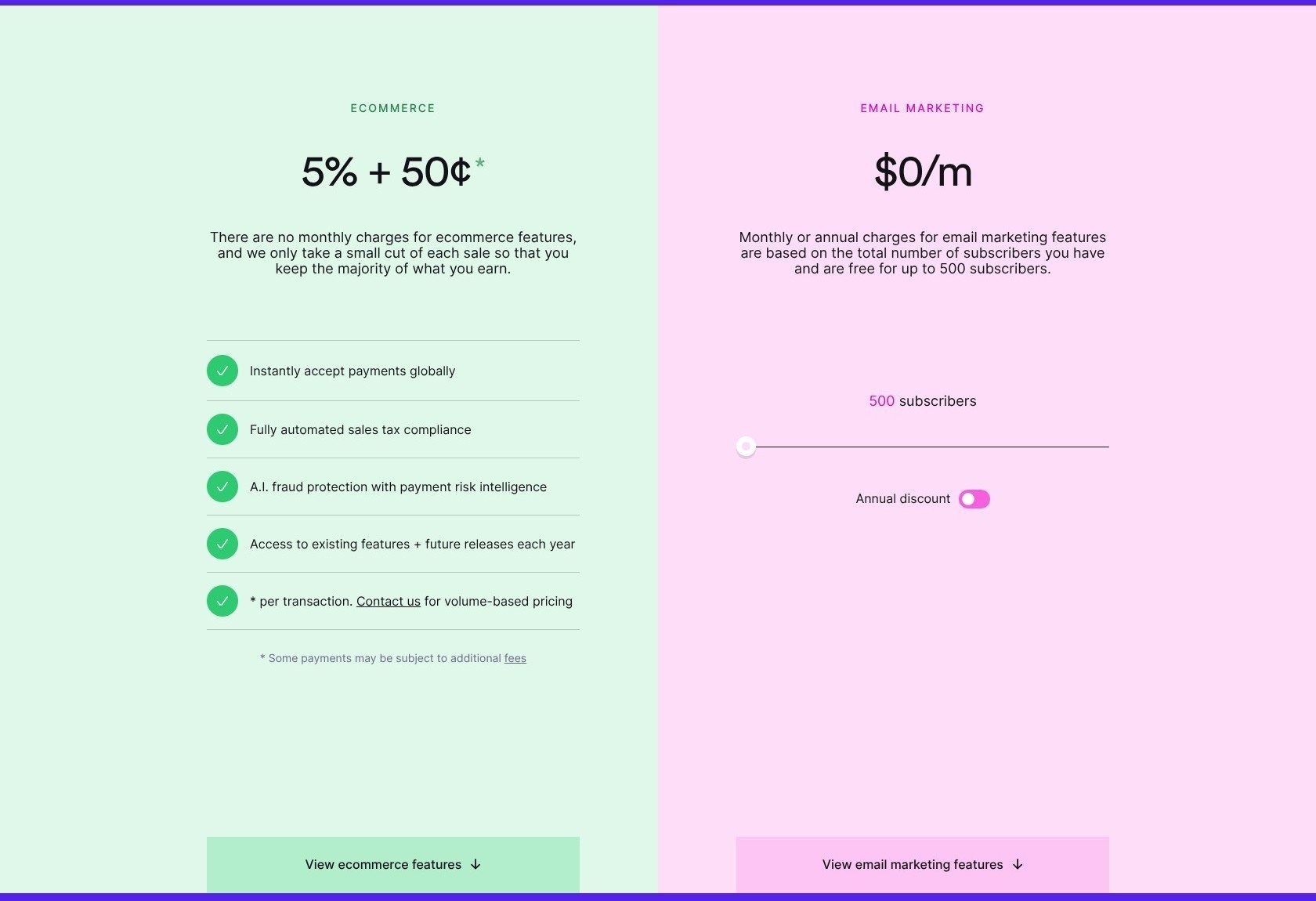
How Much Does Lemon Squeezy Cost?
Selling has no monthly subscription; email marketing is priced separately from transactions.
| Plan or service | Monthly price | Transaction fee | Who it’s for |
|---|---|---|---|
| Ecommerce | $0 | Base 5% + $0.50 | Software and digital products |
| Email marketing | $0 up to 500 subscribers | Selling fees remain separate | Small email lists |
Choose Lemon Squeezy if you need software licensing today and can accept a possible second move later. Before committing, check whether the planned destination supports the selling tools your business needs. For a fresh MoR setup without that announced transition, I favor Polar.
7. Ko-fi: Best for Tips and Fan Support
- Ko-fi pricing: $0 to $12 per month
- Standout capability: Tips, memberships, commissions, and a shop
- Gumroad pain it fixes: High fees on fan-funded purchases
Ko-fi is the best option for fan support because it brings different ways to support a creator onto one page. Gold removes platform fees for $12 monthly. However, its storefront and marketing tools are thinner than Payhip’s or Sellfy’s.
What I Like
- ✔️ Free starting option without a subscription
- ✔️ Gold’s 0% platform fee for $12 monthly
- ✔️ Direct payments into your Stripe or PayPal
What I Dislike
- ❌ Free shop sales still incur 5%
- ❌ Limited storefront tools compared with Sellfy
- ❌ Tax collection and remittance remain your responsibility
What’s new with Ko-fi?
Ko-fi’s current Free, Standard, and Gold split matters most for tips. Standard is the default for new creators and charges 5% even on one-off tips. Free removes that particular charge, while Gold removes platform fees across fee-bearing activity for a monthly subscription.
Why use Ko-fi in 2026?
Choose Ko-fi when people support you as a creator, rather than only visiting to buy a specific product. A supporter can tip or browse the shop from the same page. If promotions or storefront customization drive your sales, Payhip is the stronger starting point.
My Ko-fi testing notes
On Ko-fi, the tip button and the shop are separate fee cases, even though they share one creator page. A $20 shop purchase costs $1.88 on a free plan, versus $0.88 on Gold before its subscription. Check whether your account is on Standard before assuming one-off tips carry no platform fee.
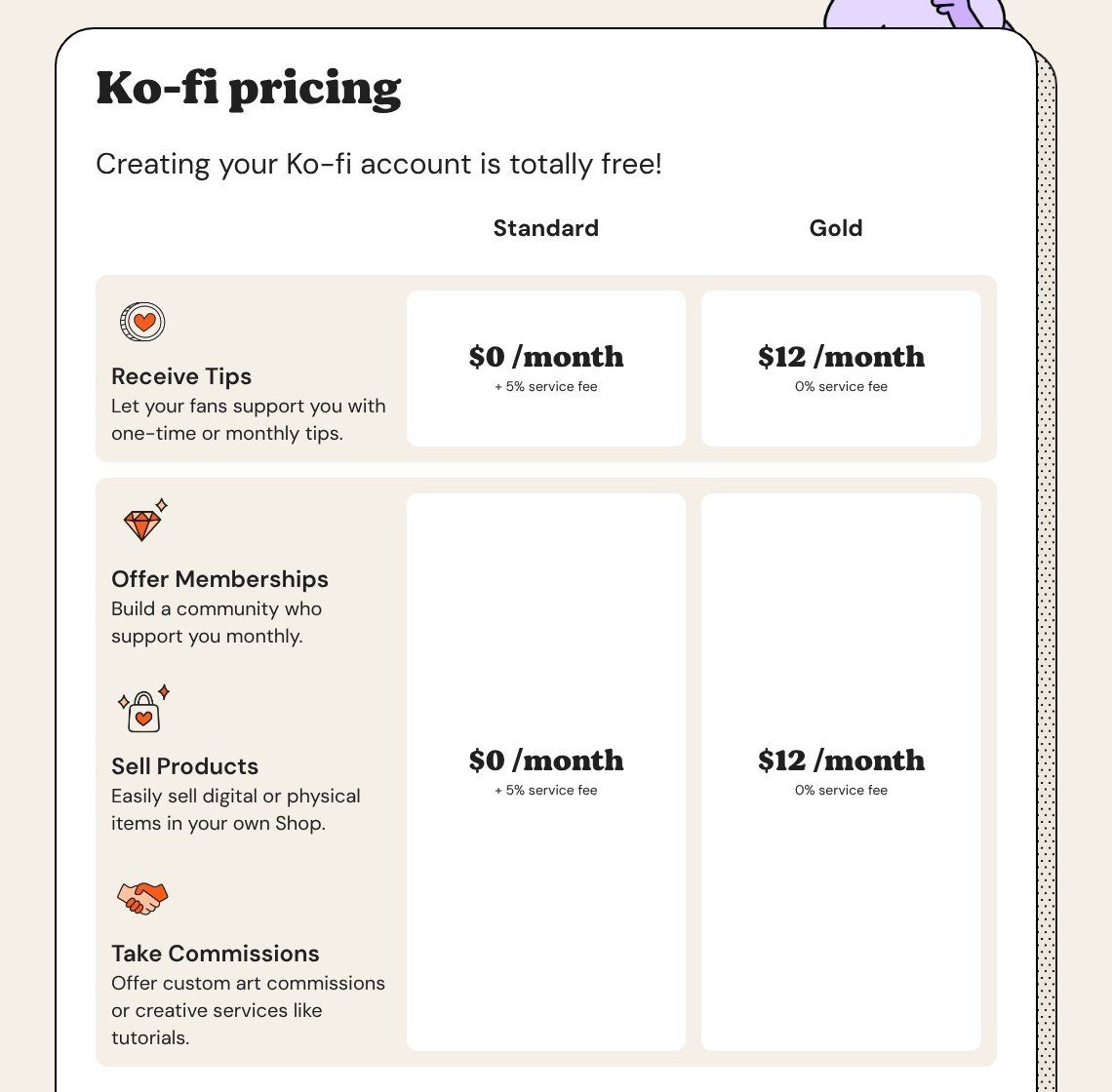
How Much Does Ko-fi Cost?
Gold’s $12 monthly subscription breaks even at $240 in sales that would otherwise attract the 5% fee.
| Plan | Monthly price | Transaction fee | Who it’s for |
|---|---|---|---|
| Free | $0 | 0% one-off tips; 5% shop and other paid activity | Occasional fan support |
| Standard | $0 | 5%, including one-off tips | Default starting setup |
| Gold | $12 | 0% | Regular fee-bearing income |
At $500 in fee-bearing sales, Gold saves $13 in platform charges after its subscription. Payment processing remains payable.
Choose Ko-fi for fan support with a small shop; skip it if you need advanced promotions or a full branded ecommerce store.
8. Shopify: Best for Scaling Into a Full Store
- Shopify pricing: $29 to $299 per month, billed annually, for Basic through Advanced
- Standout capability: A broader ecommerce store with apps
- Gumroad pain it fixes: Limited storefront and selling flexibility
Shopify is the best option for expanding into a full store because you can grow beyond a digital-only catalog. However, downloads need an app, and Basic starts at $29 before any paid apps. Payhip is simpler for a download-only business.

What I Like
- ✔️ Mixed catalog support for digital and physical products
- ✔️ App ecosystem for extending your store
- ✔️ Outside-gateway fee reductions on higher plans
What I Dislike
- ❌ Digital delivery requires an app
- ❌ Basic subscription costs $29 monthly with annual billing
- ❌ Standard store tax responsibilities remain yours
What’s new with Shopify?
Shopify’s lineup runs from a $5 per month Starter plan up through Basic, Grow, and Advanced. Basic is the full-store starting point in this comparison. Outside-payment-gateway fees fall from 2% on Basic to 1% on Grow and 0.6% on Advanced, separate from processing.
Why use Shopify in 2026?
Shopify makes sense when digital products are becoming one part of a larger retail business. Its app-based approach gives you more room to extend the store than a compact creator page. However, that flexibility adds setup work and potential subscriptions that a PDF seller may never need.
My Shopify testing notes
On Shopify, creating the product and attaching its download are two separate jobs, because the download needs a delivery app. Sky Pilot, for example, has a free tier with 100MB storage and paid plans from $9 monthly. My objection is the extra management layer: you manage the product in Shopify and delivery through the app.
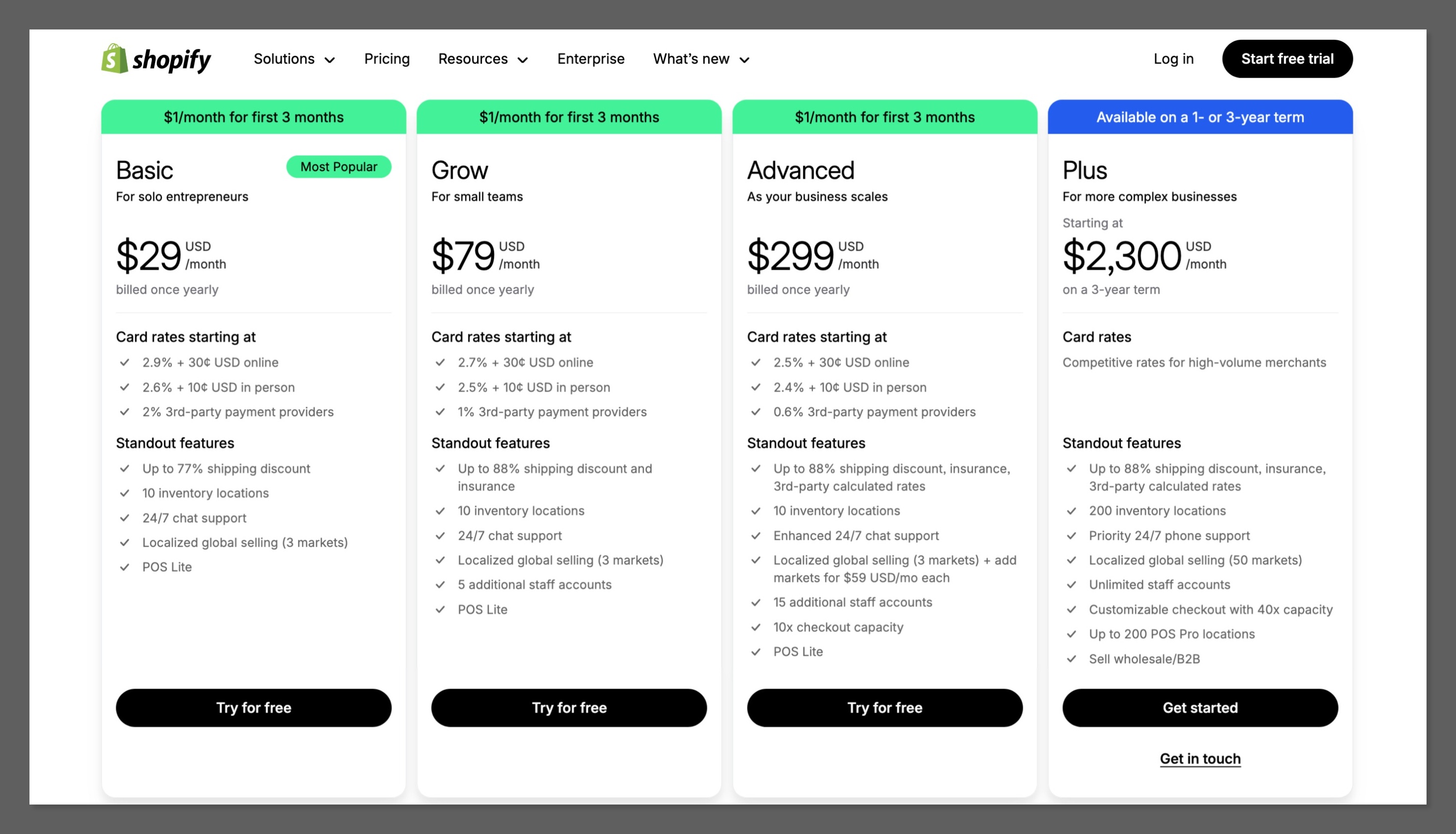
How Much Does Shopify Cost?
These are US subscription prices; card processing and any paid apps cost extra.
| Plan | Monthly price, billed annually | Monthly price, billed monthly | Transaction fee | Who it’s for |
|---|---|---|---|---|
| Basic | $29 | $39 | 0% Shopify Payments; 2% outside gateway | First full store |
| Grow | $79 | $105 | 0% Shopify Payments; 1% outside gateway | Growing operations |
| Advanced | $299 | $399 | 0% Shopify Payments; 0.6% outside gateway | More complex stores |
Check your files against the delivery app’s storage allowance before choosing its free tier.
Choose Shopify for expansion, not merely to cut Gumroad fees. Sellfy offers a simpler mixed-product storefront if its annual sales allowances fit your business.
How Do I Choose the Right Gumroad Alternative?
A cheaper platform can become an expensive move if it adds tax work or forces subscribers to sign up again. Start with your monthly sales, then decide whether retaining Merchant of Record coverage is nonnegotiable.
Match the software to what you actually sell. A download shop does not need Podia’s teaching tools, while a growing physical catalog deserves the broader options in our Best Big Cartel Alternatives guide.
- How much do I sell per month, and at what price per product?
- Do I want the platform to collect and remit sales tax and VAT for me?
- Do I sell courses, memberships, or software license keys, not just files?
- Do I need payments in my own Stripe or PayPal account immediately?
- Will a plan’s annual sales cap force an upgrade this year?
- How many of my sales come from Gumroad Discover?
Should You Stay on Gumroad?
Stay on Gumroad when the savings do not justify the disruption, particularly in these cases:
- Low volume: At $500 monthly from $20 products, Gumroad costs $84.50 versus $37.50 on a base-rate 5% + $0.50 MoR. That is a $47 gap before payout charges
- Discover brings buyers: Its 30% fee includes processing, and none of these picks directly replaces that marketplace
- Tax simplicity matters: You already have MoR coverage without a monthly subscription
- You regularly exceed $20,000 monthly: Subsequent direct sales receive the lower 5% + $0.50 platform rate until the month resets
Can I Move My Products Off Gumroad?
Yes, but moving is not one click. Start with your sales and customer CSV from Gumroad’s Sales or Payouts dashboard.
- Export your CSV and retain a copy with customer and fee information
- Check migration assistance: Lemon Squeezy imports customers and licenses; Podia moves up to 50 or 150 products; Sellfy Premium includes product and design migration
- Rebuild missing content such as descriptions, files, and variants rather than assuming the CSV contains your complete catalog
- Test checkout and delivery before replacing your existing product links
Subscriptions do not transfer directly. Coordinate cancellation on Gumroad and re-subscription on the new platform around each member’s next billing date. Importing an email address does not transfer payment authorization, so explain the change clearly before asking members to act.
How We Test and Rank the Best Gumroad Alternatives
Low headline fees do not automatically earn the top spot. We tested 12 platforms with the same $20 digital product, from setup through checkout to the payout settings.
Outside the final eight, Paddle targets SaaS; Kajabi starts at $143 per month, billed annually; SendOwl lacks a website builder and caps Launch sales at $10,000 annually; Fungies targets games and SaaS and advertises daily payouts.
Our criteria total 100%:
- Total cost vs Gumroad, 30%: We calculate a $20 sale and $2,000 monthly volume, including required subscription fees
- Tax handling and payouts, 20%: We assess MoR coverage, settlement routes, payout minimums, holds, and withdrawal charges
- Product types and selling tools, 20%: We assess delivery options alongside discounts, affiliates, subscriptions, and other selling features
- Setup and migration, 10%: We examine product setup requirements and what can move from Gumroad without rebuilding
- Storefront and marketing, 10%: We assess design control, email capabilities, social selling, and the mobile purchase route
- Stability and support, 10%: We consider ownership, announced roadmap changes, and support access, including Lemon Squeezy’s transition
Prices current as of October 2026.
Payhip finishes first for its balance of cost and unrestricted features. Lemon Squeezy’s planned transition keeps its licensing toolkit from placing higher.
Final Verdict: Which Gumroad Alternative Do I Recommend?
Payhip is the Gumroad alternative I recommend for most creators because its free plan halves the percentage fee and routes payments into your own account. Choose Polar instead if global transaction-tax handling is essential, or Podia if courses and community are the business rather than an occasional add-on. Neither replaces Gumroad Discover’s buyer traffic.
If you sell under roughly $500 monthly or depend on Discover, staying on Gumroad can be more practical than rebuilding for modest savings. Start with a free plan or trial rather than committing your whole catalog: Payhip and Polar have no starting subscription, while Podia offers 14 days. Test one product’s checkout and delivery before changing your existing sales links.
FAQs
Is there a free Gumroad alternative?
Yes. Payhip Free, Polar Starter, Lemon Squeezy, and Ko-fi let you begin without a monthly subscription. Free does not mean fee-free: Payhip and Ko-fi charge 5% on shop sales, while Polar and Lemon Squeezy start at 5% + $0.50.
Payhip and Ko-fi also require separate payment processing. MoR options can have additional charges, so compare buyer locations as well as sales volume.
How much does Gumroad really take from a sale?
Gumroad takes 10% + $0.50 on direct sales, plus card processing of 2.9% + $0.30. That totals $3.38 on a $20 purchase. Discover charges 30% including processing.
After monthly paid sales reach $20,000, new direct sales receive a 5% + $0.50 platform rate until the 1st. Confirm processing terms on that discounted tier. Standard scheduled payouts generally require a $100 balance.
Which Gumroad alternatives handle sales tax for me?
Polar and Lemon Squeezy act as Merchants of Record, handling transaction-tax collection and remittance. Payhip automatically handles EU and UK VAT, not your complete worldwide sales-tax obligations. The other ranked picks leave those responsibilities with you in their standard setups, even where tax tools are available.
MoR coverage does not replace your income-tax obligations. Gumroad itself has operated as a Merchant of Record since January 1, 2025.
Is Lemon Squeezy still safe to use in 2026?
Lemon Squeezy remains available as a Merchant of Record at a base rate of 5% + $0.50, but availability does not guarantee unchanged service. Stripe owns it, and its CEO described a planned move to Stripe Managed Payments in January 2026 while acknowledging slower support and fewer updates.
I would consider it for licensing today, but choose Polar if avoiding that announced transition is your priority.


