
Shopify
Compare fees Try Shopify →Basic: $39/month
$29/month billed annually (US)
Payment processing and other costs extra
- Independent branded storefront
- Inventory and customer marketing
- Customizable store themes
Poshmark
Compare fees Explore Poshmark →No monthly or listing fees
$2.95 per sale below $15
20% on sales of $15 or more (US)
- Established social marketplace
- Simple listing-first setup
- Offers and prepaid shipping labels
Shopify is the stronger choice for building an independent brand, while Poshmark is easier for getting eligible products in front of marketplace shoppers. The deciding factor is whether you want to run your own store or sell within an established shopping environment.
Shopify gives you greater control, but it does not hand you an instant customer audience. Poshmark reduces setup work, but your business operates within its commission structure and marketplace rules.
This Shopify vs Poshmark comparison focuses on US sellers, from occasional resellers to businesses managing ongoing inventory. Poshmark can support a professional operation, and Shopify can suit a small shop. Your products, margins and ability to attract shoppers matter more than business size.
Key Takeaways
- Pricing: Poshmark wins for starting without a monthly storefront subscription.
- Selling online: Shopify gives you more control over your business.
- Marketing: Shopify wins for independent customer acquisition and retention tools.
- Ease of use: Poshmark requires fewer setup decisions.
- Templates: Shopify offers a customizable storefront rather than a standardized closet.
- Support: Shopify provides broader access through round-the-clock chat.
A Quick Comparison of Shopify vs Poshmark
Choose Shopify for independence or Poshmark for marketplace convenience. They overlap as places to sell products, but they solve different problems before your first order arrives.
| Comparison | Shopify: Best for Brand Control | Poshmark: Best for Marketplace Setup |
|---|---|---|
| Business model | Independent ecommerce platform | Social resale marketplace |
| Selling space | Your own online storefront | A closet and listings within Poshmark |
| Starting costs | Recurring store subscription | No standard monthly or listing fee |
| Sale-related fees | Payment processing; additional transaction fees can apply | $2.95 below $15; 20% at $15 or above |
| Customer audience | You need an acquisition strategy | Existing marketplace shoppers, without guaranteed visibility |
| Product fit | Flexible catalog, subject to applicable restrictions | Supported new and pre-owned categories |
| Branding | Themes and custom domain support | Standardized marketplace presentation |
| Marketing approach | Independent campaigns and consent-based customer relationships | Marketplace discovery, sharing and offers |
| Shipping | Configurable shipping arrangements | Standard prepaid-label model |
| Support | Live chat and self-service resources | Email and self-service resources |
The practical question is which work you want to take on. With Shopify, you must give people a reason to visit your site and trust an independent checkout. With Poshmark, you must make your products appealing among competing marketplace listings.
Your inventory matters, too. A collection of individual resale finds has different merchandising needs from a replenishable product line with repeat customers. Either can become a serious business, but the selling routine will differ.
- Shopify fits you if brand presentation and a direct customer relationship are central to your plans.
- Poshmark fits you if your products match its categories and you prefer a listing-first workflow.
- Compare both carefully if margins are tight. Lower startup costs do not necessarily mean lower costs per order.
1. Best for Pricing: Poshmark for Getting Started
Poshmark wins for lower upfront platform costs because standard selling has no monthly subscription or separate listing fee. Shopify charges for the storefront before you know how much it will sell.
However, Poshmark takes a meaningful share of each sale. Shopify can have a lower fee burden once orders become consistent, but only after you account for the costs of running and promoting your own store.
Shopify’s Storefront and Payment Costs
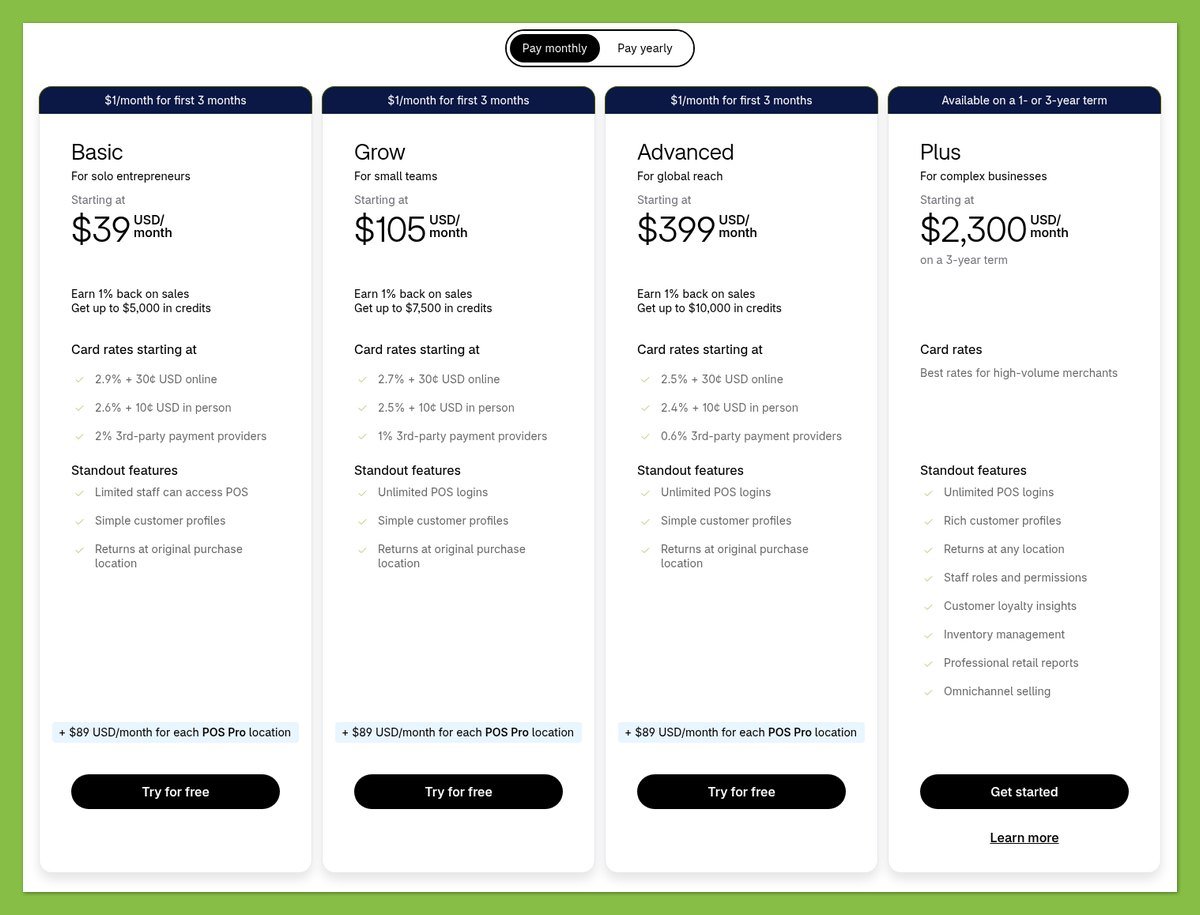
These are Shopify’s core US storefront plans, priced in USD:
| Plan | Paid Monthly | Monthly Equivalent, Billed Annually |
|---|---|---|
| Basic | $39 | $29 |
| Grow | $105 | $79 |
| Advanced | $399 | $299 |
Annual billing means an annual commitment, not a monthly payment at the lower rate. These plans include hosting, SSL, inventory tools and unlimited products.
On Basic, standard US online card processing through Shopify Payments is 2.9% + $0.30. Premium cards cost 3.5% + $0.30, with an additional 1% for international cards. Using a third-party payment provider adds Shopify’s 2% Basic transaction fee separately from that provider’s charges.
Start with the plan your operation needs. Paying for a higher tier solely to chase a lower payment rate makes sense only when your actual transaction volume supports the extra subscription expense.
Poshmark Selling Fees
Poshmark’s commission depends on the sale price, including a precise boundary at $15:
| Sale Price | Commission | Example Proceeds After Commission |
|---|---|---|
| Below $15 | Flat $2.95 | $10 sale leaves $7.05 |
| Exactly $15 | 20%, or $3 | $15 sale leaves $12 |
| Above $15 | 20% | $50 sale leaves $40 |
These proceeds are before applicable seller fee taxes, seller-funded shipping discounts and other costs. Inventory and packaging still need to come out of your margin.
Low-priced stock deserves particular attention. A $2.95 commission on a $10 item consumes 29.5% of its selling price, so a seemingly small discount can remove much of your remaining profit.
What a $50 Sale Actually Tells You
For an illustrative $50 sale, Poshmark’s commission is $10, compared with $1.75 in standard-card processing on Shopify Basic. The Shopify calculation assumes exactly $50 is processed through Shopify Payments.
That is an $8.25 fee difference, not an $8.25 profit advantage. The marketplace commission and card-processing charge pay for different things, and the Shopify figure excludes the store subscription.
With the same sales and standard-card assumptions, five such Shopify orders would produce $41.25 in fee differences, exceeding the $39 monthly Basic subscription. This is fee-only arithmetic, not a prediction that an independent store will generate those orders at no additional cost.
Budget Beyond the Headline Fee
Keep these expenses separate when comparing your options:
- Storefront costs: Shopify subscription, domain registration and any paid theme or apps.
- Transaction costs: Card processing and applicable Shopify transaction fees, or Poshmark commission.
- Fulfillment costs: Postage, packaging, shipping discounts and overweight charges.
- Marketing costs: Advertising, paid marketplace promotion and the work of attracting buyers.
Use realistic monthly order estimates rather than your target sales. Poshmark is especially useful when demand is uncertain; Shopify becomes more attractive when you can support its recurring costs with a credible sales pipeline.
Pricing winner: Poshmark for getting started. Shopify deserves a closer margin calculation once you have repeatable demand, but neither platform is universally cheaper.
2. Best for Selling Online: Shopify for Building a Brand
Shopify wins for building an independent retail business because you control more of the storefront and selling experience. Poshmark offers a more prescribed workflow, with useful tools for negotiating and completing marketplace sales.
A well-run Poshmark business can be substantial without an independent website. Shopify is the stronger fit when you need to shape more of the shopping experience yourself.
Sales Features and Product Fit
Shopify lets you organize products into a branded shopping experience. That is useful when you want buyers to understand a collection, compare related products or see the broader purpose behind your assortment.
Poshmark centers the experience on individual listings and closets. Buyers can purchase immediately or make an offer, and sellers have up to 24 hours to accept, decline or counter. Accepted offers are binding.
Poshmark is not limited to secondhand clothing. Supported inventory includes:
- Fashion: Women’s, men’s and children’s clothing and accessories.
- Additional categories: Select home goods, pet products and electronics.
- Personal care: Eligible new products, subject to category restrictions.
Check eligibility before sourcing inventory. Used cosmetics and furniture, for example, do not fit Poshmark’s permitted-product rules. Shopify also has applicable product and payment restrictions, so an independent storefront is not permission to sell anything.
For a curated resale business, Poshmark’s buying conventions may fit naturally. For a product line that needs extensive brand explanation, Shopify gives you more room to merchandise it.
Payments, Shipping and Returns
Shopify gives you more shipping choices. Available US label carriers include USPS, UPS and FedEx, alongside DHL services, subject to location restrictions. That flexibility is valuable if your orders vary substantially in weight or destination.
Poshmark’s standard US shipping is $6.49, normally paid by the buyer, using USPS Ground Advantage with an estimated 2 to 5 business-day delivery window. Same-closet purchases can share a shipping charge in a bundle up to 5 lb; sellers pay overweight costs.
That standardization removes decisions, but it does not remove preparation. Weigh the packed order before shipping, particularly when bundling heavier items.
Packaging tip: Use supplies appropriate for the Ground Advantage label, rather than following older Priority Mail packaging advice. Poshmark offers an in-app route for requesting Ground Advantage supplies.
Returns also require careful wording. Under standard Poshmark protection, buyers must report not-as-described problems within 3 days of delivery. Fit, change of mind and delayed delivery do not ordinarily qualify.
However, eligible orders can include optional paid Worry-Free Returns powered by Seel, covering fit or change-of-mind returns within 7 days. Check which protection applies before treating a sale as final.
For your independent store, plan a clear returns policy and a process you can actually manage. Greater control also means more responsibility for communicating expectations and handling customer questions.
Apps and Operational Flexibility
Shopify’s app ecosystem can extend your store, but extra functionality may introduce recurring charges and additional settings. Choose additions to solve a specific operational problem, not simply because they are available.
Poshmark keeps more work within its marketplace tools. Smart Sell can automate offers within your minimum-price settings, while bulk listing actions help with catalog administration. Its standardized approach can be a strength when you want fewer systems to maintain.
Selling winner: Shopify for brand ownership and flexibility. Poshmark remains compelling when its product categories, offers and fulfillment model already match your operation.
3. Best for Marketing Products: Shopify for Control
Shopify wins for marketing control, while Poshmark has the stronger built-in discovery environment. Your choice depends on whether you want to develop your own audience or compete for attention inside an existing marketplace.
Neither route eliminates customer-acquisition work. A store can launch without visitors, and a marketplace listing can remain unseen despite being surrounded by active shoppers.
Marketing Tools and Customer Relationships
Shopify supports consent-based email lists and customer segments, including groups based on location or purchasing behavior. You can send campaigns to selected segments, send test emails and schedule delivery.
This gives you a practical foundation for repeat purchases. A customer interested in one collection need not receive every promotion you send, although you still need permission before sending marketing email.
Poshmark’s tools work within its shopping environment:
- Social discovery: Sharing and Posh Parties can help shoppers encounter listings.
- Sales incentives: Offers and price reductions can encourage interested buyers.
- Paid visibility: Promoted Closet runs eligible listings in 7-day campaigns.
The tradeoff is independent relationship-building versus marketplace attention. Do not treat marketplace buyers as an automatically available email list for your separate business.
Before paying for promotion on either platform, check whether your listing or product page answers basic purchase questions. Advertising unclear sizing or weak condition details can create more inquiries without fixing the underlying sales problem.
Search Engine Optimization
Shopify lets you edit search-related elements, including:
- Page titles and meta descriptions
- Image alt text
- On-page product and editorial content
Those controls help you describe what you sell to search engines and shoppers. They do not guarantee rankings, and search engines can rewrite the snippets displayed in results.
Poshmark sellers work within standardized listing pages instead of configuring an independent site. Your priority is an accurate, searchable product description, not a custom website SEO strategy.
Shopify has the higher ceiling here, but useful search content takes work. Choose it for control, not because a new domain will immediately outrank established retailers.
International Selling
Shopify supports country and region markets with localized shopping experiences. Translation, international domains and currency pricing are available subject to eligibility and configuration.
Poshmark’s US marketplace does not support international shipping outside the US and its territories. It supports PO boxes and APO/military addresses, but ordinary US labels do not provide a route to Canadian customers.
International expansion therefore favors Shopify, although buying an overseas shipping label is only one part of preparing to sell abroad.
Marketing winner: Shopify for long-term control. Poshmark is attractive when access to marketplace shoppers matters more than building an independent acquisition system.
4. Easiest to Use: Poshmark
Poshmark is easier to start using because you prepare listings rather than assemble an entire online store. Shopify asks you to make more decisions before customers can shop confidently.
That does not mean Poshmark is effortless. The technical setup is lighter, but accurate listings and reliable fulfillment remain your responsibility.
Getting Started With Shopify
A manageable Shopify launch starts with the essentials:
- Choose a plan and theme that fit your initial requirements.
- Add products and collections with accurate inventory and descriptions.
- Configure payments and shipping around the orders you expect.
- Publish store policies that explain fulfillment and returns.
- Preview your storefront and checkout before sending shoppers to it.
The challenge is not just learning the software. You also need to decide what customers should see, what delivery promises you can keep and how shoppers will discover the store.
Keep your initial scope narrow. A clear store with a manageable catalog is a better starting point than a complicated launch dependent on numerous apps.
If you already have an audience, these setup decisions may be worth making immediately. Without one, reserve time for acquisition rather than treating launch day as the finish line.
Getting Started With Poshmark
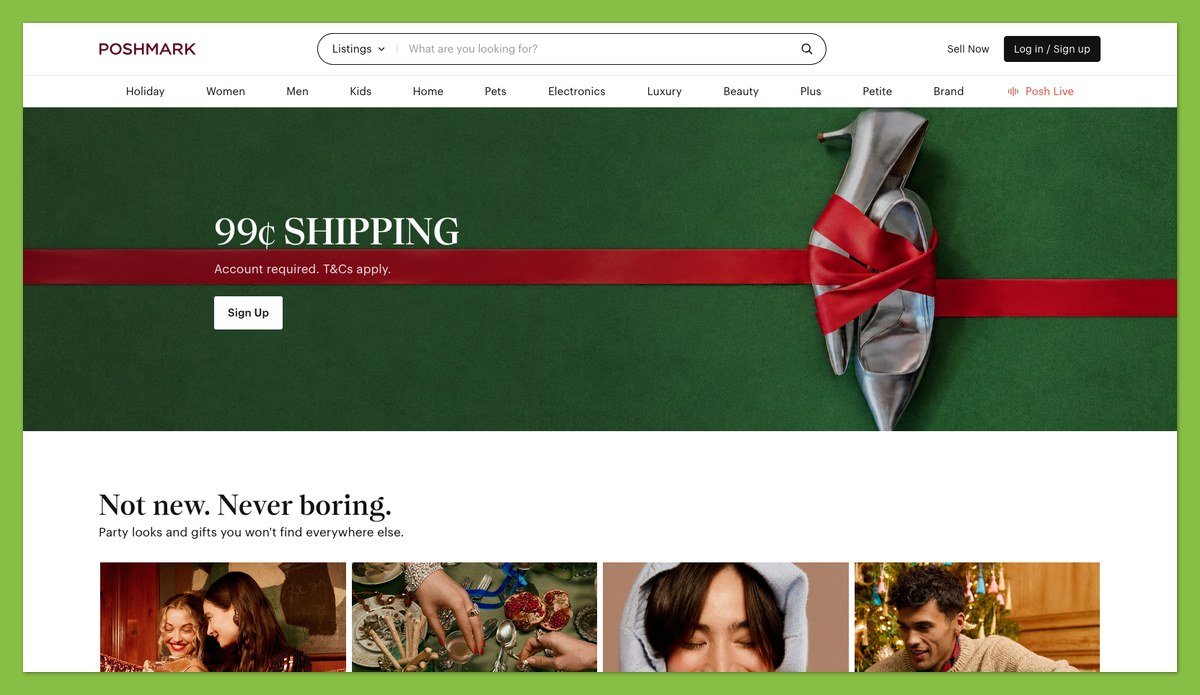
Poshmark’s starting routine is shorter:
- Confirm product eligibility before preparing the listing.
- Photograph the actual item, including wear or defects.
- Describe and price it with condition and relevant measurements.
- Review offers against your margin, not just your desired selling price.
- Pack, weigh and ship using the appropriate label.
Smart List AI can generate listing text from photographs, but check every factual detail. An automated description is not a substitute for inspecting an item or identifying damage.
Once you are selling regularly, your workload shifts toward inventory preparation and order handling. A large closet still needs organized storage, consistent descriptions and dependable routines.
Practical tip: Prepare a repeatable photography and condition-checking checklist before adding more stock. That helps on either platform and is more useful than trying to perfect every listing from scratch.
Ease-of-use winner: Poshmark. Shopify involves more setup, but that extra work buys control that a standardized marketplace cannot offer.
5. Best Online Store Templates: Shopify
Shopify wins decisively for storefront design because it offers customizable themes. Poshmark gives you a standardized closet and listing presentation, not an equivalent website builder.
Shopify’s Customizable Storefront
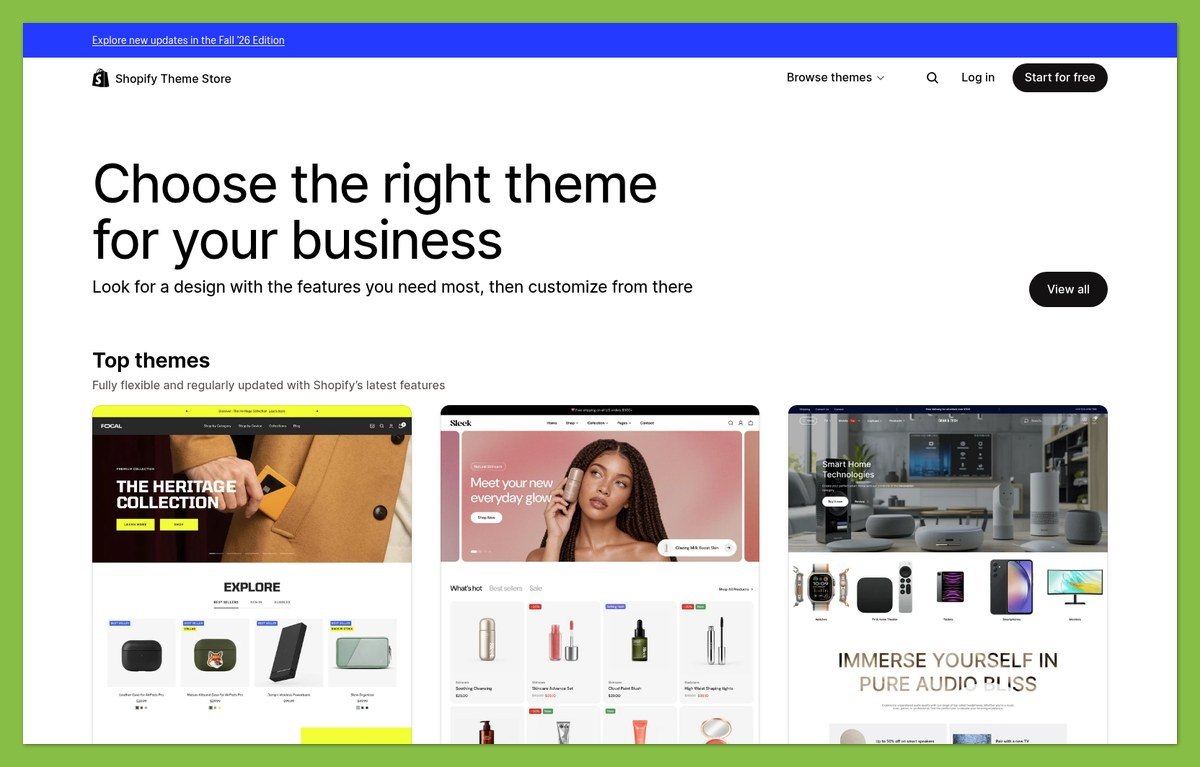
Shopify offers free and paid themes, with the option to preview and customize a paid theme before purchasing it. You must buy it before publishing, and the license applies to the store.
Combined with a custom domain, a theme lets your business feel like its own destination. That matters when customers need context beyond an individual item’s price and condition.
However, a paid theme is not automatically a better investment. Start with the layout your products need, then judge whether a premium design solves a real problem.
Poshmark’s Standardized Presentation
Poshmark gives you less layout freedom, but also fewer design decisions. Your photography and product information carry more of the responsibility for making the business recognizable.
That can suit a reseller whose competitive advantage is sourcing desirable stock rather than building an elaborate website. Consistent presentation still matters, even without a custom storefront.
Design tip: Use a consistent lead-photo style and make condition details easy to find. On Shopify, also check that decorative sections do not push essential purchase information too far down the page.
Templates winner: Shopify. Choose Poshmark’s simpler presentation when maintaining a custom site would distract from sourcing, listing and shipping.
6. Best for Business Support: Shopify
Shopify wins for support availability, with 24/7 live chat on Basic and Grow. Poshmark uses email support, so it is less suitable when you need a live conversation about an urgent issue.
Availability does not prove better resolution quality, and neither platform’s support replaces your own customer-service responsibilities.
Shopify Support: Strengths and Limitations
- ✔️ Round-the-clock chat: You can seek help outside standard business hours.
- ✔️ Self-service guidance: Help documentation supports store setup and ongoing administration.
- ❌ Third-party boundaries: External theme developers normally handle support for their themes.
- ❌ No standard phone-support promise: Do not choose a core plan expecting an included telephone helpline.
A store issue can involve several providers. Knowing whether a problem belongs to Shopify, an app or a theme developer helps you approach the right support team.
Poshmark Support: Strengths and Limitations
- ✔️ Marketplace-specific help: Support covers account and order issues within Poshmark.
- ✔️ Help Center resources: Self-service guidance explains selling rules and dispute procedures.
- ❌ Email-only contact: There is no live chat or phone alternative.
- ❌ Allow time for a reply: Poshmark says it typically responds within 1 to 2 business days.
Support winner: Shopify for access. Poshmark’s support remains relevant to marketplace disputes, where the platform itself administers the transaction rules.
How We Compare Shopify and Poshmark
WebAppMeister compares these platforms using official documentation across pricing, selling, marketing, usability, templates and support. Recommendations reflect US seller needs and documented workflows, not hands-on tests or numerical ratings. Cost examples are illustrations, not earnings forecasts.
Prices current as of October 23, 2026.
Shopify vs Poshmark: Our Verdict
Shopify is our recommendation for building an independent brand with a distinctive storefront and a long-term customer strategy. Choose it when you are prepared to fund the store and bring shoppers to it.
That said, Poshmark is the better starting point for eligible marketplace inventory when simpler setup and existing shopping activity matter more than storefront control. It can serve professional resellers as well as occasional sellers.
Before choosing Shopify or Poshmark, price a representative month of orders and map the daily workload. Base your decision on product fit, realistic demand and margins alongside the subscription price.


