Shopify is the better choice for most store owners who want to sell products without managing a software project. Laravel makes more sense when your business needs custom systems and you have the engineering budget to build and maintain them.
There is one important distinction in Shopify vs Laravel: Shopify is a hosted commerce platform, while Laravel is an open-source framework for developing web applications. One gives you a store to configure. The other gives developers tools for creating an application, which could include a store.
You are choosing between a ready-made store and a development project. Separate Laravel commerce applications can give that project a head start.
Key takeaways
- Standard store value: Shopify bundles the essentials; Laravel requires a project budget.
- Selling and marketing: Shopify provides merchant tools without a custom implementation.
- Everyday operation: Shopify is easier for owners who do not employ developers.
- Design and support: Shopify supplies editable themes and platform support.
- Custom business logic: Laravel offers greater architectural freedom, with ongoing engineering responsibility.
1. Best Value for a Standard Store: Shopify
Winner: Shopify delivers better value for a conventional store because you are paying for an operating commerce system, not just the tools to create one.
Laravel’s free license can look attractive beside a monthly subscription. But license cost is the wrong starting point: your budget must cover a working store, ongoing maintenance, and the people responsible when something breaks.
Shopify’s subscription is easier to budget
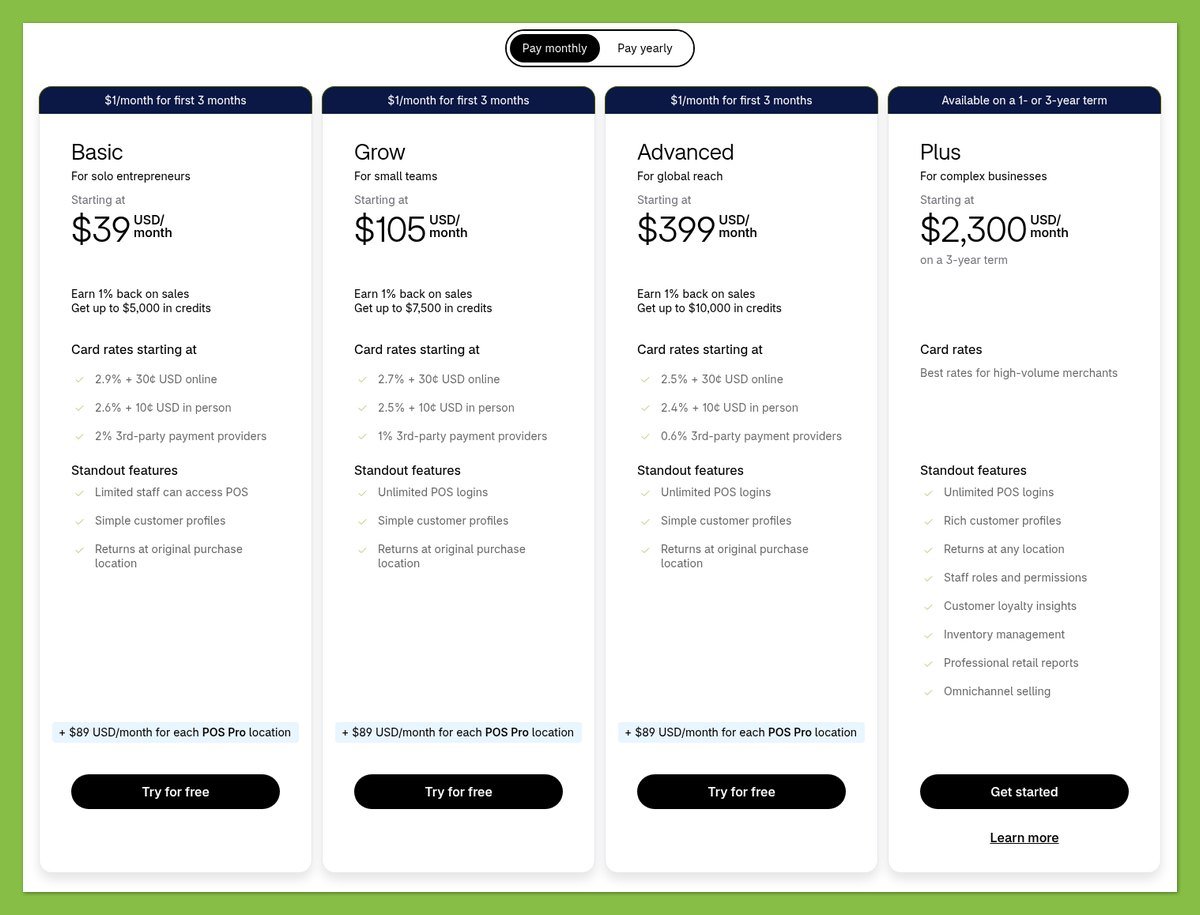
These are US prices in USD before taxes. Annual billing means paying the full year upfront, not making monthly payments at the lower rate.
| Shopify plan | Monthly billing | Annual billing equivalent | Practical buying consideration |
|---|---|---|---|
| Basic | $39/month, billed monthly | $29/month, billed annually | Starting point for a conventional store |
| Grow | $105/month, billed monthly | $79/month, billed annually | Evaluate when team or payment needs change |
| Advanced | $399/month, billed monthly | $299/month, billed annually | Justify against specific operational requirements |
| Plus | From $2,300/month, contract-dependent | Confirm contract pricing | Requires a business case and tailored quote |
A subscription is not your complete store budget. Optional apps and implementation work can materially change what you spend, especially when several essential workflows depend on separate paid services.
Include these items before comparing proposals:
- Store setup: Content preparation, configuration, migration, and any developer assistance.
- Optional extras: Your domain, paid theme, and required apps.
- Selling costs: Payment processing and any applicable platform transaction fees.
Annual billing reduces the subscription’s effective monthly price, but it also commits cash upfront. If your requirements remain uncertain, establish that the platform fits before treating an annual discount as the deciding factor.
Laravel’s costs sit outside its license
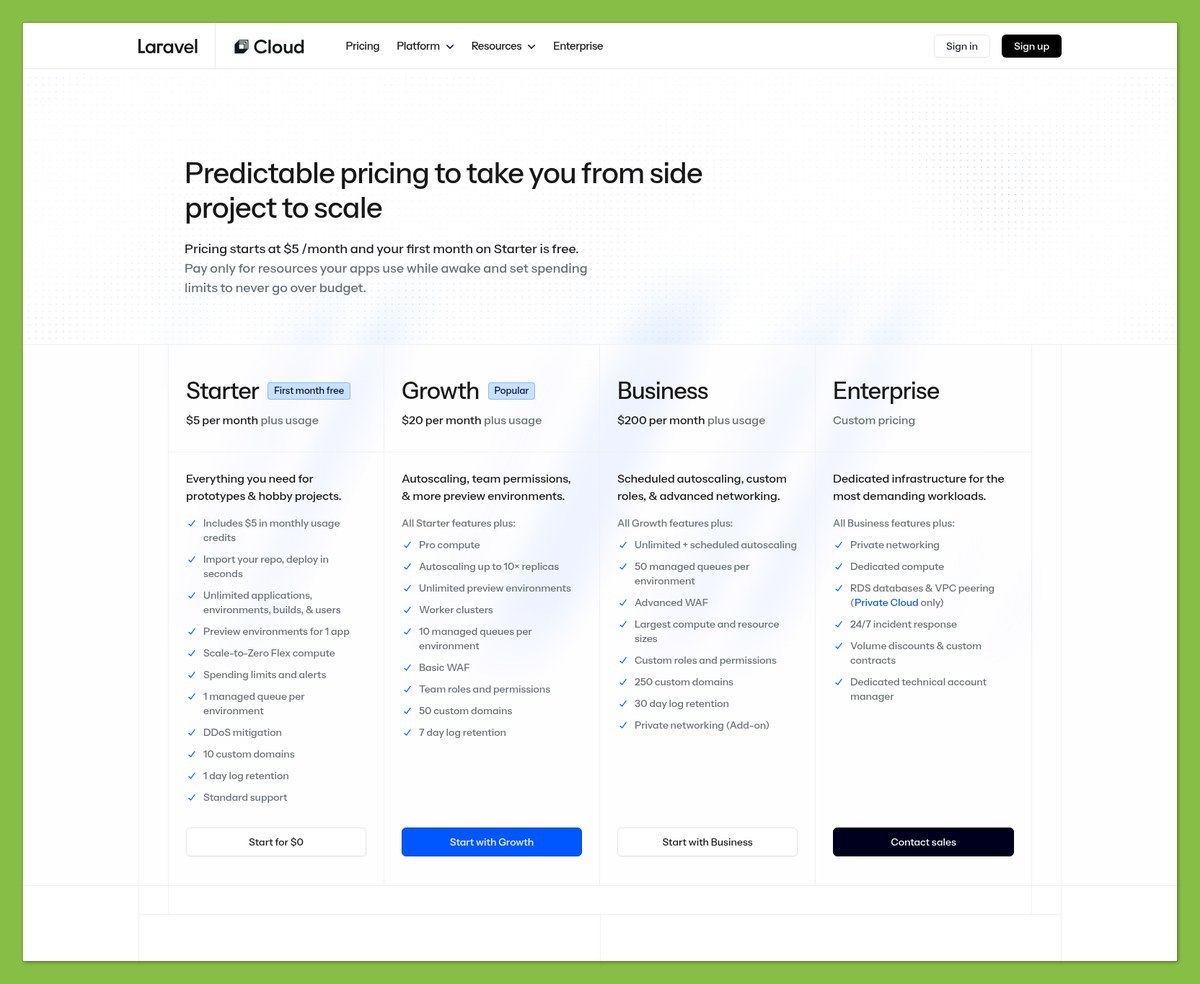
Laravel is free under the MIT license. That does not include a delivered storefront, merchant administration, or someone responsible for keeping your particular application working.
Ask your developer to separate the build price from the bills you will keep paying after launch.
| Laravel cost component | What your proposal should clarify |
|---|---|
| Commerce implementation | Which features are included and which require extensions |
| Infrastructure | Hosting, database, storage, and usage assumptions |
| External services | Payment processing and other paid integrations |
| Maintenance | Updates, monitoring, backups, and incident response |
| Future changes | How new requirements are scoped and charged |
An existing Laravel commerce application can reduce the amount of original development. It still needs configuration and upkeep, and its extensions can introduce additional costs.
The useful comparison is not “subscription versus free.” It is the total cost of delivering the same workflows over the same period, using the same sales and payment assumptions.
My recommendation: Compare quotes that include routine changes and support. A low launch quote can lose its appeal quickly if keeping the store running costs extra.
Laravel can justify its expense when custom logic solves a valuable business problem. It does not automatically become cheaper over time, and Shopify does not remain inexpensive regardless of how many apps and customizations you add.
2. Best for Selling Online: Shopify
Winner: Shopify makes selling easier because its core merchant workflows already exist. Laravel gives developers flexibility, but you must first turn that flexibility into dependable commerce functionality.
For a conventional catalog, that is a strong reason to choose Shopify. You can focus on what you sell and how you fulfill orders.
Shopify provides the retail foundation
Shopify’s product administration supports descriptions, media, inventory, and variants. You can organize merchandise with collections and tags, while metafields hold additional structured product information.
For a clothing store, size and color options belong in an existing product workflow. With bare Laravel, developers must implement that workflow or obtain it through a separate commerce application.
The difference extends beyond what shoppers see:
- Catalog administration: Staff need usable controls, not just a database containing products.
- Order operations: The storefront must connect to the processes used to fulfill purchases.
- Integration handling: Changes and failures need a defined recovery process.
Ask to see these tasks in a custom-store demonstration. A polished product page tells you little about the work your staff will do behind it.
Payment convenience comes with fees
Shopify’s published US standard online card rates and third-party transaction fees vary by plan.
| Plan | Standard online card rate starts at | Additional third-party transaction fee |
|---|---|---|
| Basic | 2.9% + $0.30 | 2% |
| Grow | 2.7% + $0.30 | 1% |
| Advanced | 2.5% + $0.30 | 0.6% |
Premium cards, international cards, and other payment methods can have different rates. Third-party transaction fees are generally additional to your external processor’s charges.
Orders processed through Shopify Payments do not incur those third-party transaction fees, but payment processing still costs money. Exemptions and special rules apply to certain payment types, so model your actual payment mix.
Laravel itself imposes no equivalent platform transaction fee. Your chosen processor and services still charge, and your implementation needs to handle payment status reliably.
A lower processing rate can matter at sufficient sales volume. Compare the savings against the higher subscription or development expense rather than assuming that the lowest percentage produces the lowest total bill.
Laravel’s advantage is business-specific logic
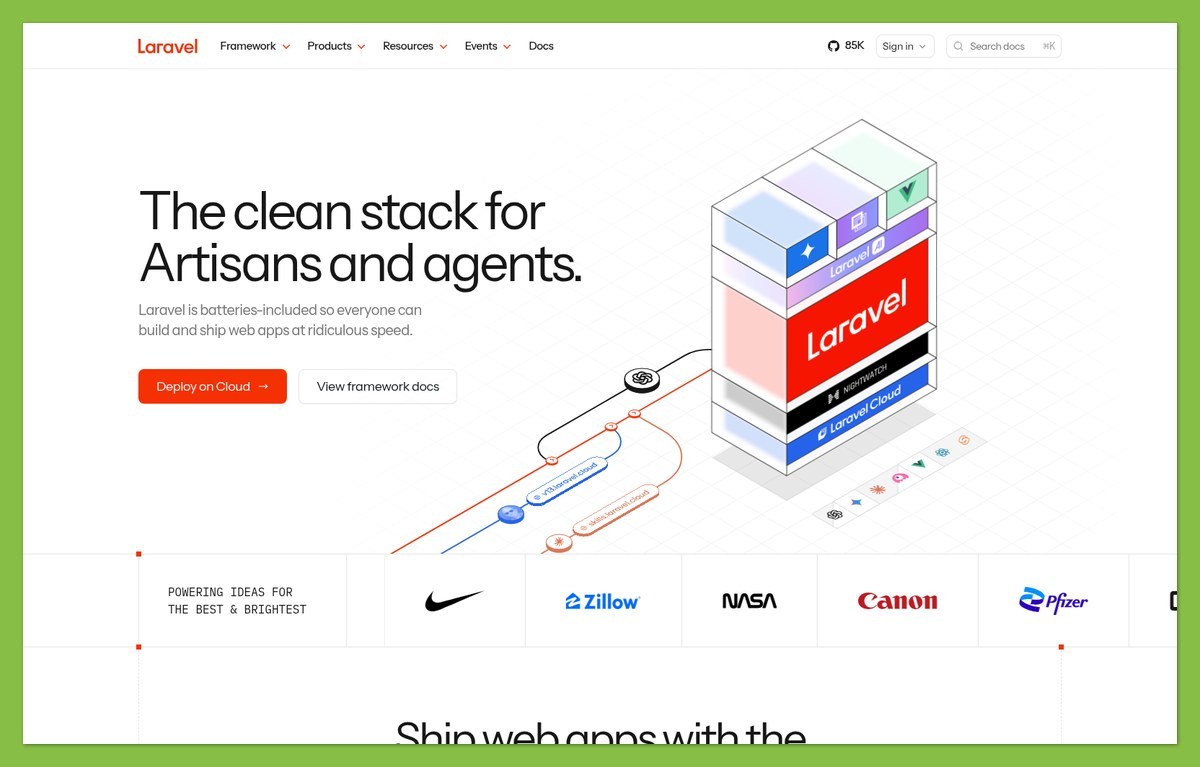
Consider a hypothetical supplier whose orders require internal approval before stock is allocated. Laravel lets developers model that process around the business rather than immediately adapting the business to a platform’s existing screens.
Shopify may still support that requirement through B2B features, apps, APIs, or custom development. B2B is not exclusively a Plus feature.
Before commissioning a replacement, establish whether your requirement can be met through:
- Configuration: An existing platform feature may already cover it.
- An app or extension: Evaluate both the workflow and recurring cost.
- A companion application: Keep commerce in Shopify while developing the unusual part separately.
Commerce packages and hybrid builds change the comparison
Bagisto is a separate open-source commerce application built with Laravel. It supplies features such as catalog management and order handling, including invoices, shipments, and refunds.
Those capabilities belong to Bagisto, not bare Laravel. Evaluate its administration, extension requirements, and maintenance arrangements as a distinct product.
You can also combine Shopify and Laravel. A Laravel application can integrate with Shopify, and Shopify’s Storefront API supports custom experiences involving products, collections, carts, and checkout.
That hybrid approach preserves existing commerce services while allowing custom work elsewhere. It also combines platform costs with development costs and remains subject to Shopify’s API and platform constraints.
3. Best for Marketing Your Products: Shopify
Winner: Shopify gives merchants a more accessible marketing starting point because its tools connect to an existing store. Laravel offers implementation control, but a framework does not supply a finished marketing operation.
If you run marketing yourself, the practical question is whether you can launch and adjust campaigns without submitting a development request. Shopify has the stronger default answer, though additional services can still increase your spending.
Campaign tools are closer to your catalog
Shopify Messaging, formerly Shopify Email, supports email, SMS, and WhatsApp campaigns from the admin, plus email and SMS automations. Messaging charges depend on volume, so include expected usage in your budget.
A Laravel application can connect to marketing services too. The extra work is defining which customer events reach those services and ensuring that the integration behaves correctly.
For example, a campaign based on a specific order status needs a dependable signal from the commerce system. Custom ownership gives you flexibility over that signal, but someone must implement and maintain it.
You still need an offer your customers want. Shopify reduces the setup work, but neither option fixes poor targeting or an unappealing promotion.
Shopify covers SEO foundations, not rankings
Shopify generates canonical tags, a sitemap, and robots.txt. You can edit page titles, meta descriptions, URLs, and image alt text.
That gives a typical store owner a useful technical baseline. Shopify’s URL structure still follows platform conventions, so it is not equivalent to complete control over routing.
Laravel lets developers define site architecture more freely. However, the application must implement the search-engine essentials correctly rather than assuming the framework supplies a finished ecommerce SEO system.
For either option, focus your brief on:
- Useful pages: Product and category content that answers buying questions.
- Indexing decisions: Clear treatment of duplicate or filtered pages.
- Change management: Redirects and checks when URLs or content structures change.
A Laravel build can accommodate unusual content relationships. That only becomes an advantage if the resulting structure helps shoppers and search engines, rather than adding complexity.
International selling needs more than translated pages
Shopify Markets supports market-specific experiences, including language, currency, product availability, and domain configuration. Some capabilities depend on plan or eligibility.
Local-currency payment processing requires Shopify Payments or Adyen. With another processor, customers generally pay in the store’s default currency, and currency conversion can carry fees.
For Laravel, developers can build localization around your requirements; commerce applications may already provide parts of it. Still, ask separately about displaying a currency and accepting payment in it.
Shopify wins for a merchant seeking a manageable launch into additional markets. Laravel becomes more compelling when your regional requirements call for custom data structures or workflows.
4. Easiest to Use: Shopify
Winner: Shopify is easier for nontechnical store owners because it separates everyday selling from most infrastructure work. Laravel’s developer-friendly tools do not make a custom store automatically merchant-friendly.
The fair comparison is between Shopify’s existing admin and the admin your development team will deliver. Without that second application, there is no Laravel store dashboard to assess.
Setup is configuration versus implementation
With Shopify, your setup work centers on preparing products, choosing a design, and configuring the store’s commercial settings. You still need accurate content and sensible operational decisions, but you are working within an established system.
A Laravel project begins with application requirements. Even when a commerce package supplies much of the store, someone must install it, configure integrations, and prepare it for production.
Ask a developer to demonstrate the daily tasks that matter before you approve the project:
- Product changes: Can your team update common details without developer intervention?
- Order exceptions: How will staff handle a problem purchase?
- Access management: Who can change sensitive settings?
- Routine promotions: Which changes require a deployment?
These questions expose usability gaps that a storefront demonstration can miss.
Maintenance changes who owns the problem
Shopify manages the hosted platform infrastructure. You remain responsible for account access, store configuration, and the apps or customizations you choose.
Laravel deployment involves server configuration and production settings, with ongoing attention to the application’s dependencies and integrations. Managed services can reduce infrastructure work, but they do not maintain your custom business logic for you.
Laravel Cloud offers managed autoscaling deployment, while Forge helps manage servers. Neither turns every custom application into a maintenance-free service.
The handover matters: Establish who handles security updates, backups, and incidents after launch. Also confirm that another developer could take over the project without relying entirely on the original builder’s undocumented knowledge.
Custom software can simplify a complicated job
Laravel can produce an admin that is easier for a particular team than a general-purpose platform. A carefully designed screen could combine several internal actions into the exact workflow employees need.
For a standard store, Shopify remains the easier default. If you choose Laravel to make a complicated job simpler, have your team try the proposed workflow before signing off on it.
5. Best for Ready-Made Store Designs: Shopify
Winner: Shopify provides the better ready-made design experience because merchants can customize themes without building a frontend first. Laravel is stronger when architectural and design freedom matter more than immediate editability.
A theme gives you more than a visual style. Its available sections determine how easily you can present your catalog and make future merchandising changes.

Shopify helps you work within a finished design
Shopify’s theme editor lets you preview changes and add, remove, edit, or reorder content. The settings available depend on the theme you choose.
Changes beyond those settings can require HTML, CSS, or Liquid work. An attractive theme does not guarantee that every requested layout will be achievable without code or an app.
Before committing to a theme:
- Use representative products: Include long titles and realistic imagery.
- Check essential sections: Confirm that your intended content has somewhere suitable to go.
- Identify code-dependent changes: Price them before approving the design.
- Duplicate before customizing: Keep an unchanged copy available.
Prioritize the layouts you will use repeatedly over an impressive demo homepage. An awkward product page creates more daily friction than a less distinctive hero banner.
Laravel gives developers more frontend choice
Laravel supports frontend approaches including Blade/PHP and JavaScript frameworks such as React, Vue, and Svelte. These are development options, not equivalents to Shopify’s visual editor.
That freedom suits an experience where product configuration or an unusual buying journey determines the interface. You can design around that interaction rather than start with a conventional storefront theme.
The catch is future editing. Your marketing team may need a developer whenever it wants a new content section.
Shopify can also support custom storefronts, so bespoke design does not automatically require replacing its commerce engine. Choose Laravel’s greater architectural freedom when it solves a defined requirement, not merely because “fully custom” sounds more impressive.
6. Best for Merchant Support: Shopify
Winner: Shopify gives store owners a clearer default support route because platform assistance comes with the service. Laravel support depends on the application, hosting provider, and development arrangements you choose.
Shopify gives you a platform support contact
Shopify offers 24/7 chat across its plans. Plus adds inbound phone and email support; do not assume those channels are included with every online-store subscription.
Availability does not guarantee a particular response time or resolution. An app problem or theme customization may also require help from its developer rather than Shopify’s platform support.
Laravel needs a support agreement, not just documentation
Laravel has documentation and a developer ecosystem, but those resources are not a merchant support desk for your custom checkout. A hosting provider may resolve infrastructure faults without fixing application code.
For a custom store, clarify:
- Incident ownership: Who investigates when the cause is initially unclear?
- Coverage: When is assistance available, and what response is contracted?
- Scope: Are integration failures and software updates included?
- Continuity: Who can maintain the application if your main developer leaves?
A dedicated development partner can provide support closely tailored to your operations. That is useful for complex workflows, provided your agreement includes it.
Shopify gives you an established contact for platform issues. A Laravel development partner can know your particular store more deeply, but you need a clear agreement about the help available.
How We Compare Shopify and Laravel
This is a documentation-based comparison, not a hands-on store test. WebAppMeister’s recommendations weigh documented capabilities, pricing, implementation responsibilities, and merchant fit across the six rounds.
We distinguish bare Laravel from separate commerce applications and use hypothetical examples to explain tradeoffs. No performance benchmarks, response-time tests, or custom development quotes underpin these judgments.
Shopify wins the ready-to-use merchant criteria. Laravel’s architectural flexibility is evaluated separately from out-of-the-box convenience.
Prices current as of October 2026. Confirm pricing and eligibility before committing.
Shopify vs Laravel: Our Verdict
Choose Shopify for a standard store unless a validated requirement gives you a strong reason not to. It provides the more practical route to everyday commerce without making you responsible for a custom application.
That said, Laravel fits businesses whose distinctive workflows justify ongoing engineering investment. Its advantage is control over application architecture and business logic, not a guaranteed cost or performance win.
Before choosing Shopify or custom ecommerce, write down your nonnegotiable workflows. Check Shopify’s features, apps, and integration options against them, then commission a scoped Laravel proposal only where a meaningful gap remains.


