
Mailchimp Free
Compare plans Start free →$0
250 contacts, 500 emails/month
- Landing pages, pop-ups and surveys
- 1 seat and 1 audience
- Email support for 30 days
Mailchimp Essentials
Compare plans Start free trial →From $13/month
500 contacts, 5,000 emails/month
- Email scheduling and A/B testing
- Flows up to 4 steps
- 24/7 email and chat support
Mailchimp Standard
Compare plans Start free trial →From $20/month
500 contacts, 6,000 emails/month
- Up to 200 branching flows
- Generative AI and predictive segments
- Multivariate testing
Mailchimp Premium
Compare plans Try Mailchimp →$350/month for 12 months
From 10,000 contacts
- Unlimited seats and audiences
- Phone and priority support
- 4 onboarding sessions
Mailchimp’s free plan shrank in early 2026, and owner Intuit is reducing investment. Mailchimp remains a beginner-friendly all-rounder, but it isn’t the budget pick. Brevo and MailerLite offer more for free.
This Mailchimp review covers pricing at realistic list sizes, what Free still includes, and which automation and AI tools justify paying more. If you’re choosing your first email platform, start with the limits rather than the familiar name.
Key Takeaways 🔍
- Strong ecommerce tools and integrations appeal to online stores, but costs climb as your list grows.
- Free means 250 contacts and 500 monthly emails, capped at 250 daily, without scheduling or flows. Email support lasts 30 days.
- Essentials starts at $13/month, Standard at $20/month, both for 500 contacts; Premium is $350/month for its first 12 months.
- Unsubscribed contacts count toward your bill, making regular list cleanup essential.
- Standard is the strongest fit for branching automation, generative AI and advanced segmentation. Budget beginners should consider Brevo or MailerLite.
Start free or try Essentials or Standard free for 14 days → Try Mailchimp
📢 November 2026 page update
Rewritten for current pricing, the early-2026 free-plan cut, June 2025’s Classic Automation Builder retirement and Marketing Automation Flows rename, AI features, and Intuit’s May 2026 investment announcement.
Mailchimp Pros & Cons
Mailchimp pairs a polished editor with ecommerce connections and list-building tools on every plan. Its biggest drawbacks concern billing and features reserved for Standard.
What I Like
- ✔️ A polished drag-and-drop editor: 130+ templates and Content Studio keep reusable brand assets together.
- ✔️ Affordable paid entry: Essentials starts at $13/month for 500 contacts, including 24/7 email and chat support.
- ✔️ Tools beyond email on every plan: even Free includes landing pages, pop-up forms, surveys and social posting.
- ✔️ Strong ecommerce connections and 300+ integrations: Shopify and WooCommerce connections help bring store activity into your email marketing.
- ✔️ Serious targeting on Standard: multivariate testing, send-time optimization and predictive segments give growing businesses more control over campaigns.
What I Dislike
- ❌ You pay for contacts you can’t market to: unsubscribed and non-subscribed contacts count toward your paid allowance.
- ❌ Free keeps shrinking: today’s 250 contacts and 500 monthly sends fall well below the 2,000-contact allowance available before 2022.
- ❌ Steep tier jumps: moving from 2,500 to 2,501 contacts takes Essentials from $45 to $75 a month.
- ❌ Generative AI and branching automation require Standard: Essentials isn’t a cheap route to Mailchimp’s full marketing toolkit.
- ❌ Intuit is reducing investment in Mailchimp: its May 2026 announcement makes future development less certain for businesses choosing a long-term platform.
How Much Does Mailchimp Cost?
Paid plans run from $13 per month on Essentials to $350 per month on Premium, alongside Free. Pricing follows stored contacts, with separate sending allowances.
- Free ($0): try Mailchimp with up to 250 contacts.
- Essentials (from $13/month): newsletters and simple automations.
- Standard (from $20/month): branching flows, AI and advanced segmentation.
- Premium ($350/month for the first 12 months): starts at 10,000 contacts and adds phone support and unlimited seats.
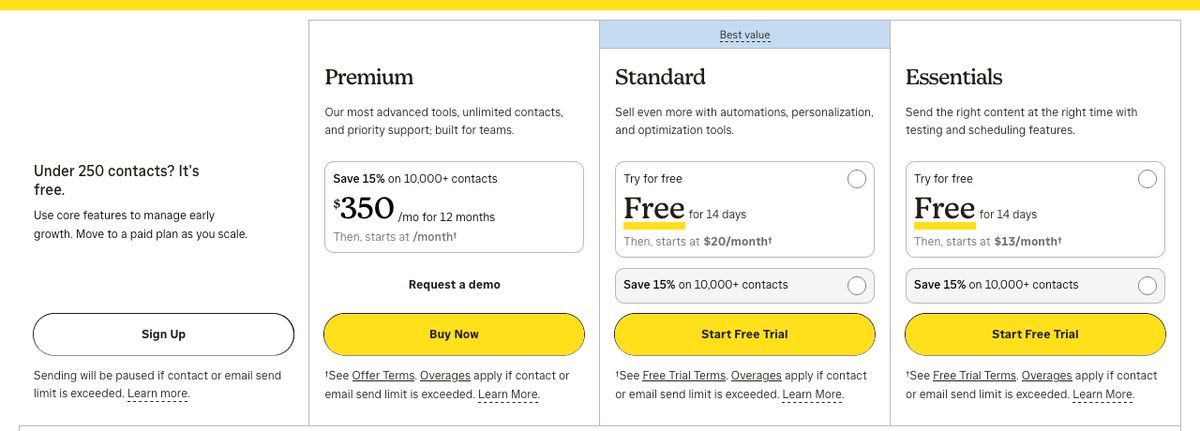
Pay As You Go credits suit infrequent senders, with Essentials-style features but no automation.
| Feature | Free | Essentials | Standard | Premium |
|---|---|---|---|---|
| Starting monthly price | $0 | $13 (500 contacts) | $20 (500 contacts) | $350 for 12 months (10,000 contacts) |
| Maximum contacts | 250 | 50,000 | 100,000 | 200,000, custom above |
| Monthly email sends | 500 (250/day) | 10x contact tier | 12x contact tier | 15x contact tier |
| Seats | 1 | 3 | 5 | Unlimited |
| Audiences | 1 | 3 | 5 | Unlimited |
| Email scheduling | No | Yes | Yes | Yes |
| Automation flows | Preview only | Up to 4 steps, one starting point | Up to 200 flows, branching | Up to 200 flows, branching |
| A/B testing | No | A/B | A/B and multivariate | A/B and multivariate |
| Generative AI tools | No | No | Included | Included |
| Support | Email: first 30 days | 24/7 email/chat | 24/7 email/chat | Phone and priority |
Prices checked November 2026: US list prices on monthly billing. Prices vary by region and currency; confirm on Mailchimp’s pricing page before buying. Premium’s $350 includes the 15% discount Mailchimp gives 10,000+ contact accounts for their first 12 months.
Mailchimp pricing rises sharply at larger list sizes:
| Contacts | Essentials | Standard |
|---|---|---|
| 500 | $13/month | $20/month |
| 2,500 | $45/month | $60/month |
| 5,000 | $75/month | $100/month |
| 10,000 | $110/month | $135/month |
Try Essentials or Standard free for 14 days → Try Mailchimp
Premium costs about three times Essentials at 10,000 contacts.
Is Mailchimp Good Value for Money?
- Entry prices are fair, but increases are steep: one contact past 2,500 moves Essentials from $45 to $75 and Standard from $60 to $100. MailerLite’s entry paid plan costs $33 at 2,500 subscribers.
- Unsubscribed contacts still cost money: subscribed, unsubscribed and non-subscribed contacts count. Archived, cleaned and deleted contacts don’t. Billing uses your highest contact count during the billing cycle.
- Paid overages don’t stop sending: exceed your contact or sending allowance and Mailchimp bills the overage automatically.
- Free is better treated as a trial: the early-2026 cut left just 250 contacts and 500 monthly sends.
- Discounts help: accounts with 10,000+ contacts get 15% off the first 12 months; nonprofits can request 15% off through Billing. Essentials and Standard offer a 14-day free trial.
If price decides your choice, our Mailchimp vs Sender comparison explores a cheaper alternative.
Top Tip 💡: archive contacts you can’t email
- Archive unsubscribed, non-subscribed and inactive contacts you no longer need in your active audience.
- Merge duplicates across audiences, since each audience counts separately for billing.
- Maintain the lower total for a full billing cycle to qualify for the cheaper tier.
I’d start with Essentials for newsletters below 2,500 contacts and a simple welcome email. Choose Standard for an online store needing branching flows, AI and predictive segments. Premium only makes sense if you need phone support or unlimited seats.
Getting Started With Mailchimp
Passing 250 contacts on Free pauses every send, including test emails. Check your import size before choosing a plan, then complete account setup and authentication before preparing your first campaign.
Creating Your Account
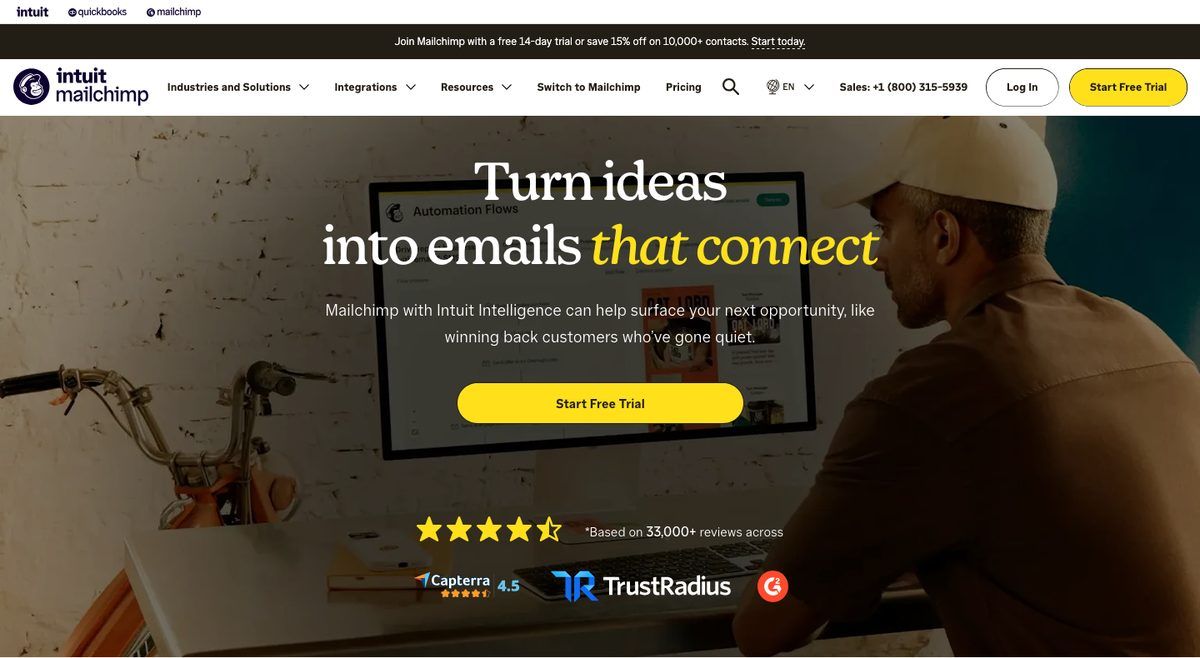
Sign up for Free or start a 14-day free trial of Essentials or Standard. Free gives you 1 seat and 1 audience; Essentials provides 3 seats if someone else needs access.
If you’ll pass 250 contacts within a few months, I’d start with the trial rather than organize your workflow around Free’s restrictions.
Importing Your Contacts
Import contacts into an audience, then organize them with tags and segments. Keep one audience where possible: the same contact stored in two audiences counts twice for billing.
Unsubscribed and non-subscribed contacts still count, as explained in the pricing section. If an import takes Free past its cap, you can still edit campaigns and add contacts, but sending stays paused until you upgrade or reduce contacts.
Authenticating Your Domain
Before sending, follow the domain-authentication instructions for SPF, DKIM and DMARC at your domain host.
Authentication helps mailbox providers verify your messages. Don’t leave it until a campaign has problems: Mailchimp lacks the deliverability dashboard that could help diagnose issues later, as covered in the security section.
Sending Your First Campaign
- Pick a template in the drag-and-drop builder and replace its sample content with your own message.
- Write your subject line and check it with Subject Line Helper, available on every plan.
- Send a test email and check the content and links. Tests count toward your monthly send limit, including Free’s 500 sends.
- Schedule or send now: scheduling requires a paid plan. Free users can only send immediately.
If you prioritize one setup task, make it domain authentication before your first campaign.
Designing Emails With Mailchimp
Mailchimp’s template gallery lists over 130 email templates, including sale and ecommerce designs, with drag-and-drop editing. You can use the newer email builder or legacy builder, although Free gets a limited template selection.
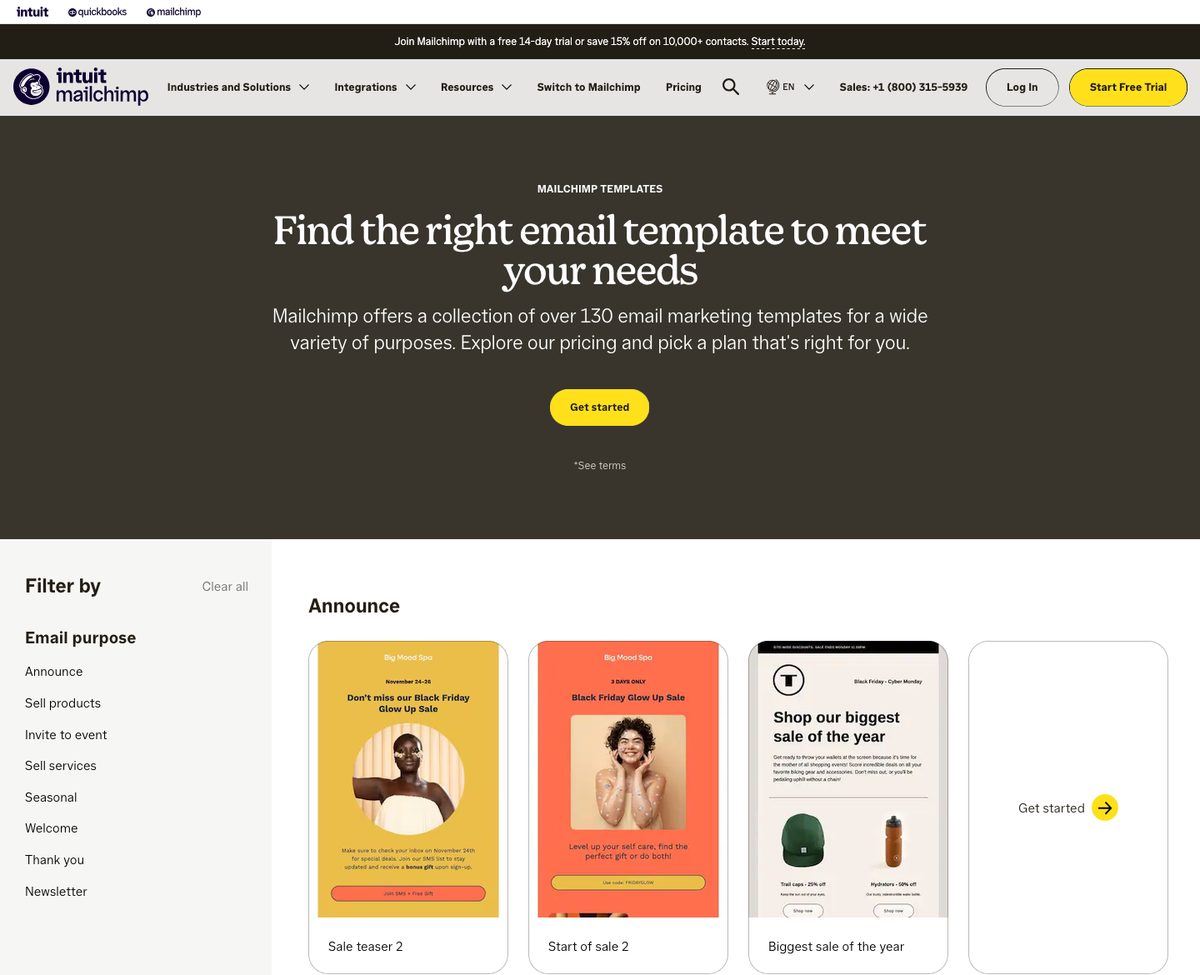
- Content Studio: store logos, images and brand files for reuse across campaigns.
- Mailchimp branding: Free emails carry Mailchimp branding. Removing it requires a paid plan, and branded templates need Standard or Premium.
- Custom-coded templates: build them on any plan, but sending requires Standard or Premium.
- Inbox Preview: paid plans include 25 tokens to check how emails render in different email clients before sending.
Can I design emails with AI? 💻
Yes, on Standard and Premium. Creative Assistant generates designs, while Write with AI produces copy through Intuit Assist. Free and Essentials only get Subject Line Helper. See the AI section for the complete plan breakdown before choosing a subscription.
MailerLite is the cheaper route for sending your own HTML: it added custom templates and an HTML editor to Free in June 2026. If custom code matters more than Mailchimp’s template library, that difference is worth considering before paying for Standard.
For another editor comparison, our Campaign Monitor vs Mailchimp comparison looks at a long-standing alternative.
Email Marketing With Mailchimp
Returning after a few years? In June 2025, Mailchimp retired Classic Automation Builder and renamed Customer Journey Builder Marketing Automation Flows. Existing Classic automations were converted into flows automatically.
The marketing toolkit remains broad, but Standard holds the strongest features. Essentials covers simpler campaigns without the same flexibility.
🔄 Marketing Automation Flows
Your plan determines whether you can activate a flow and how complex it can become:
- Free: preview only. You can inspect flows but cannot turn them on.
- Essentials: up to 4 steps, with one starting point and no branching.
- Standard and Premium: up to 200 flows, with multiple starting points and branching.
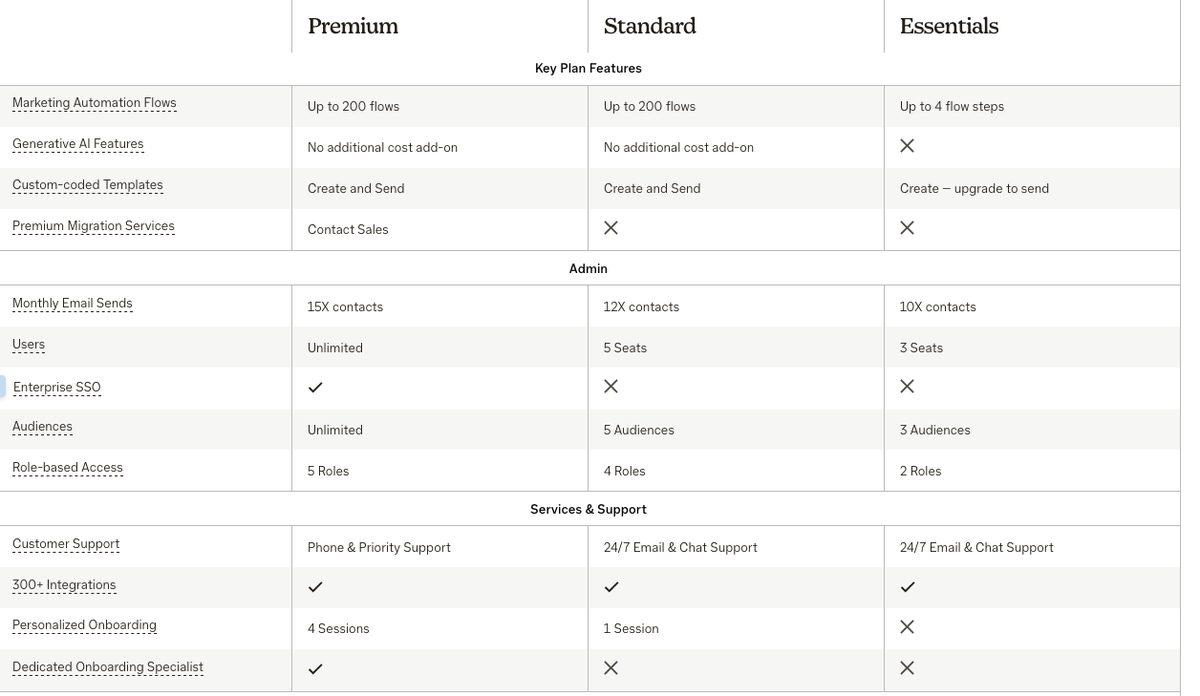
Flows can also include SMS and survey steps. I’d choose Standard if different customer actions need different follow-up messages, rather than forcing everyone through one sequence.
To set up a welcome flow:
- Open Automations and create a flow from a template.
- Choose “Signs up for Email” as the starting point.
- Add a Send email step and design your welcome message.
- Use Send a Test Email to check content and links in a real inbox.
- Add branches if your plan supports them, then turn the flow on.
If automation is your main buying reason, consider our GetResponse review before committing.
🎯 Segmentation and Personalization
Essentials includes basic segmentation only. Standard and Premium unlock:
- Advanced segmentation for more detailed contact groups.
- Behavioral targeting based on contact activity.
- Predictive segmentation using anticipated behavior.
- Dynamic content for personalized email content.
Keep these groups inside one audience where possible. Audience allowances are 1 on Free, 3 on Essentials, 5 on Standard and unlimited on Premium, but duplicates across audiences are billed separately.
More audience slots aren’t a reason to create separate lists unnecessarily. Tags and segments inside one audience are the more economical starting point.
📝 Forms, Landing Pages and Surveys
Every plan, including Free, includes:
- Landing pages for standalone campaign destinations.
- Pop-up forms to collect signups.
- Surveys to gather responses.
- Social posting alongside email marketing.
- A mobile app for access away from your desk.
These list-building tools are Free’s strongest argument: you can start collecting contacts before paying. Collection tools don’t remove the 250-contact sending ceiling, though.
Mailchimp also offers a website builder, covered separately in our Mailchimp website builder review. I’d judge that separately from whether its email plans fit your budget.
📊 Reporting and A/B Testing
A/B testing starts on Essentials; Free doesn’t include it. For straightforward subject-line tests, Essentials may be enough.
Standard and Premium add:
- Multivariate testing to compare combinations of changes.
- Send-time optimization based on engagement.
- Delivery by time zone for differently located audiences.
- Custom reports for tailored reporting.
- Anomaly detection to highlight unusual results.
Budget for Standard if you want to compare combinations of subject lines and content. Skip the upgrade if those reporting options would sit unused: Essentials already provides basic testing for regular newsletters.
📱 SMS Marketing
SMS is an add-on from Essentials, purchased through monthly credits that don’t roll over. It isn’t included with Free.
Availability covers:
- North America: US and Canada.
- Europe: UK, Belgium and more than 30 other European countries.
- Australia.
Each country needs its own registered sending number and credits. Standard and above unlock MMS and branded short links, with MMS restricted to the US and Canada.
Mailchimp doesn’t publish a flat SMS rate. Credit costs depend on the country and bundle, so check your account before budgeting. Your email subscription doesn’t cover the complete cost of multichannel marketing.
🛒 Ecommerce Tools
Connect Shopify, WooCommerce or Square to use store activity in your marketing. Abandoned-cart flows start on Essentials, within its four-step limit; predictive segments require Standard.
The February 2026 release added:
- 26% more ecommerce triggers.
- A site tracking pixel.
- Migration tools aimed at Klaviyo users.
Mailchimp claims abandoned-cart flows earn up to 1.7x the attributed revenue of bulk emails. That’s a vendor claim, not a guaranteed result for your store.
Shopify merchants should weigh our Shopify Email vs Mailchimp comparison. For an ecommerce-first alternative, read our Omnisend review.
If you sell online, these store-connected features are the strongest reason to choose Mailchimp over a cheaper newsletter tool.
Mailchimp’s AI Features
Most Mailchimp AI tools are unavailable on Free or Essentials. Generative features use Intuit Assist, included on Standard and Premium at no extra cost for now, with beta, English-only availability in select countries.
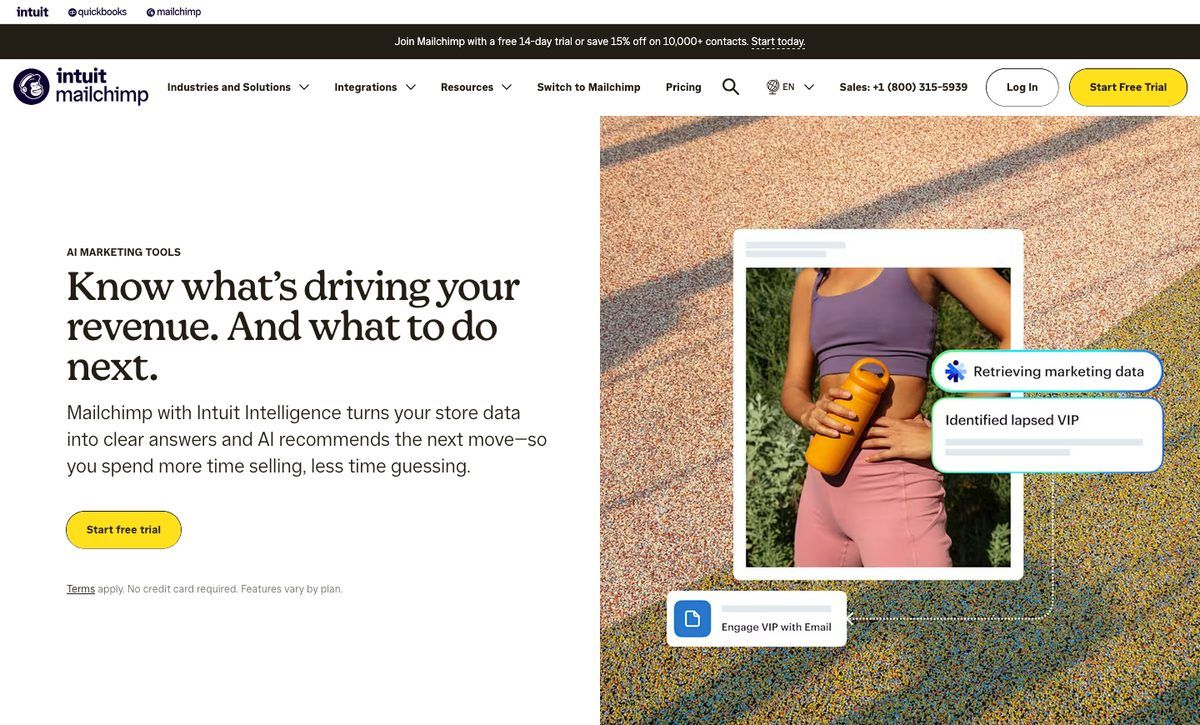
- Subject Line Helper (all plans): scores subject lines.
- Write with AI (Standard and Premium): generates and rewrites email copy.
- Creative Assistant (Standard and Premium): generates email designs.
- Predictive segmentation and analytics AI (Standard and Premium): groups contacts by predicted behavior and surfaces reporting insights.
- Send-time optimization (Standard and Premium): selects times using audience engagement.
- AI assistant connectors (Standard and Premium): support ChatGPT, Claude, Perplexity, Codex and Google Workspace.
I wouldn’t upgrade for AI alone. Branching flows and advanced segmentation are stronger reasons to pay for Standard.
Mailchimp’s 2026 updates and Intuit’s cuts ⬇️
- February’s release added AI predictive analytics, a ChatGPT integration and an omnichannel dashboard.
- May’s announcement covered about 3,000 Intuit job cuts, roughly 17% of its workforce. CEO Sasan Goodarzi’s memo described “reducing investments in areas including Mailchimp,” as reported by MarTech.
- No shutdown, product retirement or price change was announced with the cuts. Buy for today’s tools, not an assumed roadmap.
Mailchimp’s Integrations
Mailchimp connects with 300+ apps, including established store, website and CRM tools. Check your essential connections before choosing a plan rather than treating the integration count alone as proof of fit.
- Ecommerce: Shopify, WooCommerce, Square and Stripe.
- Websites and CMS: WordPress, Wix and Squarespace.
- Design: Canva.
- CRM: Salesforce.
- Automation: Zapier, for tools without a direct connection.
- Social: Facebook.
If you’re still choosing a store platform, our Shopify review covers that decision.
Transactional email is a separate consideration. Mailchimp offers Mandrill, an add-on for messages such as order confirmations and receipts, on Standard and Premium only; prices vary.
Brevo includes transactional email on every plan, making it worth considering if receipts and confirmations are central to your requirements. For Mailchimp, budget for both the qualifying marketing plan and the separate transactional service, rather than assuming everything comes with your subscription.
How Does Mailchimp Keep Your Data Secure?
Mailchimp’s security credentials don’t guarantee inbox placement or protect you from account restrictions. Check its acceptable-use rules as carefully as its encryption.
- TLS 1.2+ encryption protects the app.
- Two-factor authentication adds login protection.
- SOC 2 reports and ISO 27001 certification provide security credentials; SOC 2 covers security and availability.
- External penetration tests take place regularly.
- Role-based access: 2 roles on Essentials, 4 on Standard and 5 on Premium. Enterprise single sign-on is Premium-only.
- GDPR considerations: data is stored on US servers under the EU-U.S. Data Privacy Framework. Check whether this meets your business’s requirements.
Deliverability
Mailchimp lacks several tools for diagnosing sending problems:
- No deliverability dashboard or health score.
- No built-in list validation.
- No spam testing.
Tracking links use Mailchimp’s list-manage.com domain, with no custom tracking domain option. Paid Inbox Preview tokens check rendering, not whether a message will reach the inbox.
Authenticate your domain as described in Getting Started With Mailchimp, and archive inactive contacts rather than treating every stored address as useful.
Acceptable Use Policy and Affiliate Marketing
Mailchimp lists affiliate marketing among industries it “may not allow” because of higher-than-average abuse complaints. Other examples include:
- Multi-level marketing and work-at-home schemes.
- Gambling and credit repair.
- List brokers, pharmaceuticals and cryptocurrency.
Mailchimp can suspend or terminate accounts at its sole discretion for policy violations, and terminated users may not re-register. Some Trustpilot reviewers describe suspensions with little warning.
If affiliate offers drive your income, read the policy before importing a list. I’d resolve that fit question before comparing templates or subscription prices.
Using Mailchimp’s Customer Support
On Free, email support ends after your first 30 days, so don’t assume help stays available as your list grows.
- Free: email for the first 30 days, then the help center and chatbot.
- Essentials and Standard: 24/7 email and chat.
- Standard: adds one personalized onboarding session.
- Premium: phone and priority support, four onboarding sessions with a dedicated specialist, plus migration help through sales.
- Help center: guides and tutorials on every plan.
Capterra users rate Mailchimp about 4.5 out of 5 across roughly 17,600 reviews, while G2 users give it about 4.3 out of 5.
Trustpilot reviewers give it roughly 2.6 to 2.8 out of 5, with complaints around billing, refunds and account suspensions. One February 2026 Capterra reviewer cited unresolved technical support and a refused refund; that’s an individual account, not a measured support outcome.
Budget for paid support if you’ll need ongoing help. Phone access is expensive elsewhere too: Brevo reserves it for its $499/month Professional plan.
How Does Mailchimp Compare to Competitors?
MailerLite Free allows 2,500 emails a month, five times Mailchimp’s 500. Among Mailchimp alternatives, Brevo and MailerLite offer stronger budget cases; Mailchimp’s appeal centers on ecommerce connections and Standard-tier testing.
| Feature | Mailchimp | Brevo | MailerLite |
|---|---|---|---|
| Pricing model | Contacts, including unsubscribes | Monthly email volume | Subscribers |
| Free plan | 250 contacts, 500 emails/month | 300 emails per day | 250 subscribers, 2,500 emails/month |
| Cheapest paid plan | $13/month, Essentials, 500 contacts | $9/month, Starter, 5,000 emails/month | $12/month, 500 subscribers |
| At 2,500 contacts | $45 Essentials / $60 Standard | Depends on sending volume | $33/month |
| At 10,000 contacts | $110 Essentials / $135 Standard | Depends on sending volume | $89/month |
| Multi-step automation | Essentials: up to 4 steps; branching: Standard | Standard, $18/month | Free: up to 3 automations |
| Best for | Stores needing integrations and testing | Large lists sending occasionally | Budget-conscious beginners |
- Brevo is the better fit for large lists you email occasionally. You pay by sending volume, not stored contacts. Its Standard plan adds unlimited multi-step automation and A/B testing. Transactional email comes with every plan.
- MailerLite is my value pick for beginners. Its $33 entry paid tier at 2,500 subscribers undercuts Mailchimp Essentials. Free includes up to three automations, three forms and one landing page, but support is knowledge-base only. Its free subscriber cap fell from 500 to 250 on June 16, 2026.
If you’re torn between those two, our Brevo vs MailerLite comparison examines the trade-offs.
- Kit (formerly ConvertKit): built for creators and newsletter businesses. Read our ConvertKit (now Kit) vs Mailchimp comparison.
- Constant Contact: another established small-business email platform. See our Constant Contact review.
Omnisend (ecommerce), GetResponse (automation) and Sender (budget) are linked earlier in this review. I’d shortlist by your main requirement before comparing every feature.
How We Evaluate Email Marketing Tools
WebAppMeister’s Mailchimp review is a documentation-and-pricing-based evaluation, not hands-on testing. We assess plan documentation, help pages, security information and the Acceptable Use Policy alongside rival pricing.
Prices and plan limits were checked in November 2026 against these criteria:
- Cost at real list sizes: 500 to 10,000 contacts.
- Free-plan limits and exclusions.
- Automation and AI by plan.
- Support access at each tier.
- Policy and deliverability risk.
Capterra, G2 and Trustpilot user reviews provide supporting context, not controlled comparisons. No timings, deliverability tests, support tests or scores of our own underpin this verdict.
Mailchimp Review: Should You Use Mailchimp for Your Small Business?
Mailchimp is worth it for online stores that want broad integrations and will pay for Standard. It isn’t the budget choice: Free is restrictive, and stored-contact pricing becomes expensive as your list grows.
Choose Mailchimp if:
- You sell through Shopify, WooCommerce or Square and want abandoned-cart and other ecommerce flows.
- You value template-led design, with 130+ templates and 300+ integrations.
- You’ll pay for Standard to unlock branching flows, AI and advanced segmentation.
Look elsewhere if:
- You want more from Free: choose MailerLite or consider Brevo.
- You have a large list but send rarely: Brevo’s email-volume pricing is a better starting point.
- Affiliate offers drive your business: Mailchimp’s policy creates an account risk.
Intuit’s reduced investment warrants attention, although no shutdown or product retirement was announced with the cuts. Choose based on today’s tools, then use the trial to check whether Standard’s advantages justify its cost for your list.
Start with a 14-day Essentials or Standard trial → Try Mailchimp
FAQs
Is Mailchimp still free in 2026?
Yes, for up to 250 contacts and 500 emails monthly, capped at 250 daily since early 2026. Free excludes scheduling and automation flows; email support lasts 30 days. Exceeding 250 contacts pauses sending until you upgrade or reduce your contact count.
Does Mailchimp charge for unsubscribed contacts?
Yes, unsubscribed contacts count toward billing, alongside subscribed and non-subscribed contacts. Archived, cleaned and deleted contacts don’t count. Archive unwanted contacts, then maintain the lower total through a full billing cycle. See the pricing section’s Top Tip for cleanup steps.
Is Mailchimp good for beginners?
Yes for ease of use, less so for tight budgets. Its template editor and list-building tools suit beginners, including those using Free. MailerLite offers 2,500 monthly emails and up to three automations on Free. See the competitor comparison above.
Is Mailchimp shutting down?
No shutdown has been announced. Intuit, which bought Mailchimp for about $12 billion in 2021, announced reduced investment alongside roughly 3,000 job cuts in May 2026. That announcement included no Mailchimp product retirement or price change. Buy for current capabilities.
Can you use Mailchimp for affiliate marketing?
It’s risky for affiliate-driven businesses. Mailchimp’s Acceptable Use Policy lists affiliate marketing among industries it may not allow. Accounts can be suspended at its sole discretion, and terminated users may not re-register. Read the policy before importing contacts.


