I’ve reviewed just about every ecommerce platform out there. From open-source setups like WooCommerce to all-in-one builders like Wix, BigCommerce, and Squarespace. But when it comes to Shopify, the biggest thing people ask me is simple:
“How much does Shopify actually cost?”
And honestly, most articles miss the mark. They give you the plan prices and call it a day. But when you’re actually testing platforms for real-world use — whether it’s dropshipping, DTC, or retail — pricing becomes layered. You’re not just paying a monthly fee.
You’re paying for:
- Subscription plans
- Payment processing
- Point-of-sale (POS) tools
- Third-party apps
- Email limits
- Shipping label costs
- Themes
- Tax automation
- International expansion fees
I’ve used Shopify across test stores, small business clients, and head-to-head reviews. Here’s exactly what the costs look like in 2026 — with actual numbers, traps to avoid, and verdicts on each tier.
Shopify Pricing Plans in 2026 (The Core Tiers)
At the most basic level, Shopify offers several tiers depending on your needs:
| Plan | Monthly (billed monthly) | Monthly (billed yearly) |
|---|---|---|
| Starter | $5 | Not available |
| Basic | $39 | $29 |
| Grow (was “Shopify”) | $105 | $79 |
| Advanced | $399 | $299 |
| Plus | Starts at $2,300 | Billed yearly (3-year term) |
Shopify is currently running a free trial, then offers $1/month for the first 3 months, which is great for testing. But once that window closes, pricing gets real quickly.
The Starter plan is more for selling via social media or links in DMs — it’s not a full storefront. If you’re testing ecommerce platforms, you’ll want to skip straight to Basic.
Here’s what I’ve found using these tiers:
- Basic works for most new brands. You get everything you need to build a full store, blog, products, and checkout.
- Grow adds features like better reporting, more staff accounts, and shipping insurance. If you’re growing fast, it’s the better value.
- Advanced is where it starts getting pricey. Unless you need advanced shipping, duties handling, or custom reports, most small businesses won’t need this yet.
- Shopify Plus is for enterprise brands. The $2,300/month price tag is real — and so are the commitments (3-year minimum).
While Basic is plenty to launch, Grow is where you start getting tools that actually save time and money at scale — like ecommerce automation and professional reports. I used Grow for a brand doing mid-five figures annually, and the difference in time saved across reporting and staff management was noticeable.
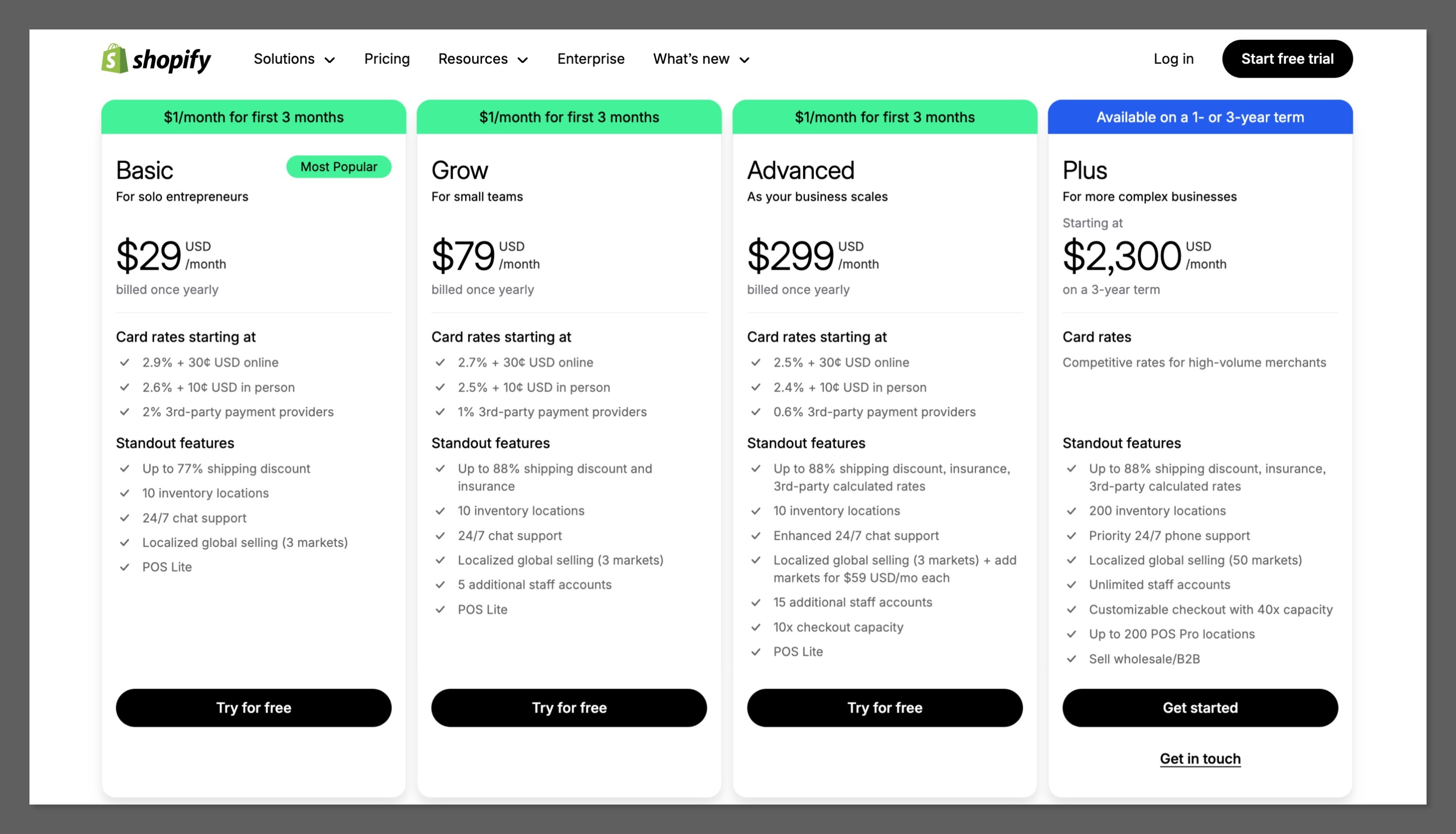
Shopify Plus, though, is a different animal. It’s priced for brands doing millions annually or needing custom checkouts and dedicated support. I only recommend it if you’re hitting at least $1M in revenue and already maxed out Advanced. For most people reading this, Plus will be overkill.
Verdict:
Start with Basic, and only upgrade once the added features unlock actual value. Don’t jump into Grow or Advanced just because they sound better — unless your margins can carry the cost.
Payment Processing: The Hidden Fee Everyone Misses
This is where the real money goes. Shopify charges payment processing fees on every sale. If you use Shopify Payments (their own payment gateway), the fees are baked in and clear.
Here’s what those look like:
| Plan | Online Credit Card Fee | In-Person Credit Card Fee |
|---|---|---|
| Basic | 2.9% + 30¢ per transaction | 2.6% + 10¢ |
| Grow | 2.7% + 30¢ | 2.5% + 10¢ |
| Advanced | 2.5% + 30¢ | 2.4% + 10¢ |
If you process $10,000/month in online sales on the Basic plan, you’re paying:
- 2.9% = $290
- 30¢ per order (assuming 200 orders) = $60
- Total monthly processing cost = $350
Here’s the kicker: If you don’t use Shopify Payments, you’re charged a third-party fee on top of your processor’s own fee:
| Plan | Third-Party Payment Fee |
|---|---|
| Basic | 2.0% |
| Grow | 1.0% |
| Advanced | 0.6% |
So let’s say you want to use Stripe. That’s 2.9% from Stripe plus 2% from Shopify — you’re now paying 4.9% per sale, which kills your margins.
Refunds? Shopify doesn’t give you the original processing fee back. That’s another cost most sellers overlook until it’s too late.
This especially matters if you’re in a niche with high return rates. I ran a store in apparel — returns hovered around 15%, and the fees added up quickly. Not getting your processing fee back means a refund is never really neutral.
If you’re running a high-ticket store, that 2.9% + 30¢ per transaction becomes a much bigger issue. On a $1,000 product, you’re losing nearly $30 in processing — and that’s before marketing costs, shipping, and product margin.
Verdict:
Always use Shopify Payments if you can. The built-in fee is high but still cheaper than using third-party gateways. Watch out for refunds, because you’re not getting your fees back.
POS (Point of Sale): Great In-Store, Expensive at Scale
Shopify’s in-person selling system is strong. The hardware is slick, and the POS app works well even for pop-ups or multi-location retailers. But the real cost comes when you upgrade.
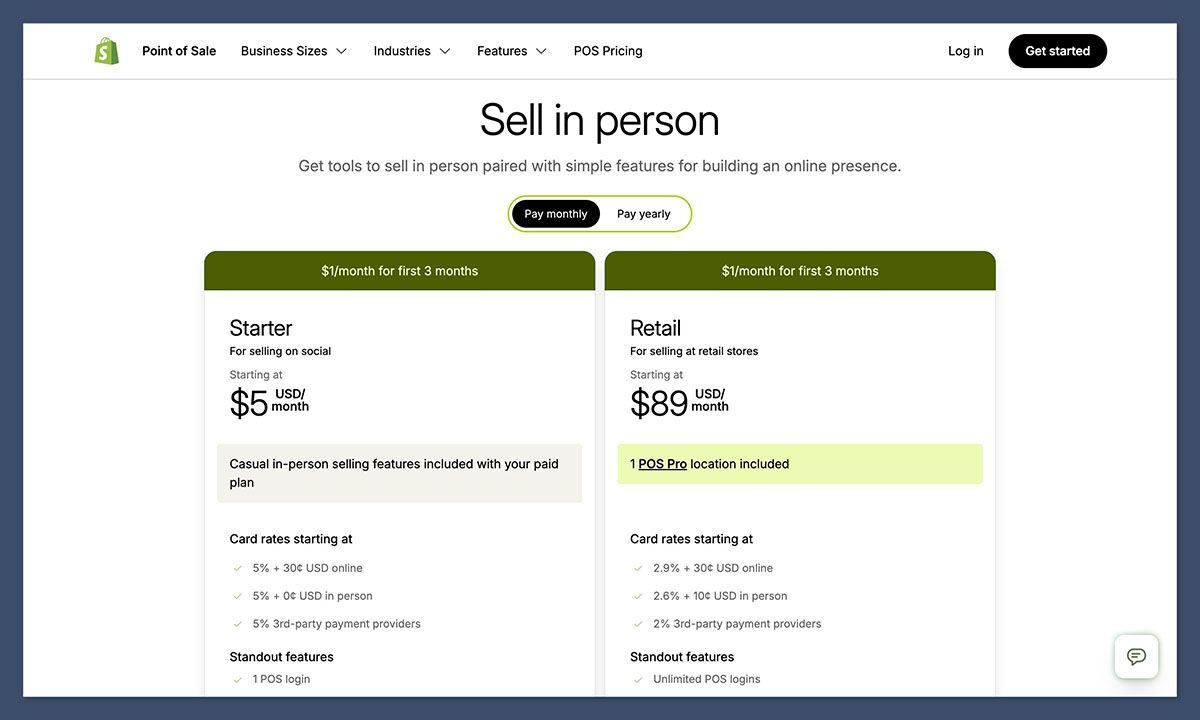
Here’s how Shopify POS pricing breaks down:
| Feature | Price |
|---|---|
| POS Lite | Included with all plans |
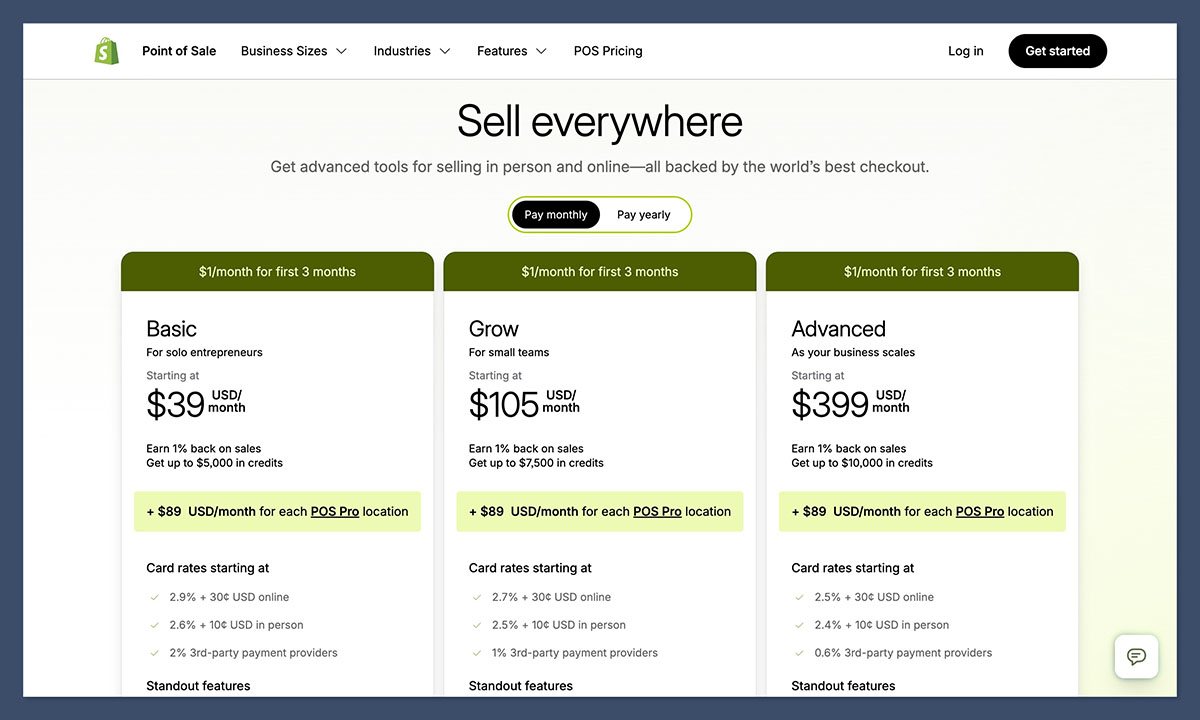
| POS Pro | $89/month per location |
| Retail Plan | $89/month (includes 1 POS Pro license) |
For one location, it’s not bad. But once I started testing Shopify across two brick-and-mortar shops, that $89 per location doubled fast. It became more expensive than the Shopify Basic plan itself.
The difference between POS Lite and POS Pro is also key:
- Lite: Accept payments, sync inventory
- Pro: Advanced reporting, staff permissions, customer profiles, omnichannel selling tools
The POS Pro features are helpful, especially if you’re managing teams. Things like staff permissions and location-based inventory let you avoid a lot of backend headaches. But they’re not optional — if you’re running anything beyond a solo cash register setup, you’ll hit that paywall fast.
Hardware costs are also a factor. Shopify doesn’t include POS equipment with any plan. Expect to pay $300–$700 for a standard setup (iPad stand, card reader, barcode scanner). That’s a one-time investment, but it should be part of your budgeting.
Verdict:
POS Pro is powerful — but budget for it early. It can double your monthly cost without warning. At two or more locations, POS quickly becomes your biggest Shopify expense.
Shopify Tax: The Quiet Expense That Shows Up at $100k+
Most people miss this until they hit real volume. Shopify Tax automates US sales tax collection and reporting. It’s free… until you cross $100,000/year in sales.
After that, Shopify charges:
- 0.35% per taxable order (capped at $0.99)
- 0.25% per order on Shopify Plus
- Max fees per region: $5,000/year
If you’re doing $500,000/year in taxable sales, that’s up to $1,750/year in tax automation fees — or about $145/month. That’s another subscription-level cost added to your stack.
The Shopify Tax tool is good — easy to use, accurate, and compliant. But the cost is something you’ll feel once your store scales.
I hit the $100k mark on a seasonal brand — selling only 4–5 months a year — and the fees kicked in almost overnight. You can’t toggle them off, and there’s no free alternative once you cross the threshold. This makes forecasting important.
Also note: The tax tool doesn’t replace your accountant or tax consultant. It helps with automation, but if you’re in multiple states, you’ll still need human review for edge cases and audits.
Verdict:
If you’re under $100k/year, it’s a free bonus. After that, it becomes a real expense. Plan for it early, especially if you’re scaling quickly or selling into multiple US states.
Domains, Email, and Shipping Labels: Small Fees That Add Up
These aren’t huge costs individually, but they add polish to your store and can push your total monthly outlay higher than expected.
- Domains: Shopify domains start at $9/year and include WHOIS privacy. You can also connect third-party domains if you prefer.
- Shopify Email: All plans come with 10,000 free emails/month, then it’s $1 per 1,000 emails. That’s pretty affordable, but if you send 100,000+ emails/month, it’s still $90–$100/month.
- Shipping labels: Shopify offers discounts — up to 77% off (Basic) and 88% off (Grow/Advanced). But you’re still paying per label. For stores doing hundreds of shipments a month, this becomes a real line item.
When I launched a test brand in skincare, email was the biggest hidden cost. Growing an email list quickly meant I crossed the 10,000/month free tier in about 60 days — after that, I was paying $25–$40/month consistently.
Shipping labels are also where the costs vary wildly. A store sending lightweight items domestically pays much less than a store shipping 5lb packages internationally. Discounts help, but you’re still footing the base rate on every shipment.
Verdict:
Budget for the “extra” tools. Shopify’s base plan is lean, and these are must-haves. Domains, email marketing, and shipping costs are all recurring. They’re just not obvious until you’re operating daily.
International Selling: Hidden Fees Lurking in Currency, Duties, and Managed Services
If you plan to sell globally — and many DTC brands do — Shopify has tools to help. But most come with fees:
- Currency conversion: When your presentment currency differs from your payout currency, Shopify takes a conversion fee on top of the FX rate. These aren’t clearly published, but they exist in the docs.
- Duties and taxes: If you enable Shopify’s duties + tax calculation tools for international orders, fees may apply depending on shipping zones and tools used.
- Managed Markets: If you use Shopify’s merchant-of-record system for global selling, they take a cut of each sale. This isn’t a flat fee — it depends on your pricing and fulfillment model.
None of these costs are insane, but they stack up quietly. You could be losing 2–5% on international orders just from built-in fees.
In one test, I used Shopify’s Managed Markets feature for a store that shipped to the UK and Germany. While it streamlined duties and checkout language, it came at a cost — I lost close to 4.3% per sale in combined conversion and handling fees. It worked well but wasn’t cheap, and I had to adjust pricing just to protect my margins.
Another international wrinkle: if you’re not using Shopify Payments in a certain country (because it’s unsupported), you’re back to paying the third-party gateway fee. And if you’re using a different payout currency than your storefront currency, conversion charges apply. These aren’t listed in your monthly plan but they hit every transaction.
Verdict:
International expansion is expensive. Shopify supports it well — but it’s never free. Be clear on where your payout currency is, and budget for international tax, duty, and conversion costs if you’re planning to sell globally.
Themes and Apps: Where “$29/Month” Becomes $429/Month
This is where most sellers get surprised.
Shopify’s theme store offers:
- Free themes: Limited but usable
- Paid themes: Typically $200–$400 one-time
That’s fair — I’ve bought several, and they’re usually well-designed and easy to customize.
But apps are what really eat into your budget. Many apps charge monthly, and once your stack grows, you’re paying $20–$300/month on top of your plan.
Common app categories:
- Email marketing
- Subscription billing
- Bundles and upsells
- Reviews
- Loyalty programs
- Advanced shipping
- Returns management
I tested one store with a “basic” stack — email automation (Klaviyo), upsells (ReConvert), reviews (Loox), and returns (AfterShip). Combined, those four apps cost $146/month. That’s more than the Basic plan and just shy of the Grow plan. And none of these apps are fluff — they all improve conversion or reduce churn.
Also, remember that app pricing is often usage-based. You might start out at $9/month, but once you grow your order volume or email list, that cost scales. A 1,000-order/month store will usually end up on the mid or premium tier for most apps.
Verdict:
Apps make Shopify powerful — and expensive. Before adding apps blindly, test the ROI. A store can easily jump from $29/month to $250/month with just 3–4 “must-have” plugins.
Final Verdict: What Does Shopify Really Cost?
Here are three real-world examples from test stores I’ve run:
Example A: Basic Store with Shopify Payments
- Plan: $29/month (yearly)
- Sales: 100 orders/month, $50 AOV = $5,000 revenue
- Fees: 2.9% + 30¢ = ~$175/month
- Total: $204/month
Example B: Same Store, Using Stripe
- Plan: $29/month
- Shopify third-party fee: 2% = $100
- Total fees: $275
- Total: $304/month
Example C: Retail Store with 2 Locations
- Plan: $39/month
- POS Pro x2: $178/month
- Total: $217/month (before fees)
In my experience, no one ends up just paying their monthly subscription. By the time you add in apps, email, taxes, and processing fees, Shopify is always a few steps more expensive than it looks upfront. That doesn’t mean it’s not worth it — it just means you need to plan your budget realistically.
For early-stage sellers, Shopify’s pricing is actually pretty fair compared to other platforms once you factor in built-in features and support. But once you start scaling, everything becomes modular — and every module comes with a cost. Payment processing, POS upgrades, and international selling all shift Shopify from a flat-rate tool to a variable-cost platform.
Final Verdict:
Shopify pricing is not just the monthly subscription. It’s the combined cost of processing, POS, apps, email, tax tools, and international add-ons.
If you’re testing ecommerce platforms, you need to simulate real use — not just surface-level pricing. That’s the only way to understand what Shopify truly costs for your business model.


