
ZenBusiness
Compare costs Read comparison →$0 + state fees
Pro: $199/year + state fees
- Formation filing assistance
- EIN assistance with Pro
- Logo builder with Pro

Northwest
Compare costs Read comparison →$39 + state fees
Agent renews at $125/year
- First year of agent service
- Operating agreement included
- Annual report reminders
Looka
Compare costs Read comparison →Basic: $35 one-time
Premium: $72 one-time
- One-time logo packages
- Vector files with Premium
- Optional annual Brand Kit
ZenBusiness is my recommendation for guided business setup, while Looka is my pick for a standalone logo purchase. Northwest Registered Agent makes more sense when registered-agent support is your priority, and Canva is the better fit for ongoing marketing design.
The best Tailor Brands alternatives depend on which part of its service you want to replace. Buying logo files, creating social graphics, and arranging business formation are different jobs, even when one company sells them together.
You might want a one-time design purchase instead of another subscription. Or you might already have branding and simply need help with business paperwork, without paying for creative tools you will never open.
You also do not need to replace everything at once. Keeping an existing logo while changing business services, or using separate formation and design providers, can be more sensible than starting over.
An LLC is not necessary for every business, and hiring a formation service is optional.
Comparing Tailor Brands Alternatives
Choose the category first, then compare the cost. A logo purchase and a formation package are not substitutes, even if their advertised starting prices look similar.
All prices below are in USD. State filing fees are additional where indicated.
| Alternative | Main focus | Starting cost and cadence | Key inclusion | Main drawback | Best suited to |
|---|---|---|---|---|---|
| ZenBusiness | Guided business formation | Starter: $0 service fee plus state fees; optional services may renew | Formation filing assistance | Registered-agent service costs extra on Starter and Pro | Entrepreneurs wanting structured setup help |
| Northwest Registered Agent | Formation and registered-agent support | Advertised formation offer: $39 plus state fees; agent renewal: $125/year | First year of registered-agent service | Address use and mail handling have limits | Owners prioritizing agent coverage |
| Looka | Logo creation and coordinated branding | Basic: $35 one-time; Premium: $72 one-time | Downloadable logo files, with formats depending on package | Basic lacks the more useful vector exports | Businesses needing a logo rather than formation |
| Canva | Ongoing marketing design | Free: $0; Pro: $144/year for one person | Design workspace for recurring content | Stock graphics and templates are nonexclusive | Owners making regular promotional materials |
For the quickest route to a shortlist:
- Choose ZenBusiness if you want assistance organizing formation tasks and deciding which ongoing services to delegate.
- Choose Northwest if receiving official documents and maintaining registered-agent coverage matter more than bundled design features.
- Choose Looka if your immediate purchase is a finished logo, with an optional matching brand kit.
- Choose Canva if you already have a logo or need a flexible workspace for repeated design work.
For example, a new consulting business might combine Northwest with a Looka logo. An established retailer that only needs promotional graphics could start with Canva Free and leave its business administration untouched.
Tailor Brands remains a reasonable option when you genuinely want its combination of services. The reason to switch should be a better match for your work, not simply a lower number beside an unrelated product.
1. ZenBusiness: For Guided Business Setup
I recommend ZenBusiness when formation assistance is the main purchase and branding is secondary. The choice is how much of the setup work you want to handle yourself.
It is less compelling if you only want a logo. In that case, Looka offers a more focused purchase, while Canva addresses the ongoing design work that follows.
What I Like
- Starter keeps the initial purchase focused. You can choose filing assistance and evaluate extras individually. I would use that approach if you already know which setup tasks you can handle yourself.
- Pro combines several related setup tasks. It includes EIN assistance, an operating agreement, a logo builder, and ongoing compliance services. The practical benefit is consolidation if you would otherwise arrange those tasks separately, not proof that every included item is essential.
- Provider processing has a defined distinction from state approval. Pro advertises 1-day preparation and submission, compared with 7 to 10 business days on Starter, assuming complete and accurate information. State processing comes afterward, so neither timeframe should become your guaranteed launch date.
What I Dislike
- The checkout total needs attention. Optional compliance services can renew. Budget for the services you will keep, not just the initial filing.
- The website trial can become a paid subscription. The preselected 30-day trial can be removed at checkout. If a website is not part of your immediate plan, leaving it selected creates another renewal to manage.
- Paying for assistance is not the same as paying for a required government charge. An EIN is free directly from the IRS; a provider charges for helping obtain it. Eligibility affects the available application route, so do not assume everyone can receive one instantly online.
How Much Does ZenBusiness Cost?
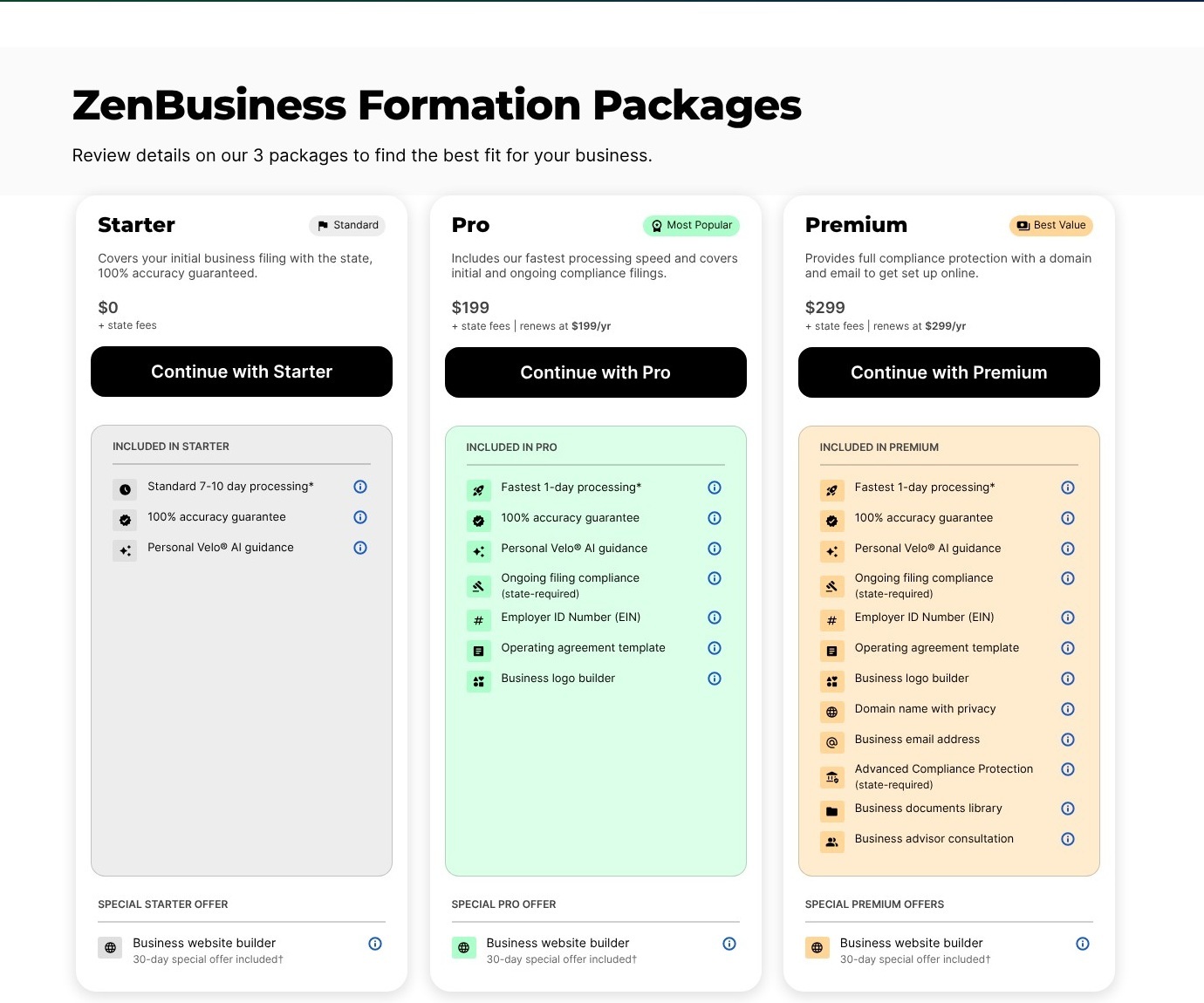
- Starter: $0 formation service fee, plus state fees. Best for a narrow filing-assistance purchase.
- Pro: $199 for the first year, plus state fees, renewing at $199/year. Best when the bundled assistance matches your needs.
- Registered agent: An additional $199/year on either of these plans.
I would write down the services you want before entering checkout. This gives you a reference point when optional products appear, rather than leaving each purchase decision to the moment an add-on is offered.
How Does ZenBusiness Compare to Tailor Brands?
- For formation: Both offer an entry route with no formation service fee, before state fees. ZenBusiness is not automatically cheaper just because Starter begins at $0.
- For branding: Tailor Brands’ Elite formation package includes branding tools, while ZenBusiness Pro includes a logo builder. Neither bundle should be treated as the price of a standalone logo.
- For purchase fit: ZenBusiness makes sense when you want a formation-centered package; Tailor Brands can still suit you when its combined setup and branding offer matches your checklist.
Should you switch? Choose ZenBusiness if you want guided formation assistance and can identify which paid services you will use. I would not switch solely for faster advertised processing, because the state’s approval timeline remains separate.
2. Northwest Registered Agent: For Registered Agent Support
I recommend Northwest when registered-agent service is the priority, whether you are forming a business or replacing an existing provider. A registered agent receives service of process and official correspondence for the business.
Its strongest reason for inclusion is that administrative role, not its supplementary website or identity tools. Treat those as limited extras rather than the foundation of your buying decision.
What I Like
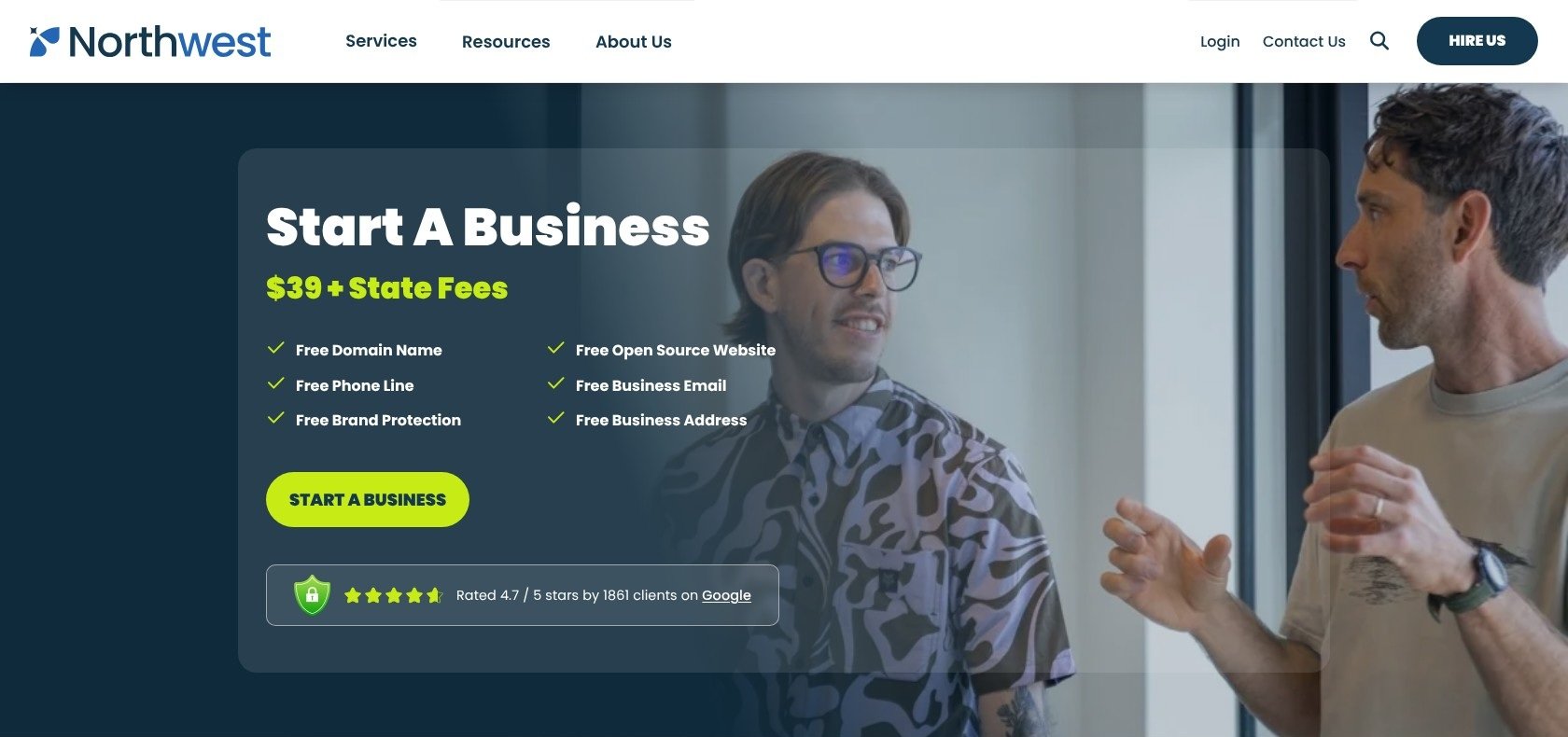
- Formation includes an initial period of agent coverage. The advertised $39 formation offer includes the first year of registered-agent service, alongside formation documents and annual-report reminders. This is useful if agent service was already on your shopping list.
- Address use can reduce unnecessary exposure. Northwest uses its address on public filings wherever possible. That can help limit where your personal address appears, but state requirements and the information requested on individual filings still matter.
- Standalone service suits an existing entity. You can purchase registered-agent service without buying formation again. This makes Northwest relevant to established owners who want a different administrative provider rather than a new company.
- Limited identity tools are available without a trial deadline. The free offering includes capped hosting, email, phone, and domain support, with domain registration and annual renewal covered up to $25 each. The absence of a trial period removes one expiry date, though the usage allowances remain restrictive.
What I Dislike
- Address privacy is not anonymity. You should not assume every owner detail will disappear from public records. Before purchasing for privacy reasons, identify the specific information you want protected and confirm what can appear on your state’s filings.
- Registered-agent service is not unlimited business-mail handling. Ordinary business-mail scanning is limited to 5 documents annually. If you expect regular customer correspondence or supplier paperwork, assess that need separately rather than treating agent service as a general mailbox.
- Reminders do not mean reports are filed for you. Northwest separately lists annual-report filing at $100 plus state fees. Receiving a reminder still leaves an action to complete unless you have specifically purchased the filing service.
How Much Does Northwest Registered Agent Cost?
- Advertised formation offer: $39 plus state fees, including the first year of registered-agent service.
- Agent renewal: $125/year after the included period.
- Standalone registered-agent service: $125/year for an existing business.
Confirm that the order you select actually contains the advertised formation offer. Do not assume every purchase route or optional service produces the same total.
The free identity tools also deserve a capacity check: hosting has 250MB of storage, email includes one 250MB inbox with 100 sends daily, and phone usage is limited to 10 calls/text messages monthly. Higher allowances cost extra.
For example, an owner expecting frequent phone inquiries should budget for a suitable communications service rather than count the free allowance as a complete solution. These extras may cover a modest starting need, but they should not determine your entire setup.
How Does Northwest Compare to Tailor Brands?
- For service focus: Northwest is the more targeted recommendation for registered-agent coverage. Tailor Brands has a broader combined formation-and-branding proposition.
- For budgeting: Compare the agent service, report filing, and state charges separately rather than comparing only the formation headline. Different packages can cover different jobs.
- For design: Northwest’s limited identity extras do not replace a dedicated branding workspace. If you need regular marketing assets, a separate design tool remains the more relevant purchase.
Should you switch? Choose Northwest if agent coverage is your main concern and its address and mail limits fit your situation. For an existing business, arrange the change through your state’s procedure rather than purchasing formation again.
3. Looka: For a Logo and Matching Brand Assets
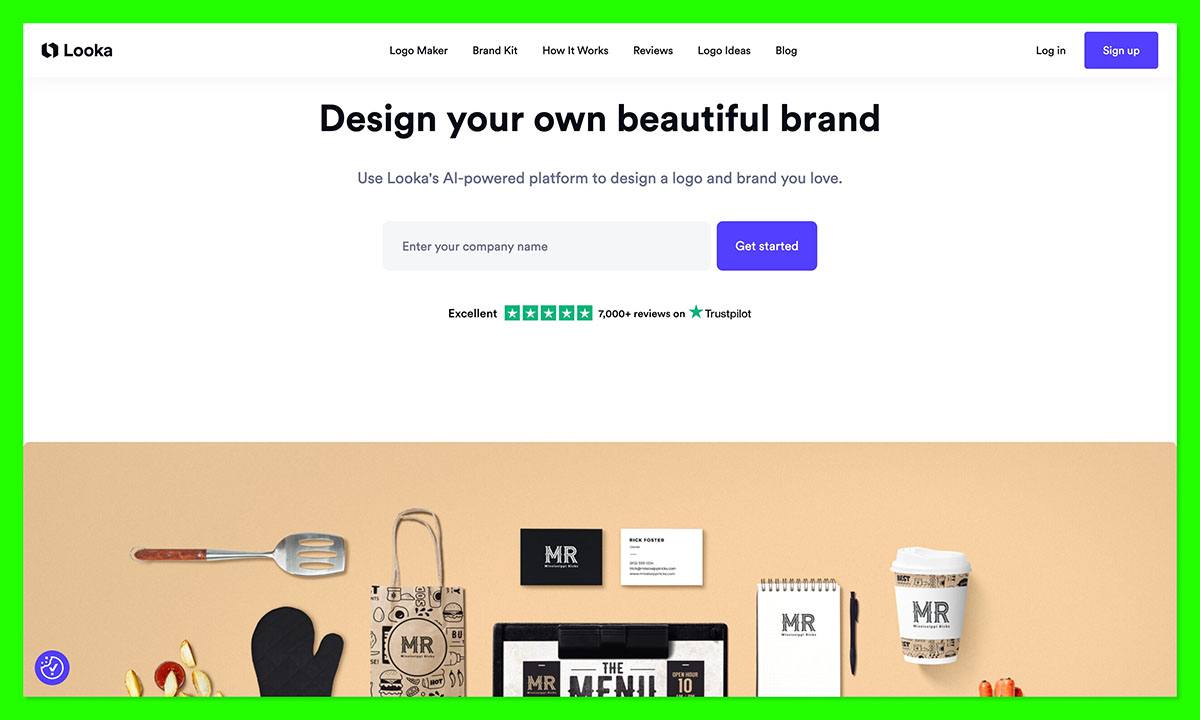
Looka is my pick if you want a logo purchase without taking on a business-formation package. Its logo-only options let you buy files once, while its brand kits serve the separate need for coordinated materials.
That distinction is useful when your business administration is already settled. You can address your visual identity without reopening decisions about registered agents or compliance services.
What I Like
- A one-time logo purchase is available. You can choose a logo-only package instead of maintaining a brand-kit subscription. That suits an owner who wants a finished asset to use elsewhere, rather than an ongoing workspace.
- Premium supplies more practical export formats. It includes SVG, EPS, PDF, and PNG files, plus transparent and black-and-white variations. Vector files are particularly useful when a designer or printer needs artwork that can scale without relying on a fixed-resolution image.
- The Brand Kit extends a logo into coordinated materials. It offers more than 300 branded templates. This is relevant when you want a consistent starting point for collateral rather than building each layout independently.
- The purchase can stay separate from your other tools. For example, you could use a purchased logo on a website managed elsewhere and in marketing designs created in another editor. I would favor that approach when you want the flexibility to replace one service without replacing everything.
What I Dislike
- Basic is a limited deliverable, not a complete logo toolkit. It supplies one 1000-by-1000 PNG with a colored background. That may be enough for a specific digital use, but it is a poor starting point if you already expect printing or transparent placement.
- Your company name is locked after purchase. The company name cannot be changed after purchase, although Premium allows layout, color, and font edits. Settle your business name and check the final composition before paying, especially if you are still considering different names.
- Matching typography may require a separate step. Premium and annual kits identify the fonts but do not supply TTF or OTF font files. Using the same typeface elsewhere may require a separate download or license.
How Much Does Looka Cost?
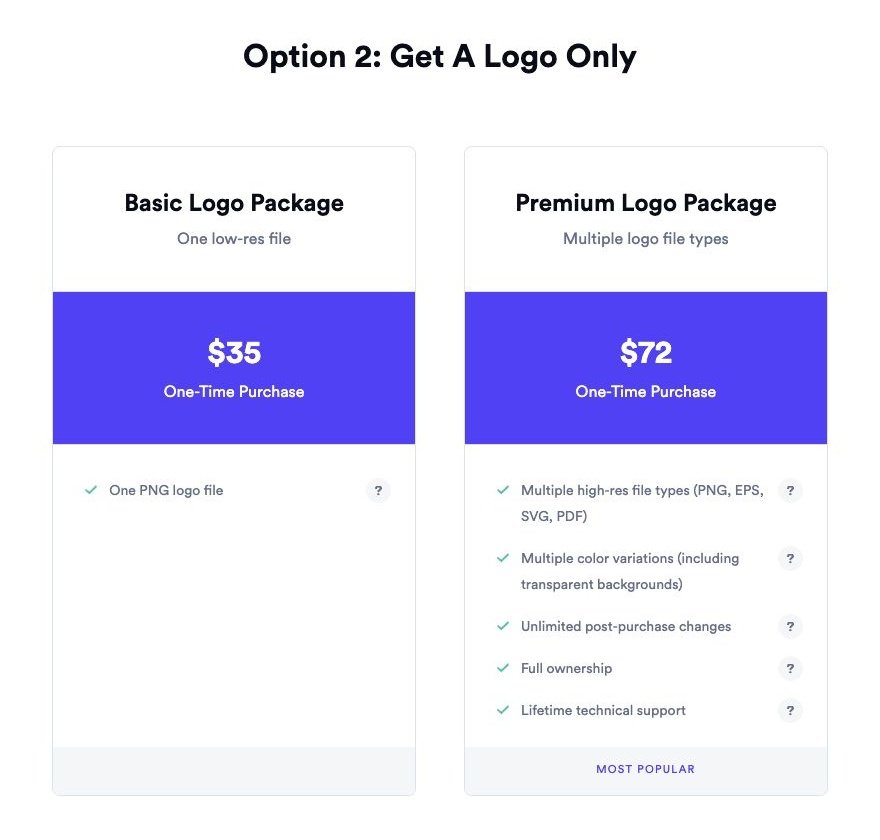
- Basic logo: $35 one-time, suitable for a narrow image-file requirement.
- Premium logo: $72 one-time, the more practical choice for broader logo use.
- Brand Kit: $96/year, billed annually, for coordinated branded materials.
- Brand Kit Web: $129/year, billed annually, adding website design and hosting.
Brand Kit Web does not include ecommerce, and a domain is a separate purchase. I would not choose that package for an online store simply because it has “Web” in the name.
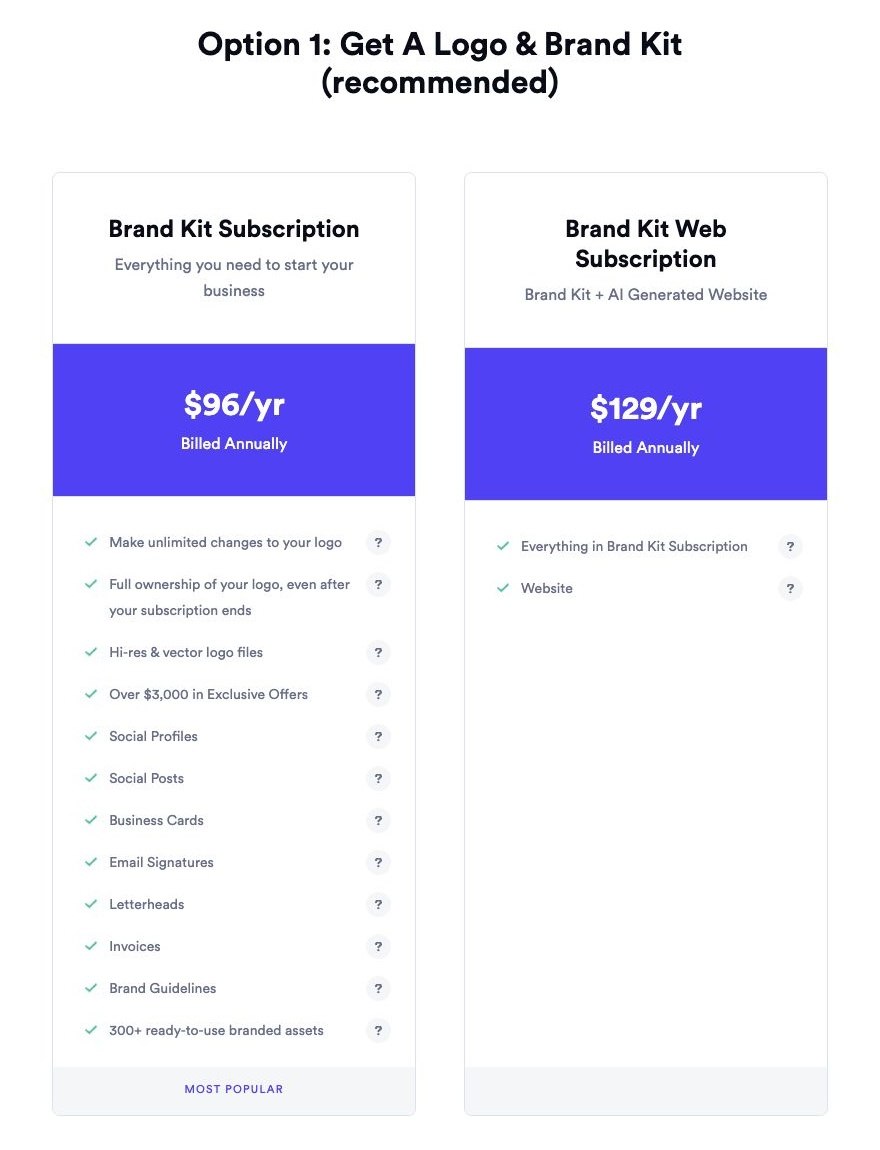
There is also a distinction between annual kits and the monthly Brand Kit add-on. The monthly option requires an existing logo package and does not add logo export files, so it is not a shortcut to upgrading Basic’s file formats.
Before purchasing, ask where the logo must work. For example, a business needing a website header, printed packaging, and signage has different file requirements from someone making a single social profile image.
How Does Looka Compare to Tailor Brands?
- For a standalone purchase: Looka offers clearly separated one-time logo packages. Tailor Brands’ public LLC package prices should not be used as a substitute for its standalone logo pricing.
- For coordinated branding: Looka’s kit is a recurring purchase, so its one-time-payment advantage applies to logo-only packages, not every product it sells.
- For business setup: Looka does not replace formation assistance. If you also need administrative services, evaluate those separately rather than expecting the logo purchase to cover them.
Should you switch? Choose Looka if you want a focused logo purchase and know which files you need. I would favor Premium over Basic for a logo intended for several different uses, but postpone payment if your business name is still unsettled.
4. Canva: For Ongoing Marketing Design
I recommend Canva when your main problem is producing the next piece of marketing, not creating a business entity. It is a different kind of alternative: a workspace for recurring design tasks rather than a formation service.
It is also a practical companion to an existing logo. You do not have to replace your visual identity simply because you want a different tool for flyers, presentations, or social content.
What I Like
- The free plan gives you a starting point without a subscription. You can assess whether its design workflow fits your regular tasks before considering Pro. I would start here if you are still discovering what you need to produce.
- It fits repeated content work. For example, a local service business might need an offer graphic, a customer presentation, and a printed handout using the same visual identity. That is a different buying problem from downloading a finished logo once.
- Pro adds tools for adapting existing work. Background removal, resizing, and scheduling can be relevant when one campaign needs several outputs. Their value depends on how often you repeat those tasks, not simply on their presence in a feature list.
- Brand Kits provide a place for reusable brand settings. Free includes one kit limited to 3 colors, while Pro includes 5 kits. That distinction matters more if you manage several identities than if your business uses one simple color palette.
What I Dislike
- Stock graphics and logo templates are nonexclusive. Paying for Canva does not give you exclusive rights to those elements. Under Canva’s stated licensing rules, stock graphics and logo templates are unsuitable for trademark registration; original work using permitted fonts and basic shapes is a different case.
- Ongoing editing remains your responsibility. A flexible workspace does not decide which message or layout is right for your business. If you only want a finished logo file and no continuing design work, Looka’s focused purchase is easier to match to that need.
- Pro creates a recurring commitment. It can be worthwhile for regular production but excessive for occasional simple designs. Upgrading because one template looks appealing is a weaker reason than identifying a paid feature you will use repeatedly.
How Much Does Canva Cost?
- Canva Free: $0, suited to starting with basic ongoing design work.
- Canva Pro: $144/year for one person under the US annual offer.
The annual price works out to $12 per month mathematically, but that does not make it a $12 cancel-anytime monthly plan. Treat the $144 annual payment as the commitment being compared here.
For example, an owner producing only a few uncomplicated graphics each quarter should start with Free. An owner continually adapting designs to different formats has a stronger reason to consider the paid tools.
How Does Canva Compare to Tailor Brands?
- For an existing logo: Canva is relevant when you want to build materials around an identity you already have. Switching your design workspace does not require commissioning a replacement logo.
- For logo expectations: Do not confuse access to an editor with exclusive ownership of its stock elements. A paid subscription does not remove that distinction.
- For business administration: Canva cannot replace LLC formation or registered-agent services. If those are the reason you are leaving Tailor Brands, choose a formation or agent provider separately.
Should you switch? Choose Canva for ongoing marketing production, especially when you can bring your own original logo. I would start with Free, then upgrade only when recurring tasks justify Pro rather than buying it as a vague promise of better branding.
How Do I Choose the Right Tailor Brands Alternative for My Business?
Choose according to the next job you need completed, not the largest bundle. These questions help distinguish a useful purchase from overlapping subscriptions.
- Are you choosing a business service or a design tool? If your company already exists and you only need graphics, formation features are irrelevant to this purchase.
- Do you need a deliverable or a workspace? A downloaded logo is a deliverable. A design subscription is a place to keep creating, and only earns its renewal if that work continues.
- Which files must you hand to someone else? Ask your printer, web designer, or packaging supplier about formats before buying. A low-cost image package can be the wrong purchase even when the image looks fine on screen.
- What must continue without interruption? Registered-agent coverage needs a different switching plan from a design subscription. Keep those decisions separate.
- What will you pay to keep? Add selected renewals and optional services to the purchase price. State filing charges should remain a separate line in a formation budget.
For example, an existing business with usable branding may need only a new agent service. Buying a fresh formation-and-logo bundle would solve problems it does not actually have.
Staying with Tailor Brands can also be reasonable. If its bundle covers work you actively use, its total cost is acceptable, and switching would create unnecessary administration, there is no benefit in replacing it merely to split the bill across more vendors.
How Do I Switch From Tailor Brands to an Alternative?
Separate the design move from the business-service move. They involve different records, subscriptions, and continuity risks, so one cancellation should not become a shortcut for both.
For branding and design:
- Download the assets you have purchased. Save the available logo formats and variations before changing your subscription.
- Record your brand settings. Keep your color values, font names, and any relevant purchase or licensing records together.
- Check the replacement workflow. Confirm that your new tool accepts the files you need and can produce your intended materials.
- Review connected services separately. A logo subscription, website, and domain may need distinct decisions; do not assume canceling one moves the others.
Tailor Brands’ published 2022 logo terms allow continued use of fully paid, downloaded logos after subscription expiry, subject to compliance with those terms. Canceling a subscription is not automatically the same as losing permission to use the logo.
For formation and registered-agent services:
- Preserve your business records. Keep formation documents, state correspondence, and upcoming filing dates accessible outside the provider’s account.
- Confirm your state’s change procedure. Look for the process for changing the agent of your existing entity before ordering any new formation service.
- Arrange the successor before ending old coverage. Confirm consent, filing, and effective-date requirements with your state, then complete the applicable steps.
- Cancel only the services being replaced. Keep confirmation and review any remaining renewals.
State procedures differ. Texas, for example, uses a change filing for an existing entity and requires continuous registered-agent coverage; confirm your own state’s requirements rather than treating that example as a nationwide process.
How We Evaluate Branding and Business Setup Services
These are research-based recommendations, not hands-on test rankings. The evaluation uses documented plans, prices, file specifications, service boundaries, and licensing terms, with editorial judgment about the buyer each option suits.
The criteria differ by category:
- Formation services: Filing assistance, agent costs, optional renewals, and the distinction between provider processing and state approval.
- Branding tools: Export usefulness, editing restrictions, recurring charges, and the difference between logo creation and ongoing content production.
- Switching practicality: Asset retention, service continuity, and whether replacing one function requires replacing anything else.
Prices current as of October 2026. Confirm your selected package and renewal terms before purchasing.
Final Verdict: Which Tailor Brands Alternative Should You Pick?
Choose ZenBusiness for guided setup, Northwest for registered-agent support, Looka for a focused logo purchase, and Canva for ongoing marketing design.
I would start by identifying which part of Tailor Brands you actually want to replace. Looka and Canva do not solve formation needs, while buying a formation package solely for its creative extras can add unnecessary cost.
A split setup can be sensible, but it is not automatically better. Keep Tailor Brands if its bundle fits your work; switch when a specific alternative offers the right service, usable deliverables, or a payment structure you prefer.
FAQs
Is there a free alternative to Tailor Brands?
Canva Free is an option for design work without a subscription fee, but it does not provide business formation. ZenBusiness Starter has a $0 formation service fee, although state fees and any selected extras still apply.
Can I keep using my Tailor Brands logo after canceling?
Tailor Brands’ published 2022 logo terms permit continued commercial and noncommercial use of fully paid, downloaded logos after subscription expiry, subject to compliance. Save your files and purchase records; continued logo use is separate from continued access to editing tools or other subscription services.
Can Looka or Canva form an LLC?
Neither replaces an LLC formation service. They address branding and design, so compare ZenBusiness or Northwest if you want formation assistance, or consider filing directly through the relevant state process.
Can I use separate providers for branding and business formation?
Yes. For example, you could purchase a Looka logo and use Northwest for registered-agent service, or keep your existing business services and use Canva for marketing. Track each provider’s charges and responsibilities separately so splitting the work does not obscure renewals or filing tasks.


