Shopify is the better choice if you need an online store. HubSpot is the better fit if your website needs to generate leads and help you manage customer relationships.
The Shopify vs HubSpot decision starts with how you make money: do customers choose products and check out, or do they enquire, discuss their needs and buy later?
Both can support marketing and payments, but they organize your business differently. Here’s how their costs, selling tools, website features and support compare.
Shopify vs HubSpot at a Glance
Shopify wins for product retail; HubSpot wins for a lead-driven business website. Neither is a substitute for the other simply because both can help you collect money online.
Your quickest route to a shortlist is to match the platform to your main daily task.
Six quick takeaways
| What matters | Shopify: best for stores | HubSpot: best for leads |
|---|---|---|
| Main purpose | Run a product-selling business | Manage contacts and customer relationships |
| Website focus | Storefront and product browsing | Business content and lead capture |
| Selling workflow | Products, checkout and orders | Enquiries, sales conversations and payment collection |
| Inventory | Dedicated stock-management tools | Not a replacement for retail inventory operations |
| Payments | Store checkout and payment processing | Payment links, invoices and subscriptions, subject to eligibility |
| Marketing | Store campaigns and purchase-related automation | CRM-led nurturing through Marketing Hub |
| Content | Store pages and blogging | Website and content tools through Content Hub |
| Cost structure | Subscription plus processing and optional extras | Free tools or paid hubs, seats and usage-related costs |
| Support | 24/7 chat on all plans | Channels depend on subscription and seat eligibility |
A homeware shop should begin with Shopify. A consultancy collecting project enquiries should begin with HubSpot.
A retailer with a separate business-sales team might eventually need both, but that is an integration decision, not a reason to buy two subscriptions immediately.
1. Which Offers Better Value?
Shopify wins for stores because its subscription supports retail operations; HubSpot wins for basic CRM because you can start with free tools. Comparing only their cheapest entry points hides what you actually need to buy.
Shopify Pricing
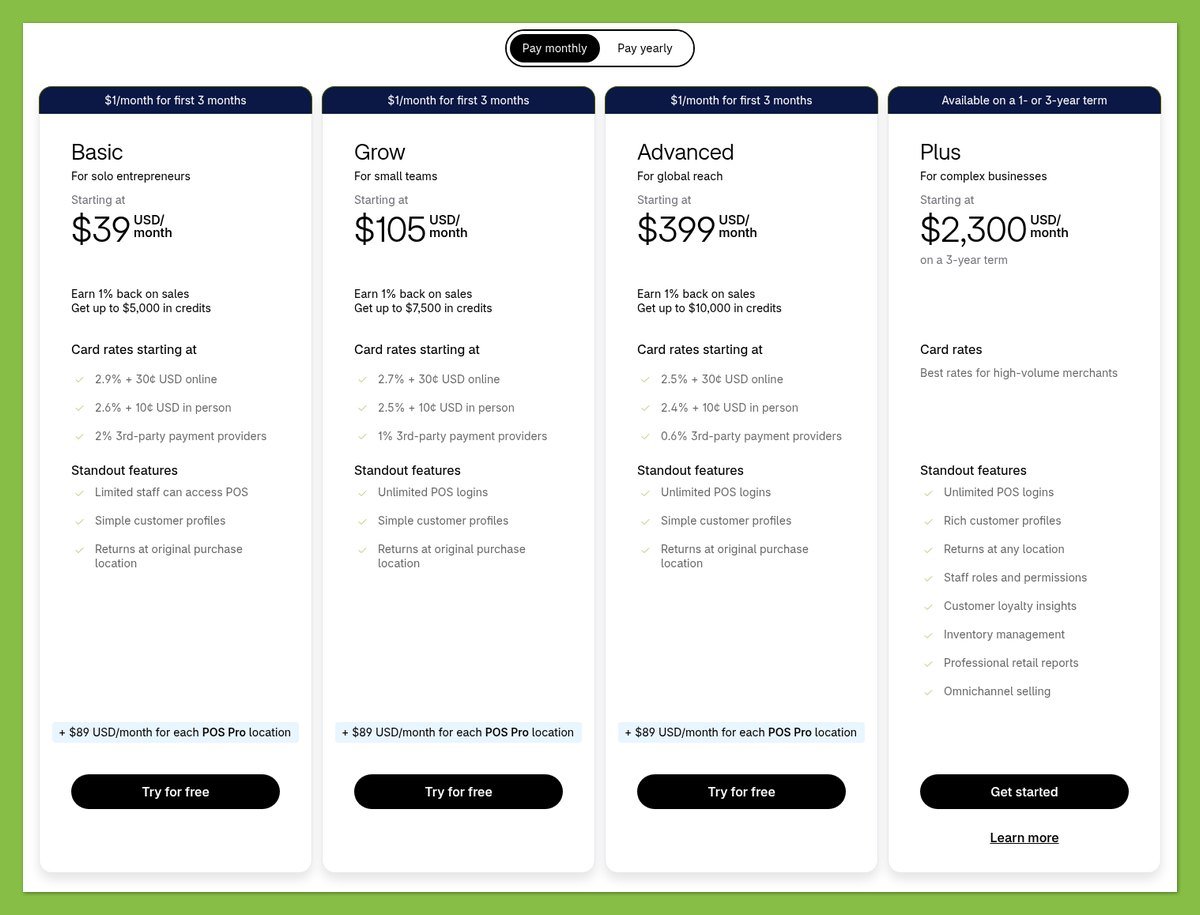
These are US prices in USD. The annual column shows the monthly equivalent of an annually billed subscription.
| Shopify plan | Per month, billed annually | Month-to-month billing |
|---|---|---|
| Basic | $29 | $39 |
| Grow | $79 | $105 |
| Advanced | $299 | $399 |
Basic is the sensible starting point for a small-business shortlist. Don’t move up solely because you expect growth; identify a specific requirement or cost saving that justifies the higher subscription.
Your budget also needs room for optional paid apps and themes. A cheaper subscription does not necessarily produce the cheaper store if your chosen workflow requires several add-ons.
HubSpot Pricing
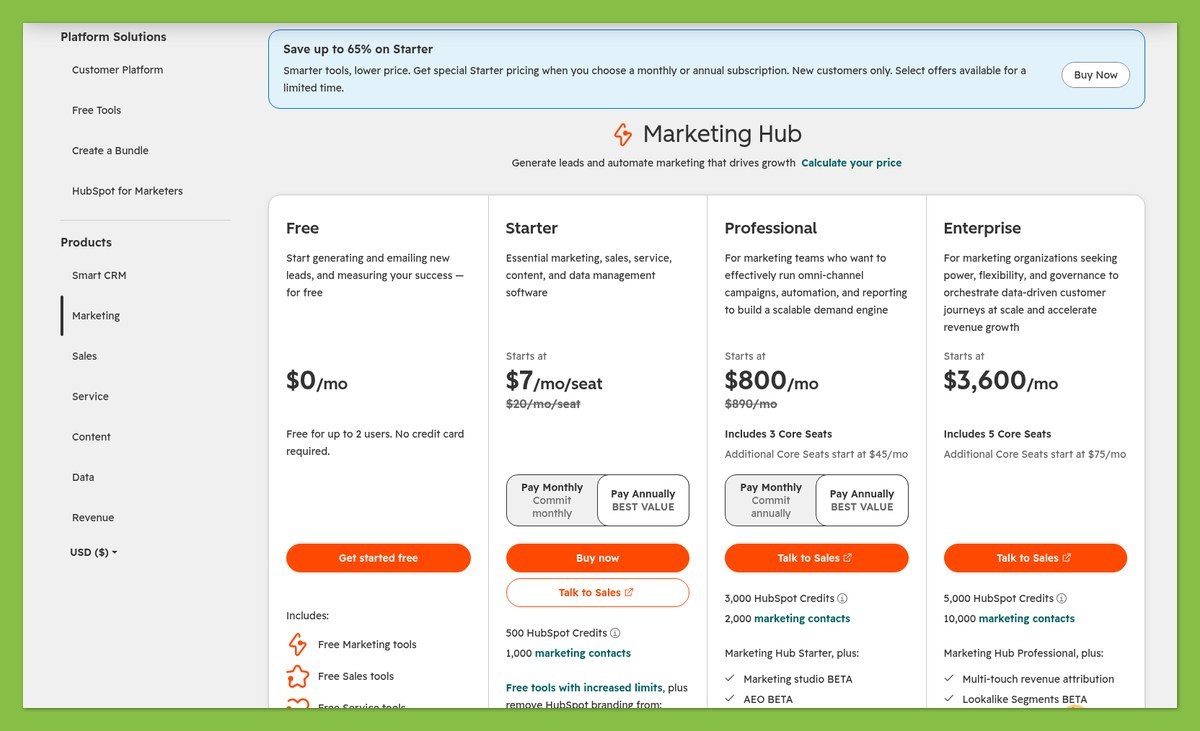
HubSpot is not one website subscription with every marketing feature included. Its CRM tools hold customer information, Content Hub handles website and content needs, and Marketing Hub addresses marketing execution and nurturing.
| HubSpot product or tier | US/USD price | What to account for |
|---|---|---|
| Free CRM tools | $0 | Starting point for basic CRM needs |
| Content Hub Starter | $20 per seat/month list price | A time-limited new-customer offer starts from $7 per seat/month |
| Content Hub Professional | $450/month, billed annually | Includes 3 Core Seats |
| Marketing Hub Professional | From $800/month, billed annually | Includes 3 Core Seats and 2,000 marketing contacts; $3,000 required onboarding |
Content Hub Professional also has a $500 monthly-billing price. That distinction matters if you want flexibility rather than an annual commitment.
More importantly, buying Content Hub does not automatically give you the Marketing Hub subscription needed for advanced nurturing. Ask which product unlocks each requirement before comparing quotes.
What Your Real Budget Looks Like
HubSpot’s paid marketing commitment can be substantial for a small business. Before upgrading, separate the costs you control from the ones your intended workflow requires:
- Seats: Who needs paid access, rather than simply appearing in your contact database?
- Marketing contacts: How many people will you actively market to under the subscription?
- Onboarding: Does your selected package require a separate onboarding charge?
- Additional software: Will integrations or specialist apps introduce another subscription?
- Payment processing: What will collecting money cost beyond the platform fee?
For a business using Shopify Basic and Marketing Hub Professional, the annual-billing subscription baseline is $829 per month. That excludes HubSpot’s required onboarding and other extras; Content Hub Professional is not automatically necessary for that combination.
The distinction is commercial, not just technical. A high-value sales process might justify that spend, while a small catalog with straightforward follow-up might not.
Free tools versus a trial: HubSpot’s free tools can be a continuing starting point for basic needs. Shopify’s listed 3-day trial is an evaluation window, not a permanent free-store plan; temporary promotions should not drive your long-term budget.
Choose the lowest-cost setup that completes your actual sales process. Paying less for the wrong kind of platform is not better value.
2. Which Is Better for Selling Online?
Shopify wins for a product store because it connects the storefront to the operational work behind each sale. HubSpot can collect payments, but payment collection alone does not make it a retail platform.
Store Management
Shopify’s inventory tools cover stock quantities and locations, with support for stock counts, transfers and purchase orders. That puts the product you advertise and the stock you manage within the same store environment.
For a candle business, the central question is whether an item is available and how an order gets fulfilled. Shopify is built around that sequence; HubSpot is better suited to understanding the customer and progressing a sales relationship.
Your retail requirements should include:
- Stock accuracy: Can you keep available quantities aligned with what you sell?
- Order handling: Can you move a purchase from checkout to fulfillment?
- Shipping: Does the proposed setup fit your destinations and delivery arrangements?
- Product information: Can shoppers understand what they are buying without contacting you?
HubSpot’s payment tools do not replace those operations. If you try to construct a physical-product store around payment links, you still need to solve stock handling and fulfillment elsewhere.
That limitation matters less for a service business. A consultant collecting a project payment may need a reliable customer record and payment request, not a browseable catalog with inventory.
Payments
HubSpot supports collecting and tracking payments through several sales-related tools. Availability, fees and eligibility depend on your subscription and chosen processor.
| Payment requirement | Shopify | HubSpot |
|---|---|---|
| Product purchase | Store checkout linked to the retail workflow | Payment collection is not a complete retail workflow |
| One-time service payment | Assess the store setup against your needs | Payment links can support this |
| Recurring payment collection | Check the required subscription setup and any extras | Payment links can collect recurring payments |
| Processor eligibility | Country and payment-provider conditions apply | Stripe or HubSpot payments, with eligibility conditions |
Stripe processing through HubSpot is available across subscriptions, subject to eligibility. HubSpot payments requires Starter or above, also subject to eligibility; confirm support for your business country before choosing either route.
For US Shopify Basic, standard online card processing is listed at 2.9% plus $0.30. Premium and international card rates differ, and an applicable third-party transaction fee can add 2%.
Compare total payment cost, not just the subscription. A processing percentage affects every qualifying sale, while software charges remain due even during quiet periods.
HubSpot’s advantage is contextual: the payment can sit within a customer relationship. Shopify’s advantage is operational: checkout belongs to a complete store process.
Apps and Integrations
Using both can make sense when your retail and relationship-management needs are different. Shopify can run the store while HubSpot supports the team responsible for longer customer conversations.
The Shopify data-sync integration has boundaries:
- Orders and carts: Shopify orders and abandoned checkouts sync into HubSpot orders and carts.
- Sync direction: Not every object supports bidirectional synchronization.
- Custom mapping: Custom Shopify field mappings require Data Hub Starter or higher.
- Metafields: Shopify metafields are unsupported by this integration.
Don’t assume a connected account means every useful piece of information appears everywhere. Before paying, list the fields your team needs and confirm how each one moves.
For example, a wholesale team might need a retailer’s account reference alongside order information. If that reference lives in an unsupported metafield, connecting the platforms does not automatically solve the workflow.
Integration checkpoint: Assign responsibility for customer-data corrections before launch. Decide which system owns each important field, then check that the supported sync direction matches that decision.
3. Which Has Better Marketing Tools?
HubSpot wins for CRM-led lead nurturing because it organizes marketing around customer relationships. Shopify remains a strong fit when your campaigns revolve around browsing, purchases and repeat orders.
Marketing and CRM
A lead-driven business often needs to educate someone before asking for a sale. HubSpot’s marketing proposition fits that process, particularly when your team needs customer information to guide the next interaction. For a training provider, a course-guide download signals interest, not readiness to book.
A HubSpot workflow could deliver content based on pages that person visits, then notify a salesperson when they visit a high-intent page.
HubSpot’s advanced automation belongs to paid Marketing Hub tiers, not automatically to its free CRM or a Content Hub subscription. Budget against the exact workflow you want rather than the broad promise of “marketing automation.”
Shopify is not missing automation. Shopify Messaging, the current name of Shopify Email, supports campaigns and automations, while its wider marketing toolkit includes:
- Shopify Forms: Lead capture.
- Customer segmentation: Grouping customers for more relevant marketing.
- Shopify Inbox: Customer conversations.
- Shopify Flow: Custom workflows and supported third-party app automation.
Shopify Messaging’s email automation options include welcome and abandoned-checkout messages, alongside post-purchase and win-back flows. Availability varies by channel, so don’t assume every automation works across both email and SMS.
That is a meaningful counterweight to HubSpot’s marketing win. A retailer seeking to welcome subscribers and encourage repeat purchases should assess Shopify’s existing tools before buying a separate CRM-led marketing stack.
The dividing line is the next action. “Return to your basket” fits a retail workflow; “continue evaluating this service with our team” points toward HubSpot.
SEO and Content
Shopify supports the essentials of search engine optimization (SEO): sitemaps, canonical tags, and editable page titles, meta descriptions, URLs and image alt text. Its blogging tools also give a store room for buying advice alongside products.
HubSpot’s Content Hub focuses more directly on website content. Advanced SEO audits and topic tools, plus AI translation, are available on Content Hub Professional and Enterprise.
Those features can help if content is central to acquiring leads, but they are a separate purchasing decision from Marketing Hub automation.
Choose around the content’s job: A product-care guide supporting a purchase fits naturally beside a Shopify catalog. A library designed to capture and develop service enquiries makes a stronger case for HubSpot.
Neither platform choice guarantees search visibility. Your topic selection and the usefulness of your pages still need to justify a visitor’s attention.
Reaching International Customers
International selling and multilingual publishing are different requirements. A translated page does not establish that you can take a customer’s payment or deliver their order.
Shopify requires Shopify Payments or Adyen as your primary gateway to process payments in local currencies. With other payment providers, customers check out in your store’s default currency.
Checkout requirement: Confirm gateway eligibility for your business country before promising a localized checkout. A translated storefront alone does not resolve payment restrictions.
HubSpot supports multilingual content, with limits depending on tier; advanced AI translation requires Content Hub Professional or Enterprise. That suits a business publishing lead-generation material for different language audiences, but it does not create retail logistics.
For either platform, review the full journey in each target market: the page a visitor reads, the action they take and the follow-up they receive. Choose Shopify when the central challenge is completing a product purchase, and HubSpot when it is developing an enquiry.
4. Which Is Easier to Get Started With?
Shopify is more direct for launching a store; HubSpot is more direct for organizing leads. Ease depends on whether the platform’s setup tasks match your business, not which dashboard looks simpler.
Getting Started With Shopify
Shopify’s setup centers on preparing a business to take and fulfill orders. Your work includes:
- Product setup: Prepare descriptions, images, prices and stock information.
- Store design: Choose a theme and configure the pages shoppers need.
- Payment setup: Confirm processor eligibility and relevant charges.
- Delivery planning: Establish how orders will reach customers.
- Launch checks: Review the buying journey before promoting the store.
The software cannot make those business decisions for you. If your shipping policy or product data is unfinished, switching platforms will not remove that work.
Shopify’s advantage is that these tasks belong together. For a retailer, the setup effort directly supports the first sale.
Getting Started With HubSpot
HubSpot starts with a different set of questions: what information do you need about a lead, and what should happen after they contact you?
A sensible initial setup includes:
- Contact organization: Decide what customer information you need to retain.
- Lead capture: Build the relevant website page and form.
- Follow-up ownership: Decide who handles each enquiry.
- Subscription selection: Separate CRM, content and marketing requirements.
- Data preparation: Review existing records before bringing them into your process.
Start with a narrow workflow rather than purchasing every hub you might eventually use. A clear enquiry form and a reliable follow-up process are more useful than elaborate automation without an owner.
HubSpot can be the easier choice for a service business precisely because it avoids unnecessary retail setup. Conversely, a merchant should not have to design a CRM process before getting products ready to sell.
For your evaluation, define one complete task and work through it. Use “buy and fulfill a product” for Shopify, or “submit and follow up an enquiry” for HubSpot.
5. Which Has Better Website Templates?
Shopify wins for retail storefronts because its themes serve product shopping; HubSpot suits business websites and landing pages. Pick the page structure that supports your customer’s decision, not simply the most attractive demo.
Shopify Storefront Design
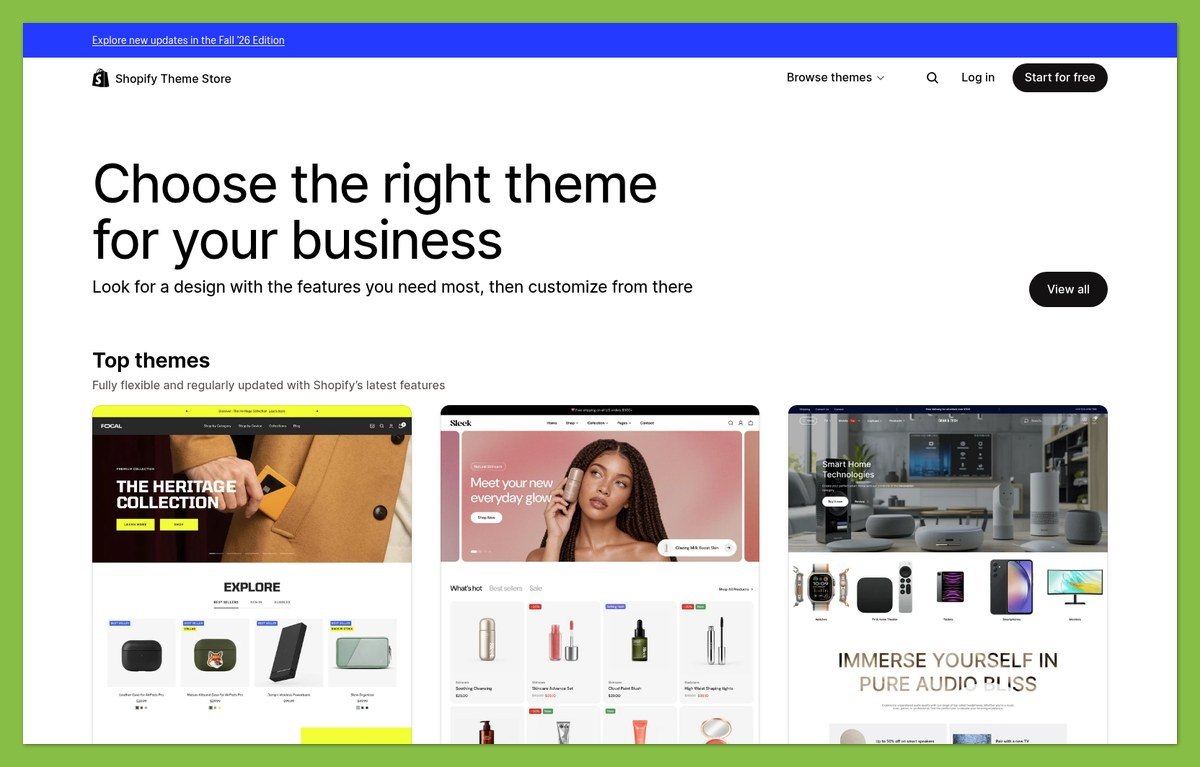
Shopify templates use sections and blocks, with available options varying by theme. Its theme editor lets you preview changes to content and styling without coding.
There are free and paid choices, and Theme Store themes can be tried before purchasing and publishing. Check the actual editing options rather than assuming every theme provides the same flexibility.
For a furniture store, useful product presentation matters more than a dramatic homepage. Evaluate how comfortably your real descriptions and images fit the layout.
HubSpot Business-Site Design
HubSpot themes combine templates, modules and shared styling. Its drag-and-drop content editor supports website pages, landing pages and blogs, with a default theme and additional marketplace choices.
Free and premium options give you different starting points, but the relevant subscription and theme requirements still need checking.
For a consultancy, assess whether the design makes your services understandable and your enquiry action obvious. A retail-style product grid might look polished while doing little to explain a complex engagement.
Template check: Put your own content into a shortlisted layout before committing. Demo photography can disguise an awkward fit for your actual business.
6. Which Offers Better Business Support?
Shopify wins for accessible 24/7 store help; HubSpot’s paid tiers offer more channel choice. Neither verdict implies a measured advantage in response speed or resolution quality.
Shopify Support
Shopify offers 24/7 chat on all plans. Phone support is reserved for Plus, so smaller merchants should be comfortable relying on chat.
That broad chat access is useful when a store problem affects trading outside normal office hours. However, paid third-party theme support comes from the theme developer, which can mean involving someone other than Shopify.
HubSpot Support
HubSpot’s support channels depend on your subscription and assigned seat. The tier differences are significant:
| HubSpot tier | Support channels |
|---|---|
| Free | Knowledge base and community |
| Starter | Chat and email, plus self-service resources |
| Professional and Enterprise | Phone and callback, plus chat and email |
On newer accounts, users need an assigned Core, Sales or Service seat to access paid support. A paid subscription alone does not give every user the same entitlement.
Before committing, confirm:
- Eligibility: Does your subscription and assigned seat include the channel you want?
- Ownership: Who supports the integration or theme involved?
- Coverage: Does the available help suit your working hours and location?
Shopify offers the clearer baseline for a small store. HubSpot is more compelling when the paid support entitlement matches your team’s needs.
How We Compare Shopify and HubSpot
WebAppMeister compares these platforms by business fit rather than treating unlike products as interchangeable. This comparison evaluates published pricing and product capabilities; it does not include hands-on testing.
The comparison considers subscription costs, selling workflows, marketing, setup requirements, design and support eligibility. Plan and country restrictions qualify the relevant recommendations.
The business scenarios are hypothetical illustrations, not customer case studies. No performance scores, setup times or support-response measurements are claimed.
Pricing reference: October 2026, US/USD. Confirm your final subscription terms, payment eligibility and applicable fees before purchasing.
Shopify vs HubSpot: Which Should You Choose?
Choose Shopify if your main job is selling and fulfilling product orders. Choose HubSpot if your main job is turning enquiries into customer relationships.
Shopify also covers useful retail marketing, so a store does not automatically need HubSpot. HubSpot can collect service payments, so a lead-driven business does not automatically need Shopify.
Use both only when a defined CRM requirement justifies the extra subscription and integration work.
Your next step: write down the complete journey from first visit to paid customer. Identify the platform that handles most of that journey, then price the exact plan and extras needed to finish it.


