After signing up, building a site from scratch, and scoring it against the six criteria we apply to every website builder we cover, Webnode is the best budget website builder for a first multilingual site because it runs a genuinely free, non-expiring plan, its cheapest paid tier starts around $4.50 per month (roughly a quarter of Wix’s entry price), and its built-in language versions do natively what Wix and Squarespace need third-party apps to pull off.
In this Webnode review, I’ll take a closer look at Webnode pricing, the editor, the AI builder, the online store, and how this Webnode website builder stacks up against Wix, Squarespace, Hostinger, and Shopify, so you can decide whether its simplicity is a feature or a ceiling for what you’re building.
Why You Can Trust This Review
- Hands-on build: I created an account, chose a template, edited on the grid, and published a live site
- 6 scoring criteria: ease of use, design flexibility, pricing value, ecommerce capability, support quality, and how easy it is to leave
- Claims checked against source: pricing, template counts, and store limits verified against Webnode’s own pricing page and support docs
- Independent and unsponsored: Webnode had no input into this review
Key Takeaways
- Pricing runs from a $0 free plan up to around $31.90 per month for Business, with the cheapest paid tier near $4.50 per month
- Multilingual is the real standout, with 2 languages on Standard and unlimited on Profi and above, more direct than Wix or Squarespace
- You cannot sell digital products, and Webnode’s own support docs still confirm that
- No template switching plus no direct content export adds up to genuine lock-in once you commit
- 50 million-plus sites and a 4.3/5 Trustpilot average, but real billing and renewal complaints sit underneath that score
Founded in 2008 by Vít Vrba and Ondřej Kratěna and owned by team.blue since 2020, Webnode has powered more than 50 million websites, and it is built for simplicity first. The reviews swing wildly because that simplicity cuts both ways: half of them call it perfect for beginners, the other half call it too limited to bother with. Having built on it, I can tell you both camps are half right, and which one you land in depends entirely on what you need.
Webnode Pros and Cons
Need the verdict in ten seconds? Here is what won me over on Webnode, and what left me frustrated after building on it.
What I Like
✔️ Best-in-class multilingual building lets you spin up a full second-language version of your site in a few clicks, with 2 languages on Standard and unlimited on Profi and up
✔️ A genuinely free, non-expiring plan that keeps running indefinitely instead of expiring like a trial, so you can prototype with zero pressure
✔️ Low entry pricing starts around $4.50 per month, roughly a quarter of Wix’s ~$17 starting point
✔️ Backup and restore from Standard up, which is rare at this budget tier
✔️ A simple structured editor that cuts decision fatigue for total beginners
✔️ An AI builder that generates a full site, copy and images included, from a single text prompt
What I Dislike
❌ No digital-product sales, confirmed by Webnode’s own support docs
❌ No template switching once you have picked one, so your first choice is permanent
❌ Product variants break below Profi, meaning cheap plans cannot sell items with size or colour options end to end
❌ No app store or third-party integrations, so you cannot connect an email-marketing tool the way you can on Wix
❌ No direct content export, which makes leaving a slow, manual job
❌ Billing and renewal complaints show up repeatedly from real Trustpilot users, and phone support is gated to paying customers with no live chat at all
Our Webnode review video below runs through the same highlights if you would rather watch than read.
How Much Does Webnode Cost? Webnode Pricing Plans Explained
The loudest complaint I ran into while researching Webnode was not about features. It was about the bill. Trustpilot users describe being charged for automatic renewals they did not expect, refused refunds, and in one case a 39.90 GBP domain recovery fee after a renewal email that said no action was needed. So before you pick a plan, here is exactly what each tier costs and where the surprises hide.
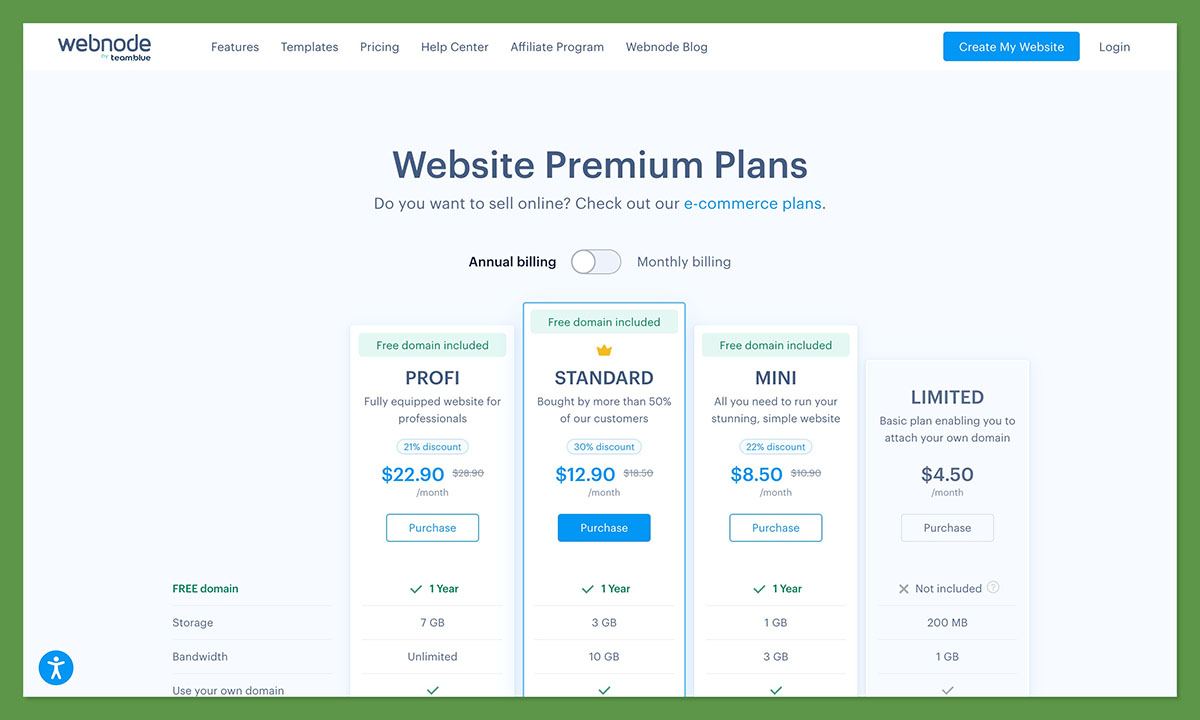
Webnode splits into website plans and ecommerce-enabled plans, and it advertises multi-year terms as a way to save “up to 50%”. The tiers break down like this:
- Free ($0) brings 100MB storage, 1GB bandwidth, a Webnode subdomain, and Webnode branding
- Limited (~$4.50 to $5.50/mo) adds a custom domain but still no online store
- Mini (~$8.50 to $10/mo) adds a free domain for year one and one email account
- Standard (~$12.90 to $16.90/mo) unlocks the online store, 2 languages, backups, and an ad-free site
- Profi (~$22.90 to $26.50/mo) brings unlimited languages plus full store analytics and product feeds
- Business (~$31.90 to $34.90/mo) tops out with 15GB storage and up to 1,000 email accounts
| Plan | Monthly price | Storage | Bandwidth | Online store? | Languages | Best for |
|---|---|---|---|---|---|---|
| Free | $0 | 100MB | 1GB | No | 1 | Prototyping and hobby pages |
| Limited | ~$4.50 to $5.50 | 100MB | 1GB | No | 1 | A basic custom-domain site |
| Mini | ~$8.50 to $10 | 500MB | 3GB | No | 1 | A small brochure site |
| Standard | ~$12.90 to $16.90 | 2GB | 10GB | Yes | 2 | A first real site or small store |
| Profi | ~$22.90 to $26.50 | 5GB | Unlimited | Yes | Unlimited | Multilingual sites, working store variants |
| Business | ~$31.90 to $34.90 | 15GB | Unlimited | Yes | Unlimited | Bigger sites needing many email accounts |
The price ranges reflect billing-term differences. The low end of each range usually requires committing to a discounted 2, 5, or 10-year term, while paying month to month lands you near the top.
Is Webnode Good Value for Money?
- The cheapest paid tier undercuts Wix at around $4.50 per month versus Wix’s roughly $17, so for a simple custom-domain site Webnode is a bargain
- The free plan is a genuine try-before-you-buy edge over Squarespace and Hostinger, neither of which offers a free plan at all
- The free domain is only free for year one. After that it renews at the standard rate for the extension, around $18.95 a year for a .com, so budget for it
- Headline prices assume a multi-year commitment. Paying monthly puts you at the top of each range, so the advertised “up to 50% off” really means paying for several years upfront
One spec I could not pin down is how many email accounts each tier actually includes. One pricing breakdown lists Standard at 20 accounts, Profi at 100, and Business at 1,000, while Webnode’s own support docs say Standard includes just 1. If email accounts matter to you, confirm the number on the live signup screen before you pay.
Author’s Testing Notes:
If you want one plan to point at, Standard is the sweet spot for a first real site. It is the cheapest tier that unlocks the online store, a second language, backups, and an ad-free site, which covers most first-timers. Step up to Profi only if you need unlimited languages or product variants that actually work for customers. And if you are still just testing the waters, the free plan is genuinely fine to prototype on.
My Experience Building a Site With Webnode
Every review says Webnode is easy. I wanted to see what “easy” actually looks like, so I built a site from scratch, from the signup screen to hitting publish. Here is how it went.
Signing Up
Getting started asked almost nothing of me. I created an account with an email address, a site name, and a password, and I was straight into the dashboard. No credit card stood between me and the editor, which is exactly what a nervous first-timer wants.
Signing up took only an email, a site name, and a password. Source: Ecommerce-Platforms.com
Starting With AI or a Template
From here Webnode gives you two on-ramps.
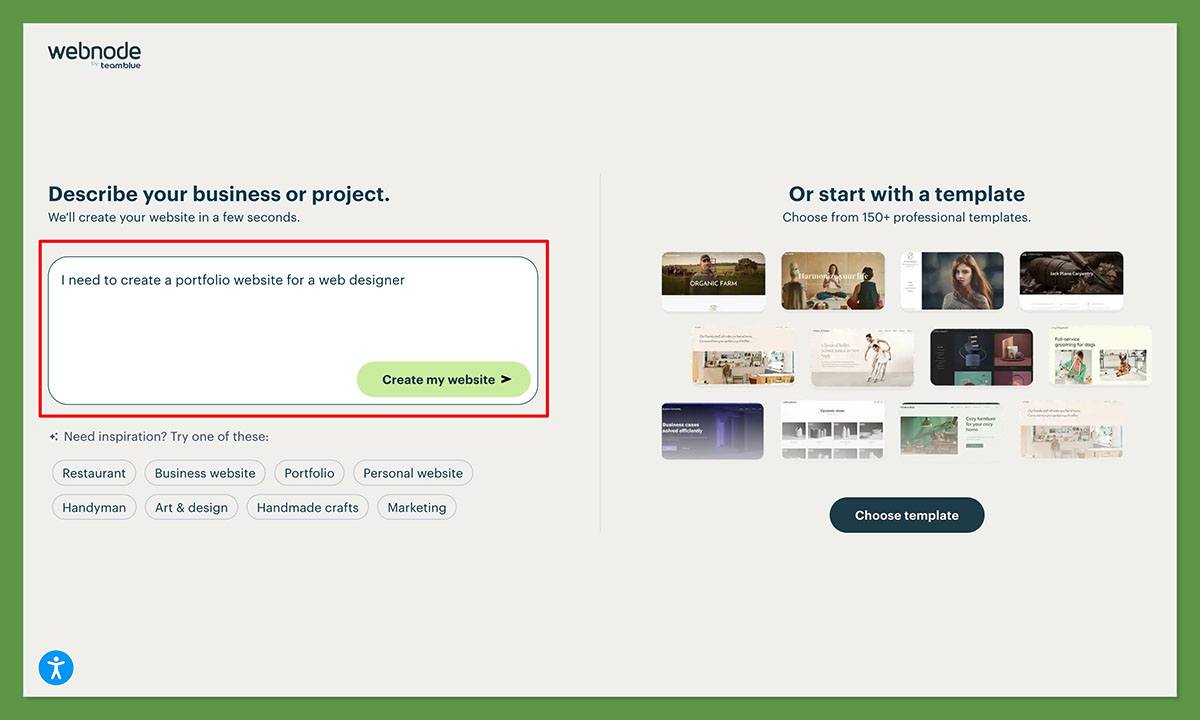
The AI path is the faster one. You type a one-sentence description of what your site is about, and Webnode’s AI generates a complete starting site, layout, written copy, and matched stock images, in seconds. You pick the generated design you like best, then edit from there. For someone who freezes at a blank template gallery, that is a real head start.
The template path is the traditional route. You browse 100-plus templates organised by industry and preview each one through an interactive presentation before you choose. And choose is the right word. Once you pick a template, you cannot switch to a different one later, so preview carefully.
Webnode’s templates are grouped by industry, but your first pick is permanent. Source: Ecommerce-Platforms.com
Editing on the Grid
The editor is a drag-and-drop ribbon setup. I could drop in text boxes, image galleries, forms, social widgets, and embedded video by dragging elements onto the page.
The constraints show up fast. There is a limited set of content blocks, roughly 50 preset colours with no custom picker, and only a handful of font combinations. The one that surprised me most: there is no built-in image editor at all, so you cannot even crop or rotate a photo inside Webnode. You have to fix your images before you upload them.
There is one escape hatch nearly every other review misses. Under Website template, Advanced Settings, Edit CSS in the legacy editor, Webnode does let you write raw CSS. It is unsupported, hidden, and tied to the old editor, but it exists, which quietly contradicts the blanket “no HTML or CSS” claim you will read elsewhere.
Mobile Preview and Publishing
Before publishing, I switched to the mobile preview to check how the layout reflowed on a phone. Publishing itself was a single click, and Webnode handled the hosting in the background. No servers, no DNS wrangling, no FTP.
Author’s Testing Notes
The structured editor is a fair trade for the right person. You give up creative freedom and get low decision-fatigue in return, which is exactly what a total beginner needs. But the no-template-switch rule turns your first design choice into a commitment, so spend real time in the preview before you pick one. Getting it wrong means rebuilding, not reskinning.
Webnode Templates, Design, and the AI Website Builder
Here is the odd contradiction at the heart of Webnode’s design story. Its AI can build you an entire website from a single sentence, yet the designs it produces look dated next to Wix and Hostinger, and the moment you pick a template you are locked to it for good.
Templates and Design Limits
Webnode gives you 100-plus templates, with some counts running closer to 200, all organised by industry. They are a solid starting point. The catch is Webnode’s own rule, quoted straight from its support docs: “Once you pick a template, you can’t switch to a different one” but you can remake it just about any way you want. Your only workaround is to heavily re-customise the template you already chose.
The design ceiling is real. Here is what you are working within:
- Around 50 preset colours with no custom colour picker
- A limited set of font combinations, not free font choice
- No built-in image editor, so no cropping or rotating inside the platform
- Restricted white-space control, a recurring complaint from Capterra reviewers
One nuance almost every rival review gets wrong: a raw CSS override does exist, under Website template, Advanced Settings, Edit CSS, but only in the legacy editor. It is unsupported, so Webnode will not help if it breaks, which makes it no real answer for a beginner. It does mean the flat “no HTML or CSS editing” claim is not quite accurate.
The AI Website Builder
The AI builder is the feature competitors name-drop but never actually show. Here is the real flow:
- Describe your site in a sentence, such as what your business or project is about
- Webnode generates a full site, including layout, written copy, and matched stock images, in seconds
- Pick your favourite from the generated designs
- Edit everything afterward, swapping text and images, adding your logo, and bolting on a blog or store
No coding, writing, or design skills required, which is the whole point for a first-timer who does not know where to start.
Webnode’s AI builds a full starter site from one sentence, then hands it to you to edit. Source: Ecommerce-Platforms.com
How Webnode’s AI Compares
How does Webnode AI compare to Wix ADI and Hostinger AI? ⚖️
Webnode’s AI works, but its output reads as more dated than the alternatives. Hostinger’s AI builds a complete site in about 45 seconds and starts at $2.99 per month, though it has no free plan. Wix’s ADI uses a longer conversational Q&A and offers a broader feature set, but its pages load more slowly, around 4 to 6 seconds. Webnode’s genuine edge is not AI polish. It stays the multilingual system and the free plan.
One more thing to file away for later: Webnode also has a separate AI Migration Tool, but it only moves content into Webnode, not out. That distinction matters a lot when we get to leaving the platform.
Webnode Multilingual Sites and SEO Tools
If there is one thing Webnode does better than almost anyone, it is this: you can spin up a second-language version of your entire site in a few clicks.
Multilingual, the Standout
This is the reason to pick Webnode over almost anything else. Its built-in language-version system lets you build a full translated copy of your site directly, with no third-party app required. Switch on a second language and Webnode clones your existing pages into a parallel version, so your job is translating the content, not rebuilding the layout. You get 2 languages on Standard and unlimited on Profi and above, plus 30-plus interface languages for the admin side.
Compare that to the big names. Wix and Squarespace both lean on workarounds or third-party translation apps to do the same job, which adds cost and moving parts. If you serve customers in more than one language, Webnode’s approach is simply more direct, and it is the single feature I would switch to Webnode for.
SEO, Basic but Real With Genuine Gaps
Search for a verdict on Webnode’s SEO and you will find it called both “robust” and “minimal”. Having built on it, I can tell you both labels are half right. The basic tools are present and they work. The technical gaps are just as real.
SEO tools you get:
- Custom title tags for each page
- Meta descriptions you control
- Custom URLs for your pages
- An automatic XML sitemap, generated for you
SEO gaps to plan around:
- No 301 redirects, so you cannot cleanly point an old URL to a new one
- Inconsistent heading hierarchy, since some blog templates skip a proper H1 and H2 structure
- No real blog categories or tags, because each “category” is a separate subpage that eats a navigation slot
Top Tip
If you think you will ever restructure your URLs, the missing 301 redirects will bite. Lock in your URL and page structure up front, because Webnode gives you no clean way to redirect old links to new ones later.
Adding a second language version of the whole site is a few-clicks job, and it is Webnode’s real standout. Source: Ecommerce-Platforms.com
Selling Online With Webnode: Store Features and Limits
The store limitation beginners discover too late: you cannot sell digital products on Webnode at all, and on the cheap plans you cannot even sell a physical product with size or colour options.
What the Store Does
The online store unlocks at the Standard plan and up. For a simple physical-goods shop, it covers the basics, including a reasonable spread of payment methods:
- Cash and cash on delivery
- Bank transfer
- PayPal
- Card payments via Stripe, Paytrail, or Sofort
One thing to check for your region: some shipping integrations are geographic. Packeta and Zásilkovna, for example, cover the Czech Republic, Slovakia, Hungary, and Romania, not everywhere.
The Hard Limits
This is where Webnode’s store shows its budget roots.
- No digital products. Webnode’s own support wording is blunt: its ecommerce “isn’t well-adjusted for selling digital goods.” That is disqualifying if you sell ebooks, courses, or downloads.
- No automatic tax rates or real-time shipping rates, so you configure both by hand.
- Product variants are tier-gated and broken below Profi. This one traps people, so here is exactly how it shakes out:
| Plan | Can you configure variants? | Can customers actually buy them? |
|---|---|---|
| Free / Limited / Mini | Yes | No |
| Standard | Yes | No, they don’t display live |
| Profi / Business | Yes | Yes |
In plain terms: unless you are on Profi or Business, a customer cannot buy a t-shirt in their size or a mug in their colour. Everything below that can look fine in the editor and fail at checkout.
Transaction Fees
Here is one I will not guess at. No source I found, including Webnode’s own ecommerce pricing page, confirms whether Webnode charges its own platform commission on sales, so I will not claim it is 0%. What is documented is that you will pay the standard processing fees of whichever gateway you use, such as Stripe or PayPal.
Where the Webnode store does make sense is as a cheap way to validate a store idea. At around $12.90 a month on Standard, it is a fraction of Shopify’s cost, so you can test whether people actually buy before committing to a heavier platform. Just go in knowing the ceiling you will hit if it works.
Webnode Support, Security, and Leaving the Platform
Here is the part cautious beginners skip right past: there is no one-click way to get your site out of Webnode, and even downgrading your plan is not something you can do yourself.
Support
Webnode’s support setup is more layered than it first looks, which is why reviews disagree about it. Here is what is actually on offer:
- Email and a contact form for everyone, free or paid
- Phone support, but only for paying customers, with the number sent in your payment-confirmation email
- No live chat at all
- A stated target of a reply within 24 business hours, across a five-day week
That is the paper version. The reality reported by Trustpilot reviewers is slower and less consistent than that 24-hour target, especially on billing disputes. So set your expectations for email-paced support, not instant help.
Security
Security is thin but adequate for a small site. Every Webnode site gets a free SSL certificate. There is no two-factor authentication on accounts, which is worth knowing if you are security-conscious.
Export, Downgrade, and Lock-in
This is the real risk, and it is the thing I most want a first-timer to understand before committing.
There is no direct content-export tool. If you decide to leave, you are copying your content by hand, downloading images one at a time, and recording your URLs to preserve your SEO, or you are paying a third-party migration service. Remember that AI Migration Tool from earlier? It only moves content in, not out.
Downgrading is almost as awkward. Dropping to the Free plan is not self-service, you have to contact support to do it, and doing so forfeits your custom domain. Your site reverts to a yoursite.webnode.com subdomain.
Author’s Testing Notes 📝
The pattern here is simple and worth saying plainly: Webnode is easy to get into and hard to get out of. That is fine if you see it as a long-term home for a simple site. It is a real risk if there is any chance you will outgrow it, because the exit is entirely manual. Factor that in now, not later.
Update, July 2026
The billing and renewal complaints are not historical. They remain a current theme in recent Trustpilot reviews, so treat your auto-renewal settings as something to check the day you subscribe.
How Does Webnode Compare to Wix, Squarespace, Hostinger, and Shopify?
If Webnode is this cheap, the obvious question is what you are giving up against the big names. Here is the real fee-and-feature math, not the one-line comparisons you usually get.
| Builder | Entry price/mo | Free plan? | Best for | Standout strength | Key weakness vs Webnode |
|---|---|---|---|---|---|
| Webnode | ~$4.50 | Yes | Cheap multilingual first sites | Multilingual plus a free plan | Store depth and no easy exit |
| Wix | ~$17 | Yes | All-round beginner sites | Deep features and AI suite | Around 4x the entry price |
| Squarespace | Above Webnode | No | Design-led sites | Most polished templates | No free plan, pricier |
| Hostinger | $2.99 (48-mo term) | No | Cheapest AI build | Speed and bundled hosting | No free plan, weaker multilingual |
| Shopify | ~$32 | No | Scaling a real store | Purpose-built ecommerce | Cost plus app and transaction fees |
The table sets the shape of it. Here is where each rival pulls ahead of Webnode, and where it drops behind.
- Wix brings deeper ecommerce, a full AI suite, all-plan live chat and phone callback, and a sprawling 2,700-plus template library. In a straight Webnode vs Wix comparison, though, Wix starts near $17 a month, roughly four times Webnode’s entry price, and its open-canvas editor hands a total beginner more freedom than they know what to do with. Pick Wix if you want room to grow into advanced features and do not mind paying for it.
- Squarespace ships the most polished templates, around 199 of them, and charges $0 in store transaction fees. There is no free plan and its entry price sits above Webnode’s, so you pay from day one with no risk-free trial to fall back on. It suits a design-led brand site more than a budget first project.
- Hostinger is the cheapest option here at $2.99 a month on a 48-month term, and its AI builds a complete site, SEO copy and a contact form included, in about 45 seconds, with hosting and a first-year domain bundled in. What it gives up is a free plan and Webnode’s more proven multilingual system. Choose it if speed and raw price beat the ability to try before you buy.
- Shopify is purpose-built to scale a real store, but Basic runs around $32 a month before you stack app and transaction fees on top. For someone still testing whether an idea sells, that is firepower you can skip until you have proof of demand. Move to Shopify once orders are consistent, not before.
The pattern is clear. Webnode wins on the free plan, the multilingual system, and raw entry price. It loses on store depth, third-party integrations, and the ability to leave without a manual rebuild. For a cheap, low-risk first site, that trade lands in Webnode’s favour more often than not.
How We Test Website Builders
To keep our reviews honest, we put every website builder through the same hands-on process rather than rewording a spec sheet. For this review I personally signed up for Webnode and built a site, then scored it against six criteria that decide whether you will still be happy six months in.
| Criterion | What we look at |
|---|---|
| Ease of use | Signup friction, editor learning curve, and time from account creation to a published page |
| Design flexibility | Template range, colour and font control, image editing, and whether you can change your mind later |
| Pricing value | Entry cost, what each tier actually unlocks, renewal terms, and hidden fees |
| Ecommerce capability | Product types supported, variants, payment methods, tax and shipping, and transaction fees |
| Support quality | Channels available, who they are gated to, stated response times, and what real users report |
| Exit flexibility | Content export, downgrade paths, and how much of your work you can take with you |
That is why we can say the following with confidence.
Webnode Review: Should You Build Your Website With Webnode?
So, is Webnode good? After building on it, my answer is a qualified yes, and the qualification is everything.
Webnode is one of the cheapest, lowest-friction ways to get a first website online, and for the right person it is genuinely a great pick. The free plan, the low entry price, and the best-in-class multilingual system are real advantages the bigger names cannot match at this cost.
Choose Webnode if you want a cheap or free, low-friction first site, especially a multilingual one, or a simple small store to validate an idea before you spend real money.
Look elsewhere if you need to sell digital products (Shopify or a dedicated platform), want full design freedom (Squarespace or Wix), or want an easy exit down the line.
The tradeoffs are worth restating plainly. You get cheap, multilingual, and a real free plan. You give up digital products, template switching, and any painless way out, as covered in the Pricing and Leaving the Platform sections above. Neither list is a dealbreaker on its own. Together they draw a clear line around who Webnode is for.
My advice: start on the free plan and build a few real pages before you pay anything. It costs nothing, it commits you to nothing, and it will tell you within an afternoon whether Webnode’s simplicity feels like freedom or a fence.
Webnode Review FAQs
Can I sell digital products on Webnode?
No. Webnode’s own support docs state its store “isn’t well-adjusted for selling digital goods.” If you sell ebooks, courses, or downloads, you will need a platform like Shopify or a dedicated digital-product tool instead.
Can I change my Webnode template after publishing?
No. Once you pick a template you are locked to it, and Webnode confirms you “can’t switch to a different one.” Your only option is to heavily re-customise the template you already chose, so preview your options carefully before you commit.
Does Webnode support custom HTML or CSS?
Partially. A buried, unsupported CSS editor exists in the legacy editor under Website template, Advanced Settings, Edit CSS. It works, but Webnode will not help if it breaks and it is missing from the newer editor, so treat it as an advanced-user escape hatch, not a real design tool.
What happens to my free domain after year one?
It renews at the standard rate for that extension, roughly $18.95 a year for a .com. The free year is an introductory offer, not a permanent perk, so budget for the renewal before it lands.
Can I export my Webnode site if I leave?
No, there is no direct export. Leaving means copying your content by hand, downloading images individually, and recording your URLs, or paying a third-party migration service. Webnode’s AI Migration Tool only moves content in, not out.
Does Webnode charge store transaction fees?
Unconfirmed. No source, including Webnode’s own pricing page, documents a platform commission, so I will not claim it is 0%. What is certain is that you will pay your payment gateway’s standard processing fees.
How many people use Webnode?
Over 50 million websites have been created on Webnode since 2008, per its own About page. That has grown from 30 million in 2017 and 45 million in 2023. A 130,000 figure cited elsewhere could not be corroborated and looks like an error.


