Shopify is the better choice for a full online store, while Jotform makes more sense when you mainly need forms that accept payments. The deciding factor is whether customers need to browse a retail catalog or complete a specific task, such as registering for a workshop.
This Shopify vs Jotform comparison weighs the costs and practical tradeoffs across 6 rounds. Both can display products and collect money, but they organize your business differently. Shopify centers on retail operations; Jotform centers on submissions, customer details, and flexible payment workflows. Start with the kind of checkout your customers need, then compare prices.
Shopify vs Jotform: At a Glance
Shopify is our overall recommendation for a dedicated ecommerce business. Jotform wins on affordability for light use and simplicity when collecting information matters as much as collecting payment.
Key Takeaways
- Pricing: Jotform for light use. Its free plan supports up to 10 payment submissions monthly.
- Selling online: Shopify. Its catalog and inventory tools better suit ongoing retail operations.
- Marketing: Shopify. Store SEO and commerce-focused campaigns give it the advantage.
- Ease of use: Jotform for simple selling. A focused payment form involves fewer retail decisions.
- Store templates: Shopify. Its themes are built around browsing and buying.
- Ecommerce support: Shopify. Commerce-specific help wins, although Jotform also offers 24/7 support.
| Comparison | Shopify: overall store winner | Jotform: form-led selling winner |
|---|---|---|
| Best fit | Dedicated online retail | Payment forms and lightweight stores |
| Starting option compared | Basic, a paid storefront plan | Free Starter plan |
| Entry paid price, monthly billing | Basic: $39/month | Bronze: $39/month |
| Entry paid price, paid yearly | Basic: $29/month equivalent | Bronze: $34/month equivalent |
| Product organization | Retail catalog and collections | Product lists and store categories |
| Stock management | Tracking across locations and transfers | Stock limits in supported payment fields |
| Customer intake | Commerce-first workflow | Conditional form fields |
| Marketing approach | Store campaigns and product discovery | Lead capture and connected tools |
| Design approach | Store themes | Forms and store-app templates |
| Support | 24/7 chat across plans | 24/7 support |
All prices in this comparison are in US dollars (USD).
Your existing website also matters. If it already explains your service and attracts customers, adding a Jotform payment workflow may be more appropriate than building a separate retail destination.
1. Best for Pricing: Jotform for Light Use
Winner: Jotform for light use, because its free plan can handle occasional payments without a recurring subscription. Once you need a paid plan, Shopify Basic becomes a serious value competitor.
Shopify Pricing
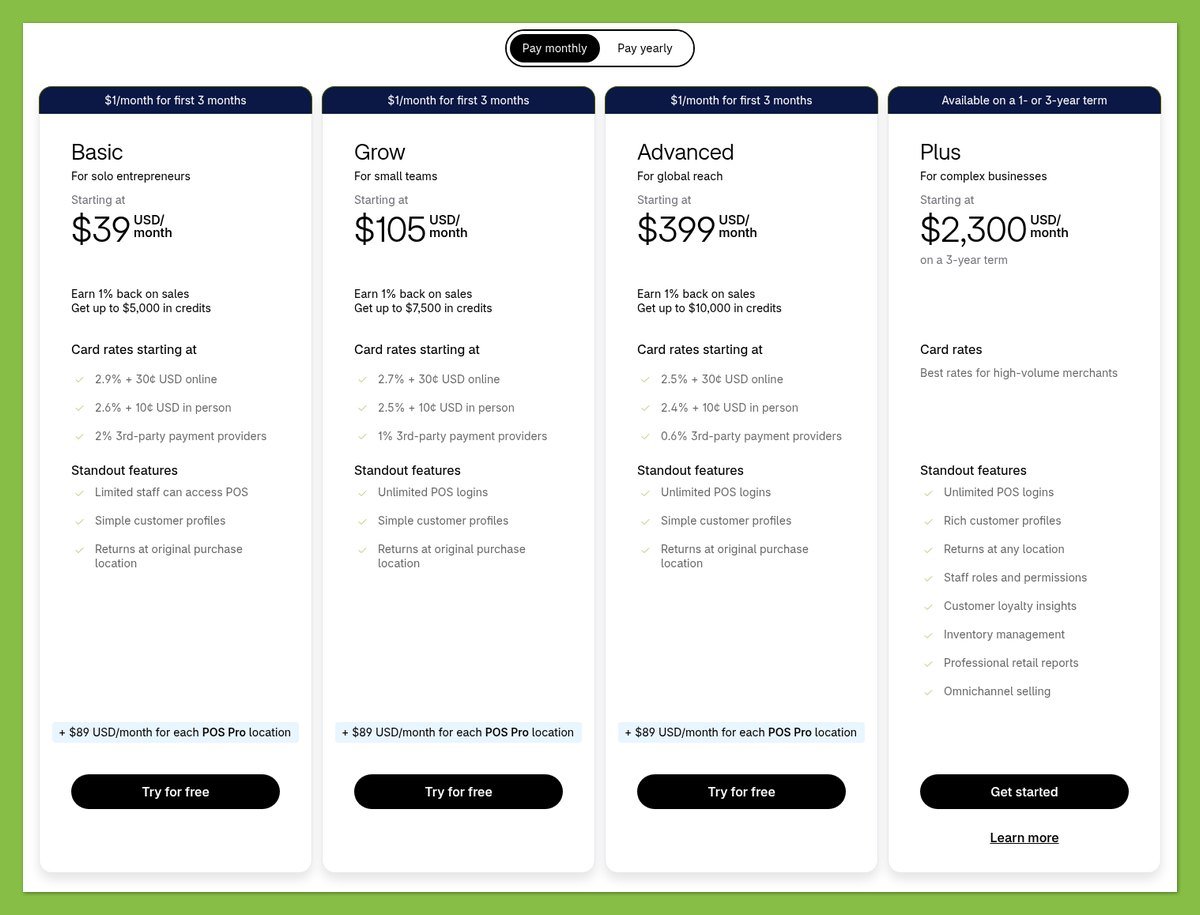
The Shopify plans below are full-store options, with US prices in USD. Annual billing lowers the monthly equivalent, but you pay for the year upfront.
| Shopify plan | Monthly billing | Monthly equivalent, paid yearly | Annual subscription total |
|---|---|---|---|
| Basic | $39 | $29 | $348 |
| Grow | $105 | $79 | $948 |
| Advanced | $399 | $299 | $3,588 |
Basic is the sensible starting point for this comparison. A higher tier should solve a specific business requirement, not simply reflect your ambition to grow.
Jotform Pricing
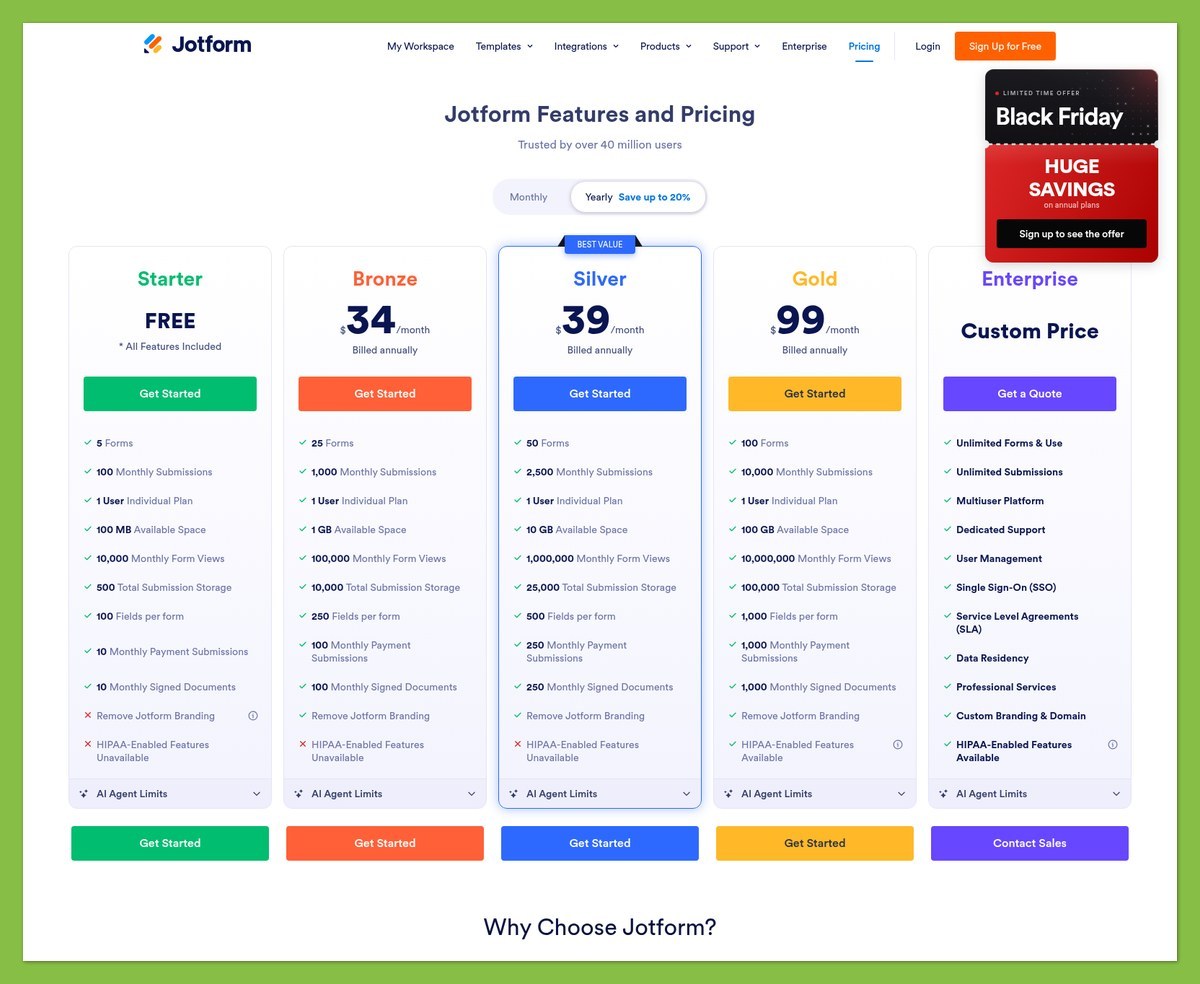
Jotform’s limits deserve as much attention as its subscription price. Total submissions and payment submissions are separate allowances, and the payment allowance is much smaller.
| Jotform plan | Monthly billing | Monthly equivalent, paid yearly | Monthly submissions | Monthly payment submissions |
|---|---|---|---|---|
| Starter | $0 | $0 | 100 | 10 |
| Bronze | $39 | $34 | 1,000 | 100 |
| Silver | $49 | $39 | 2,500 | 250 |
| Gold | $129 | $99 | 10,000 | 1,000 |
Starter includes 5 forms and Jotform branding; paid tiers remove that branding. Annual subscription totals are $408 for Bronze, $468 for Silver, and $1,188 for Gold.
The distinction between submission types can change your budget immediately. Bronze’s 1,000 monthly submissions do not mean you can accept 1,000 payment submissions: its payment allowance is 100.
Which Costs Less for Your Business?
Suppose your workshop business expects 150 payment submissions each month. Bronze would not cover that volume, so Silver would be the relevant Jotform plan, assuming the business fits its other limits.
Silver costs $49 with monthly billing, compared with Shopify Basic at $39. Paid yearly, the monthly equivalents are $39 and $29 respectively, a $120 annual subscription difference before processing fees and extras.
That does not automatically make Shopify the better purchase. If your registration process needs conditional questions and detailed participant information, Jotform’s workflow may justify the higher subscription rather than requiring a different setup.
| Cost layer | Shopify | Jotform |
|---|---|---|
| Platform subscription | Depends on store plan | Depends on plan and submission limits |
| Payment processing | Processor charges apply | Gateway charges apply |
| Additional platform payment fee | Third-party transaction fees can apply | No added payment collection fee |
| Other spending | Paid themes or additional tools may add cost | Connected services may need separate subscriptions |
“No added payment fee” does not mean free card processing. Compare the gateway’s charges alongside the subscription, and check whether your Shopify payment setup introduces a third-party transaction fee.
Budget tip: Estimate payment submissions for your busiest realistic month, not just your average month. Then compare the required Jotform tier with Shopify Basic and any tools each workflow needs.
Jotform Starter is an ongoing free option within its limits. Shopify Basic requires a subscription after any trial or introductory offer ends.
2. Best for Selling Online: Shopify
Winner: Shopify, because its catalog, inventory, and order workflows are better aligned with running a continuing retail business. Jotform is more compelling when you need detailed customer answers with each order.

Sales Features
Shopify organizes the business around products and their movement through your operation. Its inventory tools support location-based tracking, stock counts, transfers, and purchase orders, which matter when replenishing goods becomes a regular task.
Jotform Store Builder supports product lists, options, categories, and a shopping cart. You can also embed the store into an existing website.
Jotform also supports stock limits directly in supported payment fields and Product List. That helps you limit available quantities; Shopify goes further with transfers and tracking across locations.
| Selling requirement | Better fit | Why |
|---|---|---|
| Tracking stock across locations | Shopify | Dedicated inventory and location workflows |
| Taking a small food order | Jotform can fit | Product choices and payment can share a focused workflow |
| Collecting workshop registration details | Jotform | Conditional fields tailor customer intake |
| Organizing a browsable retail catalog | Shopify | Store structure centers on ongoing product shopping |
| Reviewing form-led orders | Jotform can fit | Orders can be managed through Tables |
Jotform Tables provides a way to manage submitted orders. That can be useful when each purchase needs review alongside customer responses, rather than being treated primarily as a standard retail shipment.
For example, a workshop organizer could ask different questions depending on the session selected. Jotform’s conditional logic can show or hide fields based on responses, keeping irrelevant questions out of the customer’s path.
When those answers determine how you deliver the service, the form earns its place in the checkout.
Shopify is the stronger recommendation when your daily work revolves around maintaining a catalog and coordinating stock with fulfillment. Jotform remains credible for a narrower sales process, particularly where customer intake would otherwise require a separate tool.
Payment Options
Jotform supports multiple payment gateways, so you can build payment collection into the form or lightweight store. Availability still needs checking against your country, currency, and chosen payment field.
Shopify’s payment setup deserves the same scrutiny. The relevant question is not simply whether a familiar provider appears, but what processing and platform charges apply to your business.
Before choosing either platform, check:
- Provider availability: Can your business use the gateway in its country?
- Customer currency: What currency will the customer actually be charged in?
- Total fees: What will processing and any additional platform charges cost?
- Workflow fit: Does the payment setup support the information your order needs?
For a small seller, payment compatibility can outweigh a modest subscription saving. Avoid building your complete workflow before establishing that your preferred provider works with the intended setup.
Apps and Integrations
Jotform connects with tools including Mailchimp, HubSpot, Google Sheets, Salesforce, and Zapier. These connections can move customer information into a spreadsheet or customer relationship management (CRM) system after a sale.
Those services may have their own subscription costs. A form that connects several tools can be convenient without necessarily being the cheapest overall system.
Shopify also has an App Store for extending your store. App charges can be recurring, based on usage, or a one-time payment, so the installation price alone may not tell you what an app will cost.
Start with what Shopify already handles, such as inventory and marketing. Then compare the cost of any extra apps with Jotform and its connected services.
Workflow tip: Write down what must happen after payment. If the next step is reviewing customer answers, lean toward Jotform; if it is managing stock and fulfilling a retail order, lean toward Shopify.
3. Best for Marketing Products: Shopify
Winner: Shopify, because it combines a searchable store structure with commerce-focused marketing tools. Jotform is useful for capturing interest and passing customer information to other systems, but that is a different marketing job.
Marketing Tools
Shopify Messaging, the current name of Shopify Email, supports marketing campaigns and automations. Basic, Grow, Advanced, and Plus include 10,000 marketing emails monthly. Sending beyond that allowance adds usage charges; other messaging channels have their own eligibility requirements.
Campaigns can target groups of customers rather than treating everyone as one audience. Shopify also helps you recover eligible abandoned online checkouts, though coverage varies by sales channel.
Jotform’s strength is collecting useful information before or during a transaction. You can connect that information to a marketing platform, but the connected service’s pricing and capabilities remain separate considerations.
The distinction is practical: Shopify helps market a retail business, while Jotform can help qualify and organize the people entering your sales process. Neither approach removes the need for relevant messaging and appropriate customer consent.
SEO
Shopify offers controls for product and collection pages that suit a store built for search discovery. Its SEO features include:
- Editable titles and descriptions for products, collections, pages, and blog content.
- Image alt text to describe visual content.
- Automatically generated sitemaps to help search engines discover site URLs.
These controls support search optimization; they do not guarantee rankings or sales. Your product information and the usefulness of the pages still matter.
Jotform forms and stores can be embedded into an existing website. However, embedding a payment experience does not automatically give that website a searchable product catalog comparable to a dedicated ecommerce store.
If your main website already explains a service, a Jotform form may be all you need to convert interested visitors. If individual product pages need to attract customers through search, Shopify is the more appropriate foundation.
International Selling
Shopify Markets supports tailoring the shopping experience across markets. You can tailor currency, language, pricing, and theme content, although the available options depend on your setup.
Multiple-currency payment processing requires Shopify Payments or Adyen. With other providers, customers are charged in the store’s default currency, an important limitation to check before promising local-currency checkout.
Jotform supports multilingual forms, which can make registration or ordering clearer for customers using different languages. A translated form, though, is not equivalent to a fully localized retail storefront.
International tip: Separate translation from payment currency when planning your setup. A customer may be able to read your translated order form yet still pay in your store’s default currency.
For a multilingual service intake process, Jotform may be sufficient. For a retail business adapting its catalog experience to different markets, Shopify has the stronger toolkit.
4. Easiest to Use: Jotform for Simple Selling
Winner: Jotform for simpler selling requirements, because you can focus on a payment form rather than configuring an entire retail operation. That advantage narrows when the job requires extensive catalog and inventory management.
Getting Started With Shopify
Shopify’s setup follows the logic of building a store. You need to decide how products are presented and how the business will handle payments and orders before the storefront is ready for customers.
A practical preparation checklist is:
- Organize your products: Decide which items belong together in collections.
- Prepare product information: Gather accurate descriptions and usable images.
- Plan stock handling: Establish where inventory sits and how you will track it.
- Confirm payments: Check provider eligibility and the associated costs.
The theme editor uses templates, sections, and blocks. You can add, remove, and drag sections and compatible blocks to rearrange the page.
The greater effort comes from the breadth of the store decisions, not simply the editor. For regular retail, those decisions are necessary work rather than avoidable complexity.
Getting Started With Jotform
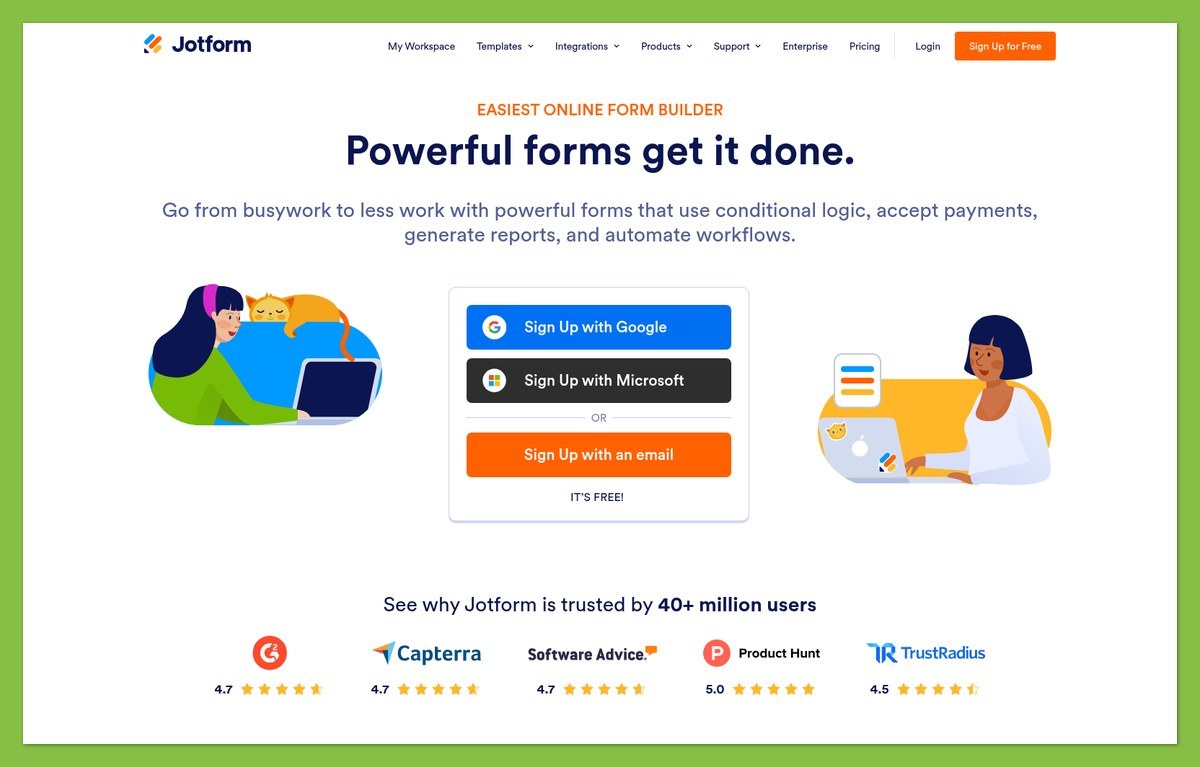
Jotform lets you start with the customer task: choose an item, answer relevant questions, and pay. Store Builder also offers a lightweight storefront route if a standalone form feels too narrow.
Its guides cover store creation, category setup, customization, and embedding. Conditional logic can keep the form focused, although complex branching still needs careful checking before you publish.
For a simple registration or food-order workflow, this narrower scope is why we favor Jotform. However, a complicated form with lots of conditional questions still takes work to maintain.
Design-process tip: Sketch the customer’s path before choosing a template. Build the shortest complete version first, then check product choices, required questions, stock behavior, and payment settings before adding decorative elements.
If you find yourself recreating a substantial retail operation through increasingly elaborate forms, revisit Shopify. If you only need a focused transaction on an existing site, resist building more store than the task requires.
5. Best Online Store Templates: Shopify
Winner: Shopify, because its themes are designed around a full retail storefront rather than primarily around form completion. Jotform deserves credit for templates that make a focused ordering experience easier to assemble.
Shopify Store Themes
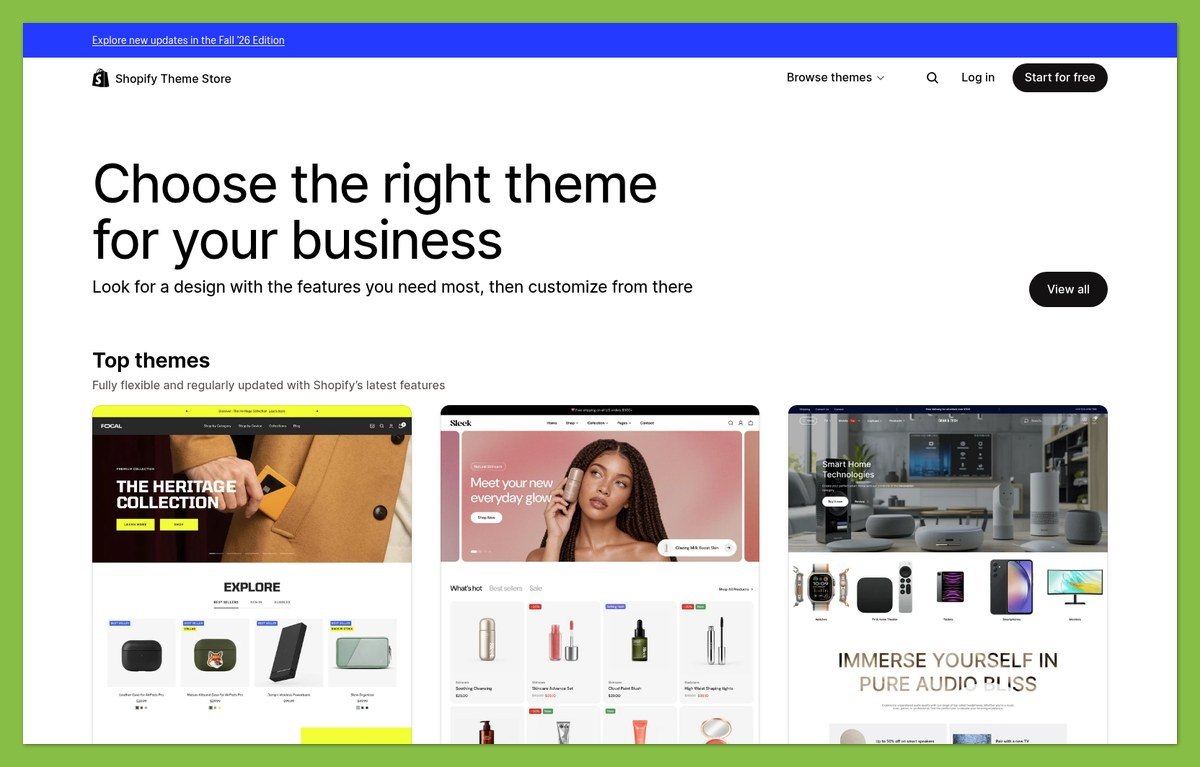
Shopify offers free and paid themes, with filters for catalog and industry needs. Its template, section, and block structure lets you adapt the layout without treating every page as an unrelated design.
Paid examples include Swift at $220 and Stretch at $400. Start with the free themes before deciding whether a paid design offers something your store needs.
Evaluate a theme against your actual products. A layout that suits a small, image-led collection may not be the right starting point for a larger catalog with more browsing decisions.
Jotform Forms and Store-App Templates
Jotform offers store-app templates as well as forms, giving it more presentation flexibility than a plain checkout sheet. Product options and categories can support a lightweight storefront without requiring a Shopify-style retail build.
A specialized registration form can be a better starting point than a complete store theme when you only need a few choices and customer details.
For either platform, judge the starting design against:
- Your product information: Can customers understand what they are buying?
- Your ordering steps: Does the layout support the necessary choices?
- Your content workload: Can you realistically maintain the pages or forms?
Shopify wins for a dedicated store design system. Jotform may be the better template choice when the entire transaction belongs in one focused ordering experience.
6. Best for Ecommerce Support: Shopify
Winner: Shopify, because its support and documentation align more closely with ongoing ecommerce operations. Jotform’s help is better matched to questions about forms and payment collection.
Shopify Support: Pros and Cons
- ✔️ 24/7 chat: Chat support is available across Shopify plans.
- ✔️ Commerce-focused guidance: Documentation covers store operations, including inventory and international selling.
- ❌ Limited channels on Basic: Additional phone and email channels are tied to offerings such as Plus and Retail; POS Pro also has phone support.
For a retail seller, the advantage is having help organized around inventory, storefronts, and international selling. On Basic, you need to be comfortable using chat for direct support.
Jotform Support: Pros and Cons
- ✔️ 24/7 support: Jotform also offers around-the-clock support availability.
- ✔️ Relevant setup guides: Help covers store creation, categories, customization, and embedding.
- ❌ Connected services add boundaries: An issue involving an external gateway or marketing service may require that provider’s help too.
Jotform’s support is a reasonable fit for the form-led use cases where we recommend it. Choose Shopify’s commerce support when inventory and storefront questions will make up more of your ongoing workload.
How We Compared Shopify and Jotform
This comparison uses official pricing, product documentation, and support guidance, not hands-on testing. Recommendations reflect how the documented capabilities fit a small retailer versus a business collecting payments through forms.
We compared costs, selling tools, marketing, setup, templates, and support. Ease-of-use and support verdicts reflect workflow fit; we did not time setup tasks or support responses. Prices current as of October 2026; billing terms and feature eligibility can change.
Shopify vs Jotform: Our Verdict
Shopify wins overall for a dedicated online store. Its catalog, inventory workflows, marketing tools, and storefront themes provide the stronger foundation when retail is an ongoing part of your business.
That said, Jotform is the better choice when payment belongs inside a form-led process, particularly for occasional orders or registrations requiring customer details. Start with your expected payment volume and the information each transaction needs.
You can also use both: Shopify for the storefront and Jotform for a separate intake workflow. Keep their roles clear so you do not pay twice to solve the same problem.


