
Shopify
Compare costs Try Shopify →Basic: $39/month
$29/month billed annually (USD)
- Branded storefront and checkout
- Product and order management
- Store themes and marketing tools
Gelato
Compare costs Explore Gelato →Free: $0/month
Gelato+: $29.99/month or $19.99/month billed annually
Production and shipping cost extra
- Print-on-demand production
- Product design and mockups
- Connects to Shopify and other stores
Shopify is the right choice for building a branded online store. Gelato is the right choice for printing and shipping your custom products. If you’re launching a print-on-demand (POD) business, you may need both rather than choosing between them.
That distinction makes Shopify vs Gelato an unusual comparison. Shopify handles your storefront, checkout, and store operations. Gelato handles product creation and fulfillment, connecting to Shopify or another supported sales channel.
For a cost-conscious seller, the useful question is which part of your business needs work. Paying for a storefront won’t cover production, and a free fulfillment account won’t give you a complete online shop.
Key takeaways
- Storefront: Choose Shopify for your website, checkout, and commerce management.
- Fulfillment: Choose Gelato to produce and ship connected print-on-demand products.
- Fixed costs: Gelato Free has no subscription, but products and shipping still cost money.
- Marketing: Shopify provides store-level SEO and customer email tools.
- Using both: Shopify Basic plus Gelato Free starts at $39 monthly before order-related costs.
Shopify vs Gelato at a Glance
Shopify powers your online store; Gelato supplies the printed products. Start with that division of responsibility, then compare the costs and features relevant to your setup.
| Factor | Shopify | Gelato |
|---|---|---|
| Main purpose | Storefront and commerce platform | Print-on-demand production and fulfillment |
| Starting subscription | Basic: $39 monthly, or $29/month billed annually | Free: $0 monthly |
| Additional order costs | Payment processing; additional transaction fees with third-party payment providers | Product, shipping, and applicable taxes |
| Website and checkout | Full online store and checkout | Connects to your sales channel rather than replacing it |
| Product management | Store listings and inventory management | Print designs, variants, and connected products |
| Design tools | Store themes and theme editor | Product editor and mockups |
| Marketing role | SEO, email campaigns, and automations | Product visuals for merchandising |
| Best fit | Sellers who need an independent online store | Sellers who need custom-product fulfillment |
Prices shown are US pricing in USD. Annual Shopify prices are monthly equivalents, not month-to-month charges.
Who Is Shopify For?

- New store owners: You need a customer-facing website and checkout.
- Existing businesses: You want to manage your catalog and orders through a dedicated storefront.
- POD brands: You need the sales platform, with production arranged separately.
Who Is Gelato For?
- Creators: You have artwork to turn into products without ordering bulk inventory.
- Existing sellers: You already have a supported storefront or marketplace.
- POD newcomers: You want to start with no fulfillment subscription or minimum order requirement.
Gelato also accepts manual orders. You don’t need Shopify simply to use its production service.
1. Pricing: Gelato Has the Lower Fixed Cost
Gelato wins on subscription cost if you already have somewhere to sell. Its free account removes a fixed fulfillment fee, but it isn’t a cheaper substitute for Shopify’s storefront.
Shopify Pricing
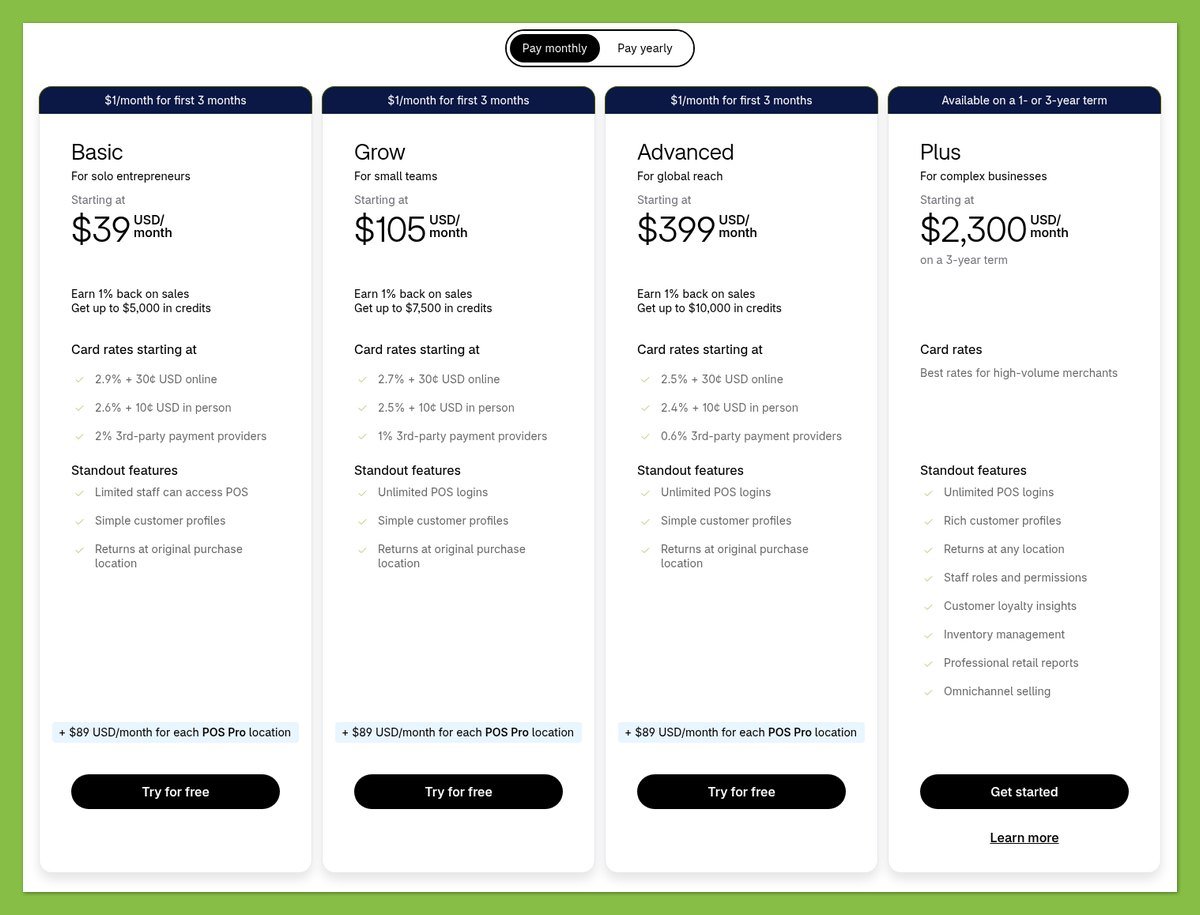
Shopify’s standard full-store plans have a recurring subscription. All 3 below include an online store and checkout, so your starting decision should be what your business needs beyond those essentials.
| Shopify plan | Monthly billing | Monthly equivalent, billed annually | Annual subscription total |
|---|---|---|---|
| Basic | $39 | $29 | $348 |
| Grow | $105 | $79 | $948 |
| Advanced | $399 | $299 | $3,588 |
These are US prices in USD, excluding taxes and additional costs. Paid themes are optional, and optional apps can increase your budget.
For a new POD store, Basic is the sensible starting point among these plans. Don’t pay for a higher tier simply because you’re connecting a fulfillment service.
Gelato Pricing

Gelato Free includes its design editor and free mockups. Gelato+ adds premium mockups, product-design tools, and product discounts of up to 33%, although the maximum discount doesn’t apply to every product.
| Gelato plan | Monthly billing | Monthly equivalent, billed annually | Annual subscription total |
|---|---|---|---|
| Free | $0 | $0 | $0 |
| Gelato+ | $29.99 | $19.99 | $239.88 |
Neither plan includes free production or shipping. Gelato+ is optional for basic fulfillment, and it doesn’t replace your ecommerce platform subscription.
Your Combined Budget
The lowest subscription budget for the combination covered here is Shopify Basic plus Gelato Free:
| Combination | Monthly billing | Annual billing: monthly equivalent |
|---|---|---|
| Basic + Gelato Free | $39 | $29 |
| Basic + Gelato+ | $68.99 | $48.99 |
The annual subscription commitment is $348 with Gelato Free, or $587.88 with Gelato+. Those figures exclude products, shipping, taxes, processing, and optional extras.
Keep these order costs separate:
- Shopify Payments: Basic’s standard US online card rate is 2.9% + $0.30. Other payment methods or card categories can have different rates.
- Third-party payment providers: Basic’s additional Shopify transaction fee is 2%, separate from the provider’s own processing charges.
- Gelato fulfillment: You pay product and shipping charges for each order, plus applicable taxes.
For Gelato+, use actual savings rather than its maximum advertised discount. In a hypothetical example, saving $2 per order would cover the $29.99 monthly subscription at 15 orders. Your break-even point depends on your product mix.
Trial tip: Shopify advertises a 3-day free trial. Gelato+ offers a 14-day trial requiring payment details, but product discounts only begin with the paid subscription. Neither trial should be treated as the ongoing cost of running your business.
2. Selling Online: Shopify Runs the Store, Gelato Fulfills Orders
Shopify wins for checkout and store operations; Gelato handles the production job Shopify doesn’t perform. Using them together connects the customer-facing purchase to the supplier-side fulfillment process.
Sales Features
Shopify gives you the store, product listings, checkout, and inventory management. It’s where customers browse and buy, and where you manage the retail side of the order.
Gelato’s tools focus on preparing printed products for sale. You choose a catalog product and variant, upload artwork, select mockups, and set retail pricing before publishing to a connected store.
The limitation runs both ways. Shopify doesn’t print your designs, while Gelato’s product editor doesn’t replace a branded shopping website.
Payments and Order Costs
There are 2 separate payment flows, not a single payout with every cost deducted. Your store’s payment provider collects the customer’s money; Gelato charges your merchant payment method for production and shipping.
A connected order generally follows this sequence:
- Your customer checks out through Shopify.
- Once Shopify marks the order Paid, connected Gelato items are imported.
- Gelato charges you for fulfillment. Orders awaiting approval are charged after approval and submission to production.
- Your store payment provider pays you according to its payout schedule.
Gelato doesn’t subtract its costs from your Shopify payout and send you the difference. Shopify Payments settlement timing varies, and bank processing adds time.
Cash-flow tip: Keep funds available for fulfillment before customer payments reach your bank. A profitable order on paper can still require cash upfront.
Your retail price also needs to cover more than the blank product and printing. Account for processing, any shipping you absorb, and a share of your subscriptions before deciding what margin you can afford.
Integrations and Fulfillment
Gelato supports Shopify as well as Etsy, WooCommerce, Wix, Squarespace, and BigCommerce. Manual orders, Order Desk, and API options provide other routes, so Shopify isn’t mandatory.
With Shopify, automatic importing applies to connected products and depends on order status and settings. Unconnected products require connection or manual handling.
You also need realistic shipping promises. Gelato routes production according to stock, capacity, and logistics; some orders can be produced internationally rather than in the buyer’s country.
Delivery estimates include fulfillment and shipping, and vary by product, destination, print location, order size, capacity, and shipping method. They aren’t guarantees.
The practical split is straightforward: Gelato handles production and delivery, but you still need to explain shipping clearly and respond when your customer has a question.
3. Marketing: Shopify Offers More Ways to Reach Customers
Shopify wins this round because it supports customer marketing and search visibility. Gelato helps you present products attractively, but better mockups don’t replace a plan for bringing people to your store.
Marketing Tools
Shopify Messaging, formerly Shopify Email, supports email campaigns and marketing automations from the Shopify admin on Basic, Grow, Advanced, and Plus.
Eligible plans include 10,000 marketing emails per calendar month across campaigns. Additional sends have volume-based charges, unused sends don’t roll over, and abandoned-checkout automations don’t count toward that allocation.
Gelato’s contribution is product presentation. Its editor and mockups help you create listing images, while Gelato+ offers premium mockups and additional design tools.
For a creator launching a collection, these serve different steps: prepare product visuals with Gelato, then use Shopify’s marketing tools to reach customers. Neither step guarantees sales.
SEO
Shopify gives you control over several search engine optimization elements:
- Page titles and meta descriptions: Describe individual pages for search results.
- URLs: Make page addresses relevant and readable.
- Image alt text: Describe images meaningfully.
- Sitemaps and canonical tags: Shopify creates these automatically to help search engines discover pages and identify preferred versions.
Those tools give Shopify the advantage over Gelato for store-level SEO. You still need useful product copy and a reason for customers to choose your designs.
Don’t treat a mockup as a complete product description. Explain what the buyer receives, which variant they’re viewing, and what makes the design relevant to them.
International Selling
For an international POD business, separate customer acquisition from fulfillment coverage. Your storefront needs to communicate clearly with the shoppers you target, while your supplier needs to support the relevant product and destination.
Gelato’s production routing can support cross-border fulfillment, but it doesn’t guarantee local production or identical delivery times everywhere.
Start with destinations you can price confidently. Check product availability, shipping costs, and delivery estimates before promoting a collection to a new market.
4. Ease of Use: The Simpler Choice Depends on Your Task
There’s no fair overall ease-of-use winner because the setup jobs differ. Shopify asks you to build a functioning store; Gelato asks you to prepare products and fulfillment. Using both means completing both sets of work.
Shopify Setup
Shopify’s theme editor lets you preview your store, change settings, arrange content, and apply branding. Code customization is available when needed, but choosing a theme doesn’t require you to commission a custom design.
Your storefront setup should cover:
- Presentation: Choose a theme and organize the store’s content.
- Products: Review descriptions, images, variants, and prices.
- Checkout: Configure payments and customer-facing shipping settings.
- Customer expectations: Make delivery and returns information clear.
Shopify covers more business functions than Gelato, so there are more decisions to make. That breadth is useful if you need a store, but unnecessary if your existing sales channel already does the job.
Gelato Setup
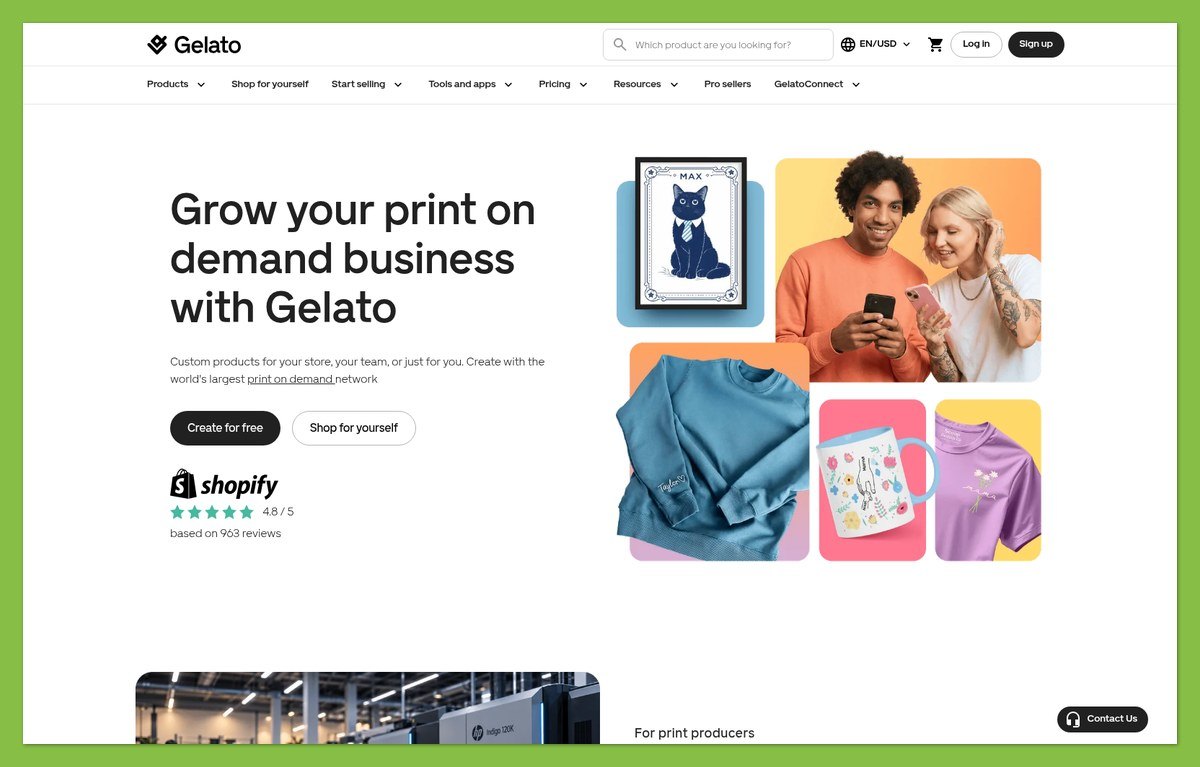
Gelato’s product workflow is narrower. Choose a matching catalog product and variant, upload your artwork, review the variant designs, then select mockups and set retail pricing.
That focuses your work on the product rather than website layout. However, artwork placement, product connections, and shipping still need attention before you accept orders.
Order a sample before building your marketing around a design. Use it to assess whether the physical product matches the expectations your listing creates, rather than treating a mockup as proof of print quality.
Using Shopify and Gelato Together
Set up the Gelato Shopify integration with these steps:
- Install the Gelato Print on Demand app from the Shopify App Store.
- Open it in Shopify admin and log in to or create your Gelato account.
- Confirm that your store appears under Stores in Gelato.
- Create or connect the products you want Gelato to fulfill.
- Assign the appropriate Gelato shipping profiles in Shopify’s shipping settings.
Before launch, review the customer-facing images, prices, variant choices, and destination shipping charges. Check your approval settings and payment method, too.
Connected importing reduces order-entry work, but it doesn’t remove oversight. A store containing both connected and unconnected products needs a clear fulfillment process for each.
5. Store Templates: Shopify; Product Designs: Gelato
Shopify wins for website design, while Gelato provides the relevant tools for print design. Comparing their template totals would confuse 2 different tasks: designing the shop and designing what’s sold inside it.
Shopify Store Design

Shopify offers free and paid themes. Paid themes can be previewed before purchase, but you must buy them before publishing; Shopify also offers AI-generated personalized themes.
The theme editor supports branding changes and content arrangement. Start with a free theme if it presents your catalog clearly, then consider a paid option only when you can identify a specific reason to upgrade.
A more expensive theme won’t improve your artwork or fix weak product information. For a new POD brand, clear navigation and useful product pages deserve priority over decorative changes.
Gelato Product Design
Gelato’s editor handles uploaded images and variant design choices. You can select mockups and set retail prices as part of preparing products for publication.
Free mockups are included without Gelato+, while premium mockups and additional design tools sit within the paid offering. These help you merchandise products, not build the surrounding website.
Design tip: Review every variant rather than approving only the first preview. Check that the image, selected option, and product description tell the same story.
When using both platforms, keep the design work coordinated. Gelato’s product images should sit comfortably within your Shopify branding, but accuracy matters more than perfectly matching backgrounds.
A consistent storefront helps customers browse. An accurate product preview helps them understand what they’re buying.
6. Support: Contact the Platform Handling the Problem
Neither platform wins support on channel availability alone. Shopify is the starting point for store and checkout problems; Gelato is the starting point for printing and delivery issues.
Shopify Support
Shopify Basic includes 24/7 live chat. That gives you a support route for storefront and platform questions, but availability doesn’t establish response speed or resolution quality.
For an order query, check its status in both dashboards. A paid Shopify order may still be awaiting production in Gelato.
Gelato Support
Gelato offers 24/7 chat, and order issues should be submitted through Report problem on the order page.
For a quality claim:
- Report promptly: Gelato asks for quality issues within 30 days of receipt.
- Provide evidence: Include a description and supporting photos; production-issue photos are mandatory.
- Follow the claim process: Validated claims can receive a replacement, with refunds potentially available when replacement is unsuitable.
Gelato generally doesn’t accept ordinary returns or provide a return address for made-to-order products. That supplier policy doesn’t replace your customer-facing obligations or consumer rights.
You still own the customer relationship. Explain the next step to the buyer while the supplier investigates, and avoid promising an automatic refund or replacement before the claim is resolved.
How We Compared Shopify and Gelato
This feature and pricing comparison evaluates official plans, integration workflows, and supplier policies for small businesses and POD sellers.
We compared storefront and production responsibilities separately. We haven’t conducted hands-on tests of print quality, delivery performance, setup speed, or support satisfaction.
Prices current as of October 2026. US pricing is shown in USD; annual figures are monthly equivalents unless labeled otherwise.
Shopify vs Gelato: Which Should You Choose?
Choose Shopify if you need a branded online store. Choose Gelato if you already have a sales channel and need print-on-demand production and fulfillment.
If you need both jobs covered, Shopify and Gelato can work together. Basic plus Gelato Free is a sensible starting combination, provided you budget for processing, products, shipping, and fulfillment charges before payouts arrive.
There’s no reason to move an existing supported store to Shopify just to use Gelato. Likewise, Shopify alone won’t supply printed goods.
Start with the missing part of your business, verify your product margins, and upgrade only when the extra value justifies the cost.


