When choosing the right ecommerce platform, Shopify and Bluehost (with WooCommerce) often show up as top contenders.
I’ve spent hours testing both tools across multiple ecommerce projects to see how they stack up, not just on pricing or features, but on what it’s actually like to run a store day-to-day.
Shopify and Bluehost both power thousands of online stores, but they serve very different types of businesses.
After testing each setup hands-on, I can confidently say that Shopify is the better option if you want an all-in-one platform that handles everything for you.
If you’re already familiar with WordPress and want more flexibility, Bluehost paired with WooCommerce is a strong alternative that can give you more control and potentially lower costs.
In this comparison, I’ll break down exactly how they compare across six key areas: pricing, selling features, design flexibility, ease of use, marketing tools, and support.
Quick Verdict: Shopify vs Bluehost (WooCommerce)
| Platform | Best For | Starting Price | Key Advantage |
|---|---|---|---|
| Shopify | Sellers who want everything in one place | $29/month | Easy setup, no maintenance |
| Bluehost + WooCommerce | WordPress users who want full control | $6.95/month | Flexibility and customization |
Shopify is ideal for sellers who want fast setup, powerful ecommerce features, and very little maintenance.
Bluehost with WooCommerce works better for those who want deep control over their website and are comfortable managing WordPress.
1. Best for Pricing: Bluehost Offers a Cheaper Starting Point
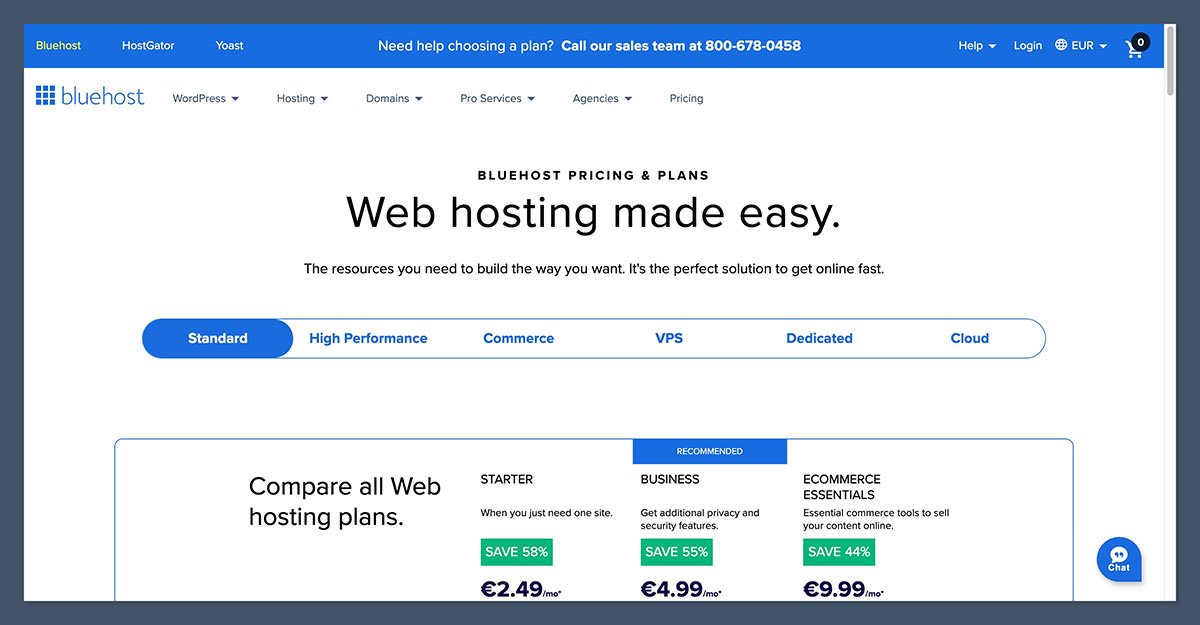
The Winner: Bluehost + WooCommerce
Shopify’s pricing is more expensive, especially once you factor in extra app costs and transaction fees. Bluehost is significantly cheaper upfront, though costs can increase as your store grows and requires more tools.
How Much Do Shopify and Bluehost Cost?
Shopify pricing (billed yearly):
| Plan | Monthly Cost | Notes |
|---|---|---|
| Basic | $29 | Most popular starting point |
| Shopify (Grow) | $79 | For growing businesses |
| Advanced | $299 | Advanced reporting, lower fees |
Shopify also charges extra transaction fees if you don’t use Shopify Payments:
- Basic plan: 2%
- Shopify plan: 1%
- Advanced plan: 0.6%
That means if you’re processing $10,000/month in revenue using Stripe, Shopify will take $200/month from you on the Basic plan, even before app fees.
Bluehost pricing (introductory rates):
| Plan | Starting Price | Notes |
|---|---|---|
| eCommerce Essentials | $6.95/month | Shared hosting with WooCommerce |
| eCommerce Premium | $9.95/month | Adds subscriptions and better tools |
Keep in mind these are promo prices. Bluehost renewals are higher, often around $13.99 to $24.99/month, depending on the term.
Unlike Shopify, Bluehost doesn’t charge transaction fees. WooCommerce uses payment gateways like PayPal or Stripe directly, and you only pay their standard processing fees.
Verdict on Pricing
Bluehost is the clear winner on affordability. But with WooCommerce, you may still pay extra for themes, plugins, and custom development — especially if you want advanced functionality. Shopify’s cost is higher, but more predictable.
2. Best for Selling Online: Shopify Offers the Complete Toolkit

The Winner: Shopify
Shopify is designed purely for selling. That focus comes through in how smooth it is to set up products, manage inventory, and process orders.
Shopify Selling Features
Here’s what stood out while testing Shopify:
- Optimized checkout: Fast, mobile-friendly, and trustworthy
- Built-in multichannel support: Sell on Amazon, Facebook, TikTok, and more
- Inventory and shipping tools: Built-in order tracking, shipping label generation, and fulfillment apps
- App ecosystem: Over 8,000 apps available for upsells, reviews, bundles, subscriptions, and reporting
- Point of sale (POS): Retail-ready POS for in-store sales
Shopify is ideal for businesses that expect to grow and want tools that scale with them. It’s not just about launching a store, it’s about managing it efficiently.
As your product range, team size, or sales channels expand, Shopify offers built-in systems to handle everything from inventory syncing to advanced reporting.
You also gain access to features like staff permissions, multi-location fulfillment, and integrated POS solutions, all designed to support long-term growth without needing to switch platforms later.
WooCommerce Selling Features on Bluehost
With WooCommerce, everything is modular. You choose which tools to install and pay for.
You can:
- Sell physical and digital products
- Use plugins for subscriptions, memberships, and product bundles
- Add integrations for Facebook and Google Shopping
- Manage tax rules, shipping zones, and inventory manually or via plugins
The flexibility is great, but it requires more setup and testing to get everything working smoothly. You’ll often need to compare plugins, configure settings manually, and make sure each extension works properly with your theme and hosting environment.
Over time, updates to WordPress core or third party plugins can also introduce conflicts, which means ongoing maintenance becomes part of running your store.
Verdict on Selling Features
Shopify wins on features, reliability, and ease of use. WooCommerce can match Shopify with the right plugins, but it requires more hands-on work.
3. Best for Design: WooCommerce Offers More Flexibility, Shopify Has Cleaner Themes
The Winner: Tie — Depends on Your Needs
Both platforms give you a professional-looking storefront, but the design approach is different.
Shopify Templates
- Over 200 themes available
- 24 free themes, premium options cost $100 to $500
- Templates are clean, fast, and mobile-optimized
- Section-based editor allows limited layout changes
Shopify themes are modern and beautiful, but somewhat rigid. You can tweak colors, fonts, and sections, but can’t drag and drop wherever you like.
The section-based editor keeps things structured, which is helpful for consistency, but it limits creative freedom if you’re aiming for a highly customized layout.
For more advanced design changes, you’ll often need to work with custom code or hire a developer familiar with Shopify’s Liquid templating language.
WooCommerce Design with Bluehost
- Powered by WordPress, so theme options are massive
- Use Astra, Storefront, Flatsome, or any WordPress-compatible ecommerce theme
- More flexibility to customize templates or hire a developer
- Drag-and-drop editing possible with tools like Elementor or Kadence Blocks
WooCommerce gives you far more control. You can create highly unique layouts, landing pages, and shopping experiences if you’re comfortable with WordPress or using a visual builder.
Tools like Elementor or Kadence Blocks make it possible to fully customize your store’s design without writing code.
This level of flexibility is ideal for brands with specific creative direction or those that want to tightly align their storefront with content and marketing strategies.
Verdict on Design
If you want ease and speed, Shopify templates are a safe bet. If you want full creative control, WooCommerce is the better choice.
4. Best for Ease of Use: Shopify Is the Clear Winner
The Winner: Shopify
Shopify makes it easy to go from signup to first sale. Bluehost with WooCommerce has a steeper learning curve.
My Experience with Shopify
After signing up, Shopify asked me a few onboarding questions and immediately walked me through setup steps.
The admin dashboard is intuitive, and the interface makes sense even if you’ve never built a website before.
Product uploads, image galleries, and tax setup were all clearly laid out. The editor is simple and structured, and the settings panel gives you full control without being overwhelming.
My Experience with Bluehost and WooCommerce
Bluehost pre-installs WordPress and WooCommerce, but once you land in the dashboard, you’re on your own.
You need to configure your theme, set up plugins, install security tools, and optimize your store before launching.
Even with Bluehost’s guided setup tools, it took more time to get everything running.
Managing updates, resolving plugin conflicts, and handling performance issues is part of the experience unless you install additional management tools.
Verdict on Ease of Use
Shopify provides a much more user-friendly experience for ecommerce beginners and growing teams. WooCommerce is powerful but better suited for users already comfortable with WordPress.
5. Best for Marketing and SEO: WooCommerce Leads on SEO, Shopify Wins on Multichannel Tools
The Winner: Depends on Your Focus
Both platforms let you market your store effectively, but in different ways.
Shopify Marketing Features
- Integrated email marketing through Shopify Email
- Marketplace selling via Shopify Marketplace Connect
- App integrations with Klaviyo, Mailchimp, and more
- Automated discounts, upsells, and abandoned cart emails
- Social channel integrations with TikTok, Instagram, Facebook, and Pinterest
Shopify also includes the Ecommerce Booster app (built with Semrush), which offers guided SEO recommendations. It’s a helpful tool if you’re new to optimizing content.
WooCommerce Marketing Features
- Email marketing via MailPoet, HubSpot, or third-party plugins
- Built-in blogging tools for content marketing
- Strong SEO performance thanks to Yoast, Rank Math, and custom permalinks
- Full control over metadata, URL structure, and schema
- Easier to build advanced content funnels
If SEO and blogging are a major part of your growth strategy, WooCommerce gives you more control. WordPress remains the best platform for long-form content and SEO-optimized publishing.
Verdict on Marketing and SEO
Shopify is better for multichannel selling and plug-and-play marketing tools. WooCommerce is stronger for SEO and content-first commerce.
6. Best Support and Maintenance: Shopify Takes the Pressure Off
The Winner: Shopify
Shopify offers 24/7 support, live chat, and extensive documentation. Bluehost’s support is good for hosting-related issues, but WooCommerce support is more fragmented.
Shopify Support
- 24/7 live chat and support advisors
- Priority support for Shopify Plus customers
- Community forums, video tutorials, and help articles
- Support for both store setup and technical troubleshooting
With Shopify, everything is under one roof. Your hosting, security, checkout system, support, and app integrations are all managed within the same platform, which makes troubleshooting and scaling much easier.
You don’t have to juggle multiple providers or worry about whether one plugin will break another, the ecosystem is built to work together out of the box. This unified setup is especially helpful for businesses that want to focus on selling, not managing the technical stack.
Bluehost Support for WooCommerce
- 24/7 phone and chat support for hosting and server issues
- WooCommerce plugin support comes from forums or plugin developers
- WordPress help is available, but not always specific to ecommerce
With WooCommerce, support is split between Bluehost, plugin authors, and the WordPress community. This means that when something goes wrong, you might need to contact different providers depending on whether the issue is with your hosting, a specific plugin, or WordPress itself.
It can take longer to get problems resolved, especially if you’re dealing with compatibility issues between plugins or updates.
While the community is large and helpful, the lack of centralized support can be challenging if you’re not technically confident.
Verdict on Support
If you want a platform that “just works” and offers responsive help when you need it, Shopify is the better choice.
Final Verdict: Shopify or Bluehost + WooCommerce?
| Use Case | Best Platform |
|---|---|
| You want a fast setup and minimal maintenance | Shopify |
| You want control over everything and use WordPress | WooCommerce with Bluehost |
| You’re focused on SEO and content | WooCommerce |
| You’re scaling fast and want an all-in-one system | Shopify |
| You have a dev team or technical partner | WooCommerce |
| You want to sell across multiple marketplaces fast | Shopify |
Personally, I use Shopify when I want reliability and built-in ecommerce features.
I use WooCommerce when I need a flexible, content-heavy site with advanced customization.
They both work, but your choice should depend on your comfort with managing a website stack and how you want to grow your business.


